Skip to content
Winsides.com

Windows Insides

Winsides.com

Windows Insides

  • Windows 11
  • Windows Features
  • Windows Security
  • Microsoft
    • Microsoft Copilot
    • Microsoft Powertoys
  • Shortcuts
    • Windows Shortcuts
    • Desktop Shortcuts
  • Video Tutorials
  • About
    • What’s New?!
    • About us
    • Contact us
    • Privacy Policy
    • Terms of Use
  • Follow us
    • Reddit
    • Dev.to
    • YouTube
    • Linked In
    • X
    • Tumblr
    • Facebook
    • Instagram
    • Buy Me A Coffee
  • Windows 11
  • Windows Features
  • Windows Security
  • Microsoft
    • Microsoft Copilot
    • Microsoft Powertoys
  • Shortcuts
    • Windows Shortcuts
    • Desktop Shortcuts
  • Video Tutorials
  • About
    • What’s New?!
    • About us
    • Contact us
    • Privacy Policy
    • Terms of Use
  • Follow us
    • Reddit
    • Dev.to
    • YouTube
    • Linked In
    • X
    • Tumblr
    • Facebook
    • Instagram
    • Buy Me A Coffee
Close

Search

Winsides.com

Windows Insides

Winsides.com

Windows Insides

  • Windows 11
  • Windows Features
  • Windows Security
  • Microsoft
    • Microsoft Copilot
    • Microsoft Powertoys
  • Shortcuts
    • Windows Shortcuts
    • Desktop Shortcuts
  • Video Tutorials
  • About
    • What’s New?!
    • About us
    • Contact us
    • Privacy Policy
    • Terms of Use
  • Follow us
    • Reddit
    • Dev.to
    • YouTube
    • Linked In
    • X
    • Tumblr
    • Facebook
    • Instagram
    • Buy Me A Coffee
  • Windows 11
  • Windows Features
  • Windows Security
  • Microsoft
    • Microsoft Copilot
    • Microsoft Powertoys
  • Shortcuts
    • Windows Shortcuts
    • Desktop Shortcuts
  • Video Tutorials
  • About
    • What’s New?!
    • About us
    • Contact us
    • Privacy Policy
    • Terms of Use
  • Follow us
    • Reddit
    • Dev.to
    • YouTube
    • Linked In
    • X
    • Tumblr
    • Facebook
    • Instagram
    • Buy Me A Coffee
Close

Search

Home/Windows Features/How do I Enable Digest Authentication in IIS on Windows 11?

How do I Enable Digest Authentication in IIS on Windows 11?

Vigneshwaran Vijayakumar
By Vigneshwaran Vijayakumar
November 9, 2024 5 Min Read
0

Enable Digest Authentication in IIS on Windows 11: It is based on the MD5 hashing algorithm, which ensures passwords aren’t sent in plaintext over the network. Instead, it transmits an encrypted hash, which helps prevent certain types of attacks, such as replay attacks. It is primarily used to authenticate clients on networks that don’t use Kerberos. While Digest Authentication is more secure than Basic Authentication, it is considered less safe than Kerberos due to MD5’s vulnerability to hash-cracking attacks. However, some older web applications or intranet systems that haven’t been updated to support more advanced protocols like OAuth, OpenID Connect, etc might still use Digest Authentication. This article will guide you through how to Enable Digest Authentication in IIS on Windows 11.

Table of Contents

  • Key Steps:
  • Directions to Digest Authentication in Windows 11
  • How does Digest Authentication work?
  • Frequently Asked Questions
    • Take away

    Key Steps:

    • Open Programs and Features using the run command appwiz.cpl
    • Click on Turn Windows Features on or off.
    • Expand Internet Information Services node and futher expand World Wide Web Services.
    • Finally, expand Security.
    • Under Security, Enable Digest Authentication by clicking on the checkbox next to it and click OK.
    • That is it. Digest Authentication for IIS Web Server is now enabled in your Windows 11 PC.

    Directions to Digest Authentication in Windows 11
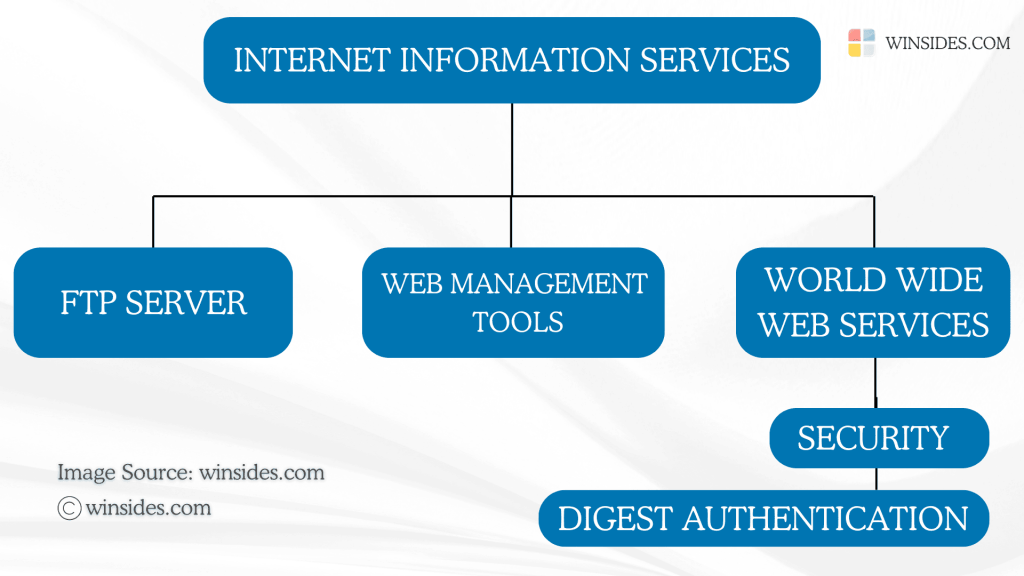
    Directions to Digest Authentication in Windows 11
    Directions to Digest Authentication in Windows 11

    Let’s get started.

    • Go to the Run command using the keyboard shortcut Win Key + R.
    • Enter the following command appwiz.cpl and click OK. This command will open the Programs and Features window.
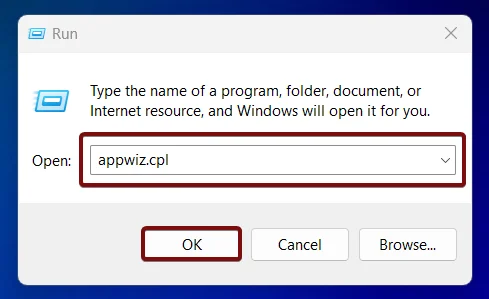
    Open Programs and Features using appwiz.cpl
    Open Programs and Features using appwiz.cpl
    • The Programs and Features window will open now. Here, you can find Turn Windows Features on or off option from the left pane.
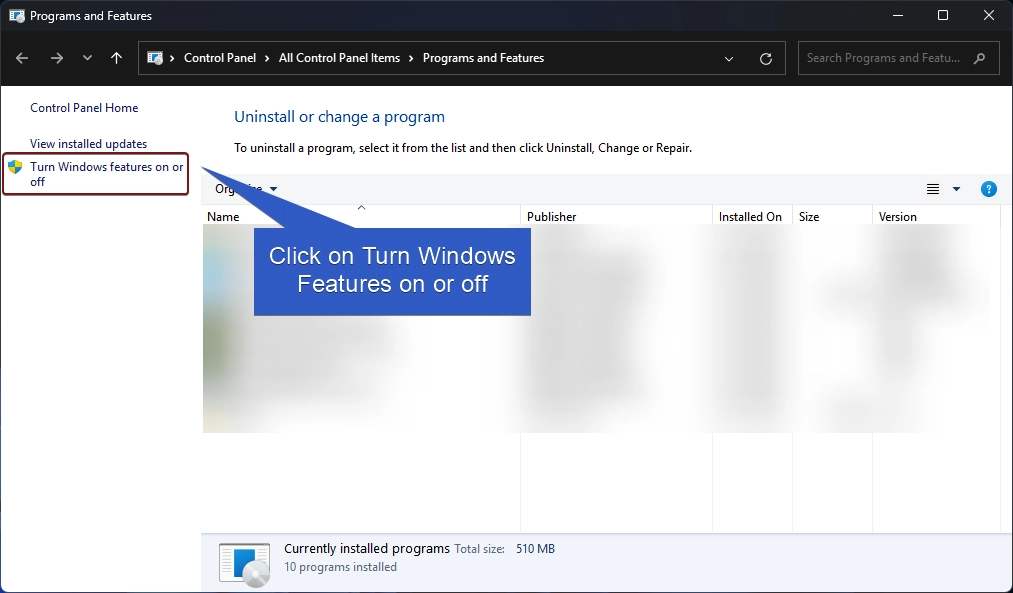
    Turn Windows Features on or off
    Turn Windows Features on or off
    • Clicking on Turn Windows features on or off will open the Windows Features dialog. Here, you can find all the available optional features.
    • Locate Internet Information Services from the list of services available and expand the tree.
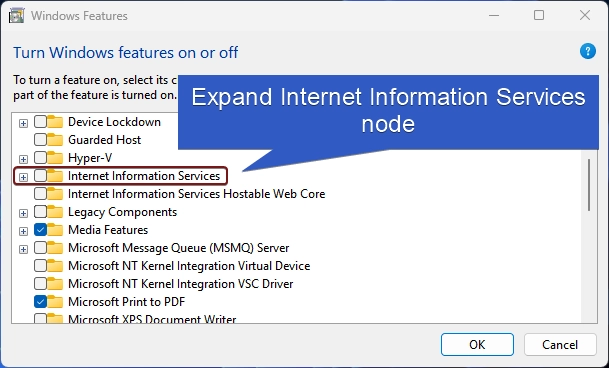
    Expand IIS Tree
    Expand IIS Tree
    • Now, you will find FTP, Web Management Tools, and World Wide Web Services. We have to expand the World Wide Web Services.
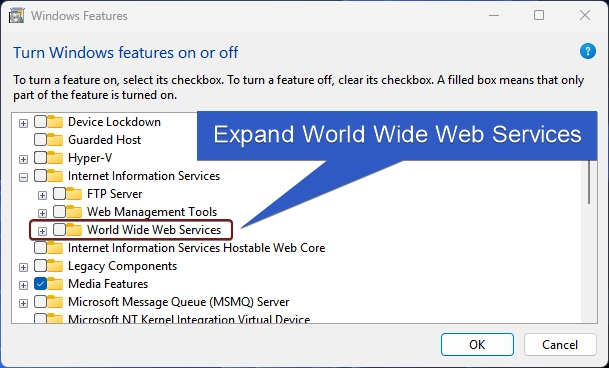
    Expand World Wide Web Services
    Expand World Wide Web Services
    • You will find various features such as Application Development Features, Common HTTP Features, Health and Diagnostics, etc. Expand the Security node.
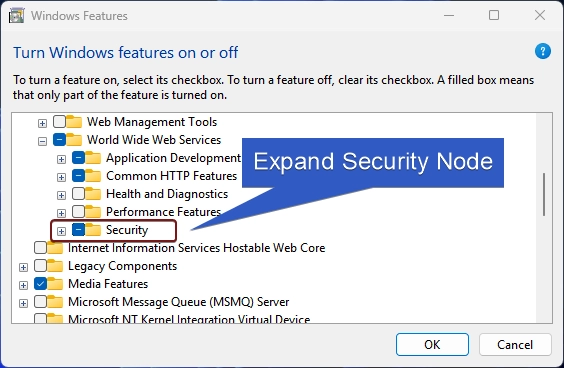
    Expand Security
    Expand Security
    • You can find Digest Authentication there. Click on the checkbox next to it to enable it and click OK.
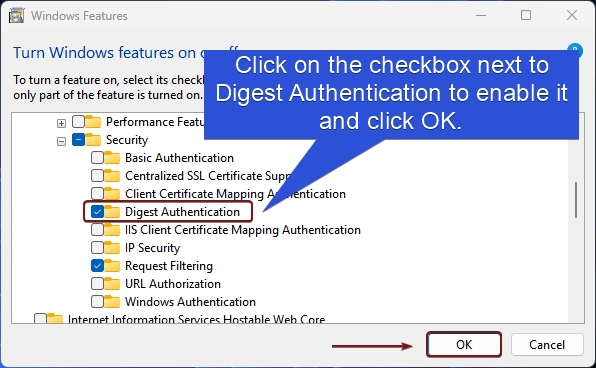
    Enable Digest Authentication in Windows 11
    Enable Digest Authentication in Windows 11
    • Windows will now start searching for the required files.
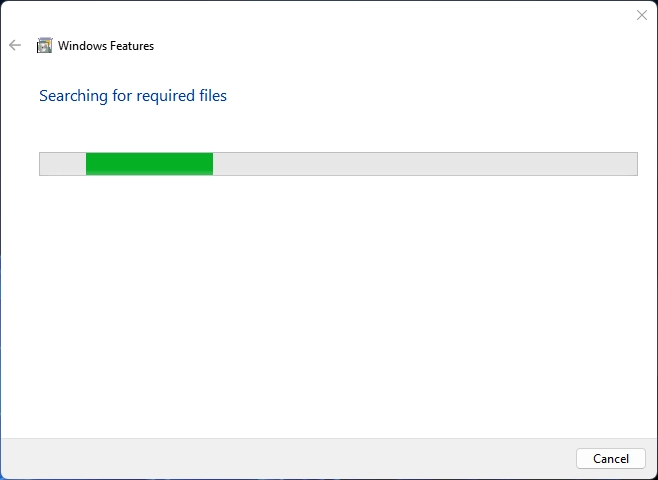
    Windows Searching for the required files
    Windows Searching for the required files
    • Then the system will apply the changes.
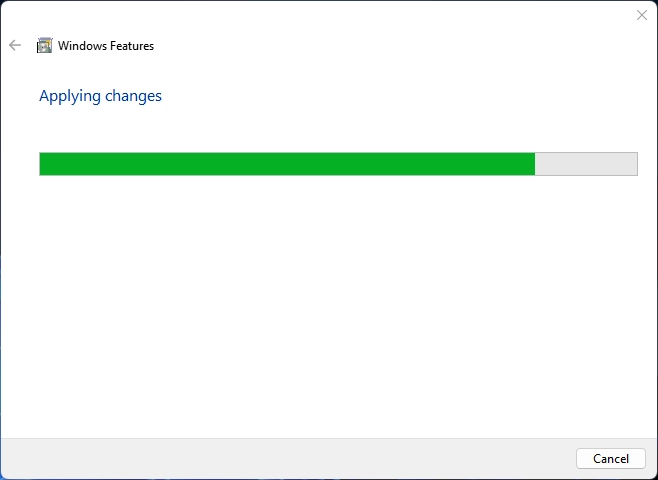
    Applying changes
    Applying changes
    • Click on Close to Close the window. If you are prompted for a Restart Now, then it is highly recommended to do a Restart right away.
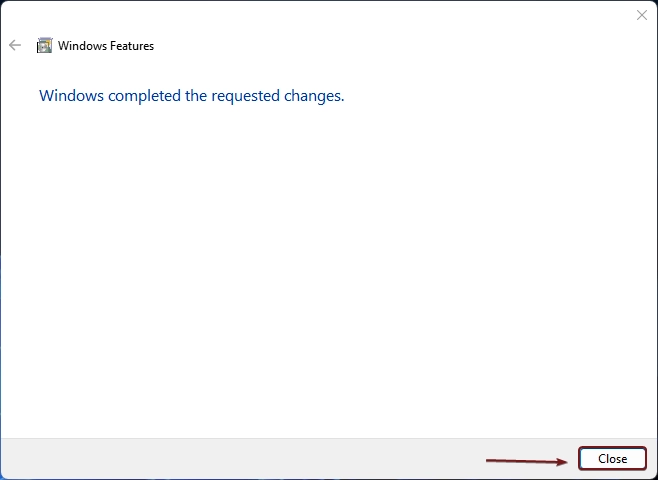
    Windows has completed the changes
    Windows has completed the requested changes

    How does Digest Authentication work?

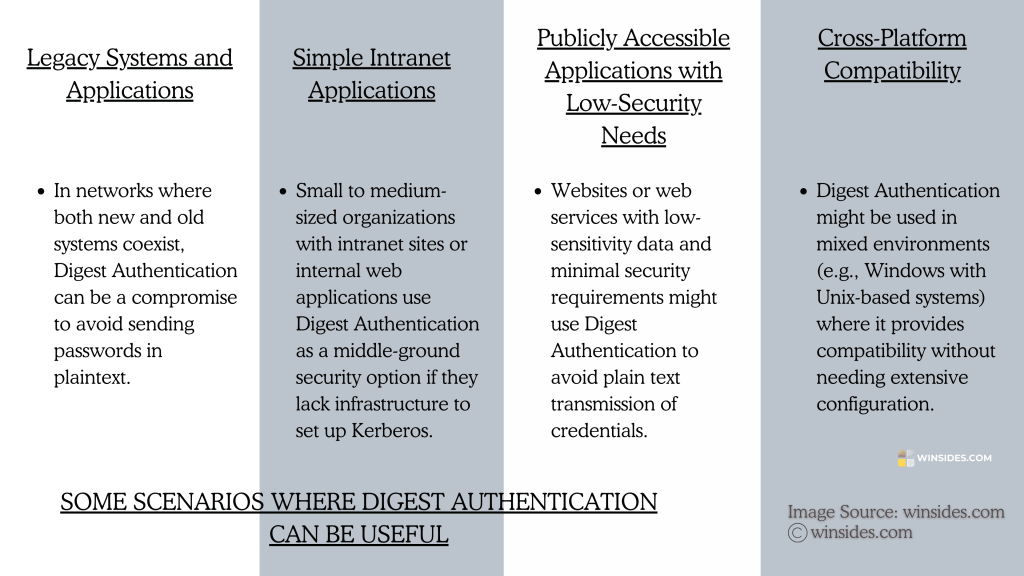
    Scenarios where Digest Authentication can be useful
    Scenarios where Digest Authentication can be useful

    Digest Authentication is a challenge-response authentication mechanism that verifies a user’s identity without sending their password in plain text. When a client requests access to a protected resource on a server, the server responds with a 401 Unauthorized status and then sends a challenge. The challenge can be a Nonce, a Realm, and more. Depending on the client’s response, the server will generate a final hash which is usually called Response Digest. This final hash is based on MD5, and becomes the authentication response and then sent to the server and processed.

    Information on the Go: Kerberos is a network authentication protocol designed to provide strong authentication for client-server applications by using secret-key cryptography. It helps verify the identity of users and services in a secure manner, especially in a network environment, and is widely used in enterprise environments.

    Frequently Asked Questions

    Is Digest Authentication secure?

    While Digest Authentication is more secure than Basic Authentication, it is still vulnerable to certain types of attacks, particularly if MD5 hashes are cracked.

    What are the limitations of Digest Authentication?

    It relies on the MD5 hashing algorithm, which is vulnerable to hash-cracking attacks. It is not suitable for highly secure environments or those with sensitive data. It lacks flexibility and integration features provided by modern authentication protocols, such as single sign-on (SSO).

    What are some alternatives to Digest Authentication?

    Common alternatives include Kerberos (for secure, enterprise-level authentication), NTLM (used in Windows environments), OAuth, and SAML (for federated authentication, commonly used for web applications and SSO).

    Can Digest Authentication be used across different platforms?

    Yes, Digest Authentication can be used in mixed-platform environments, as it is compatible with various operating systems.

    Take away

    While Digest Authentication in IIS on Windows 11 a step up from Basic Authentication, it has limitations due to the aging MD5 algorithm and is less secure than modern protocols like Kerberos. It’s best suited for environments where newer protocols aren’t an option, or when a simple, lightweight solution is enough. If you have any queries, kindly let us know in the comment section. For more interesting articles, visit Winsides.com. Happy Coding! Peace out!
    Tags:

    How to Enable in Windows 11windows 11Windows Features
    Vigneshwaran Vijayakumar
    Author

    Vigneshwaran Vijayakumar

    Hello, I'm Vigneshwaran, the founder, owner, and author of WinSides.Com. With nearly a decade of experience in blogging across various domains and specializing in Windows-related tutorials for over five years, I bring a wealth of knowledge and expertise to WinSides.Com

    Follow Me
    Other Articles
    Enable Centralized SSL Certificate Support for IIS in Windows 11
    Previous

    Enable Centralized SSL Certificate Support in Windows 11

    How to Enable Basic Authentication for IIS in Windows 11
    Next

    Easy Guide to Enable Basic Authentication in IIS on Windows 11

    No Comment! Be the first one.

    Leave a Reply Cancel reply

    Your email address will not be published. Required fields are marked *

    • Windows 10 officially ends on October 14, 2025
    • Enable Microsoft XPS Document Writer in Windows 11
    • How to Enable IIS [Internet Information Services] in Windows 11?
    • 3 Best Ways – Fix Account Unknown S-1-5-21 issue on Windows 11?
    • Download & Install Google App for Windows 11
    1. Vigneshwaran Vijayakumar
      Vigneshwaran Vijayakumar on How to Enable Windows PowerShell 2.0 in Windows 11?October 5, 2025

      Hello Mr. Mohamad El-Kheir, Thank you for contacting us. Microsoft has removed PowerShell version 2.0 completely from Windows 11 24H2…

    2. Avatar of Mohamad El-Kheir
      Mohamad El-Kheir on How to Enable Windows PowerShell 2.0 in Windows 11?October 5, 2025

      i have a MSI laptop with windows 11 Home Installed on it. how to install powershell v2.0 on it

    3. Vigneshwaran Vijayakumar
      Vigneshwaran Vijayakumar on DxDiag Windows 11 – What is it & How to use it for Troubleshooting?August 14, 2025

      Hey Myla Shannon Thank you for your valuable feedback. We are delighted to hear your compliment and excited to know…

    4. Avatar of Myla Shannon
      Myla Shannon on DxDiag Windows 11 – What is it & How to use it for Troubleshooting?August 14, 2025

      This content is incredibly informative.

    5. Avatar of seven
      seven on How to Enable IIS [Internet Information Services] in Windows 11?July 29, 2025

      I found this post very helpful.

    • About us
    • What’s New?!
    • Guest Posts on Winsides.com – Terms and Conditions
    • Publication Sitemap
    • Careers
    • Authors
    • Why Trust Winsides.com?
    • Content Removal Request
    • Terms of Use
    • Disclaimer
    • Contact us
    Copyright 2024-2026 - Winsides.com. All rights reserved.