

Introduction to CNG Key Isolation on Windows 11
In today’s interconnected digital landscape, the security of our data and communications is paramount. Windows 11, as a modern operating system, integrates a sophisticated array of security features designed to protect users from an ever-evolving threat landscape. Among these critical safeguards, CNG Key Isolation on Windows 11 stands out as a fundamental pillar for cryptographic security. It’s not just about encrypting data; it’s about safeguarding the very keys that unlock that encryption. Learn more at NIST Special Publication 800-131A Rev. 1.
This advanced mechanism ensures that your most sensitive cryptographic keys, essential for everything from secure browsing to digital signatures, remain protected from sophisticated attacks. Without robust key isolation, even the strongest encryption algorithms could be rendered useless if the keys themselves are compromised. Understanding this technology is crucial for anyone keen on enhancing their system’s security posture.
Throughout this comprehensive guide, we will delve into the intricacies of Cryptography Next Generation (CNG) Key Isolation. We will explore its underlying principles, examine how it leverages cutting-edge hardware and software technologies, and provide practical insights into managing and optimizing its functions. By the end, you’ll have a clear understanding of why this feature is indispensable for maintaining the integrity and confidentiality of your digital life on Windows 11.
Table of contents
Key Takeaways
- CNG Key Isolation on Windows 11 is a critical security feature that protects cryptographic keys from unauthorized access and attacks.
- It leverages advanced technologies like Virtualization-Based Security (VBS) and secure enclaves to create an isolated environment for key operations.
- This mechanism is vital for mitigating side-channel attacks, which attempt to extract sensitive information by analyzing physical emissions or timing.
- Hardware components, particularly the Trusted Platform Module (TPM), play a significant role in providing an unassailable root of trust for key storage and operations.
- Implementing CNG Key Isolation enhances data protection, improves user privacy, and helps organizations meet stringent regulatory compliance requirements.
- Users can monitor and manage key isolation settings through Group Policy and Registry, ensuring optimal security configurations.
- Future advancements in cryptographic protection will continue to build upon these isolation principles, adapting to new threats and hardware capabilities.
What is CNG Key Isolation?
At its core, CNG Key Isolation on Windows 11 refers to a security architecture designed to protect cryptographic keys from compromise. It ensures that these highly sensitive digital assets, which are the bedrock of all secure communications and data protection, operate within a highly restricted and fortified environment. This isolation prevents malicious software or unauthorized processes from accessing or tampering with the keys.
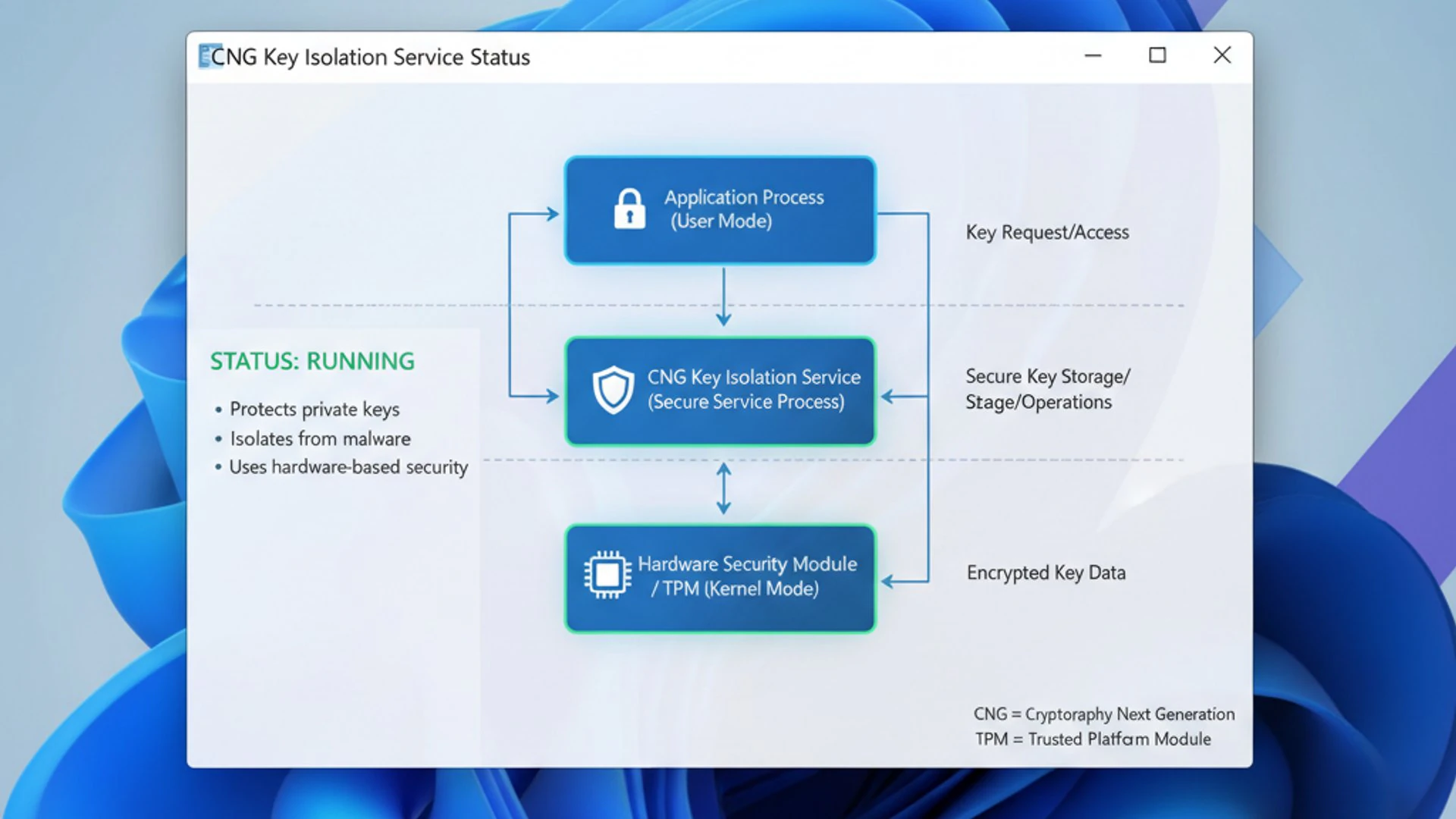
The concept is simple yet profoundly effective: by creating a virtual “safe” for cryptographic operations, Windows 11 can significantly reduce the attack surface. This protective layer is crucial because even if an attacker gains control over the main operating system, the keys remain shielded within their isolated domain. It’s a fundamental shift from merely encrypting data to securing the very tools used for encryption and decryption.
Cryptography Next Generation (CNG) Overview
Cryptography Next Generation (CNG) is Microsoft’s modern cryptographic API, introduced with Windows Vista and significantly enhanced in subsequent versions, including Windows 11. It superseded the older CryptoAPI, offering a more flexible, extensible, and algorithm-agnostic framework for cryptographic operations. CNG supports a wider range of algorithms, including elliptic curve cryptography (ECC), and provides a more robust architecture for key management.
CNG is not just about algorithms; it also defines how cryptographic providers interact with the operating system. It separates the cryptographic algorithms from their implementations, allowing for hardware-accelerated cryptography and integration with various key storage providers. This modular design is essential for adapting to evolving cryptographic standards and security requirements, making it a cornerstone of modern Windows security.
The framework encompasses various components, including key storage providers (KSPs), which manage the storage and retrieval of cryptographic keys, and algorithm providers (APs), which implement the actual cryptographic functions. This separation of concerns allows for greater flexibility and security. For instance, a hardware security module (HSM) or a Trusted Platform Module (TPM) can act as a KSP, providing a secure, tamper-resistant environment for key operations.
The Role of Key Isolation in Modern Cryptography
In the realm of modern cryptography, the strength of an encryption algorithm is only as good as the security of its keys. A perfectly uncrackable cipher becomes utterly useless if the key used to encrypt or decrypt data is stolen or compromised. This is where key isolation becomes absolutely indispensable. It addresses the critical vulnerability of cryptographic keys being exposed during their lifecycle, from generation to storage and usage.
Key isolation ensures that cryptographic operations involving sensitive keys are performed in an environment that is logically and often physically separated from the rest of the operating system. This separation makes it exceedingly difficult for malware, even with elevated privileges, to intercept or extract keys. It’s a proactive defense mechanism against a broad spectrum of attacks, including memory scraping, kernel-level exploits, and side-channel analysis.
Without robust key isolation, cryptographic keys could be vulnerable to various threats. Imagine a scenario where a piece of malware, having infiltrated your system, could simply read the memory space where your private keys are temporarily loaded for a signing operation. Key isolation prevents this by placing these operations in a protected, inaccessible area, thereby maintaining the integrity and confidentiality of the keys throughout their operational lifespan.
Why is Key Isolation Crucial for Windows 11 Security?
The importance of CNG Key Isolation on Windows 11 cannot be overstated in today’s threat landscape. As cyber attackers grow more sophisticated, they no longer just target data in transit or at rest; they also focus on the cryptographic keys themselves. These keys are the master controls for digital identities, secure communications, and encrypted data, making them prime targets. Key isolation provides a fundamental layer of defense against these advanced threats, ensuring that even if other parts of the system are compromised, the keys remain secure.
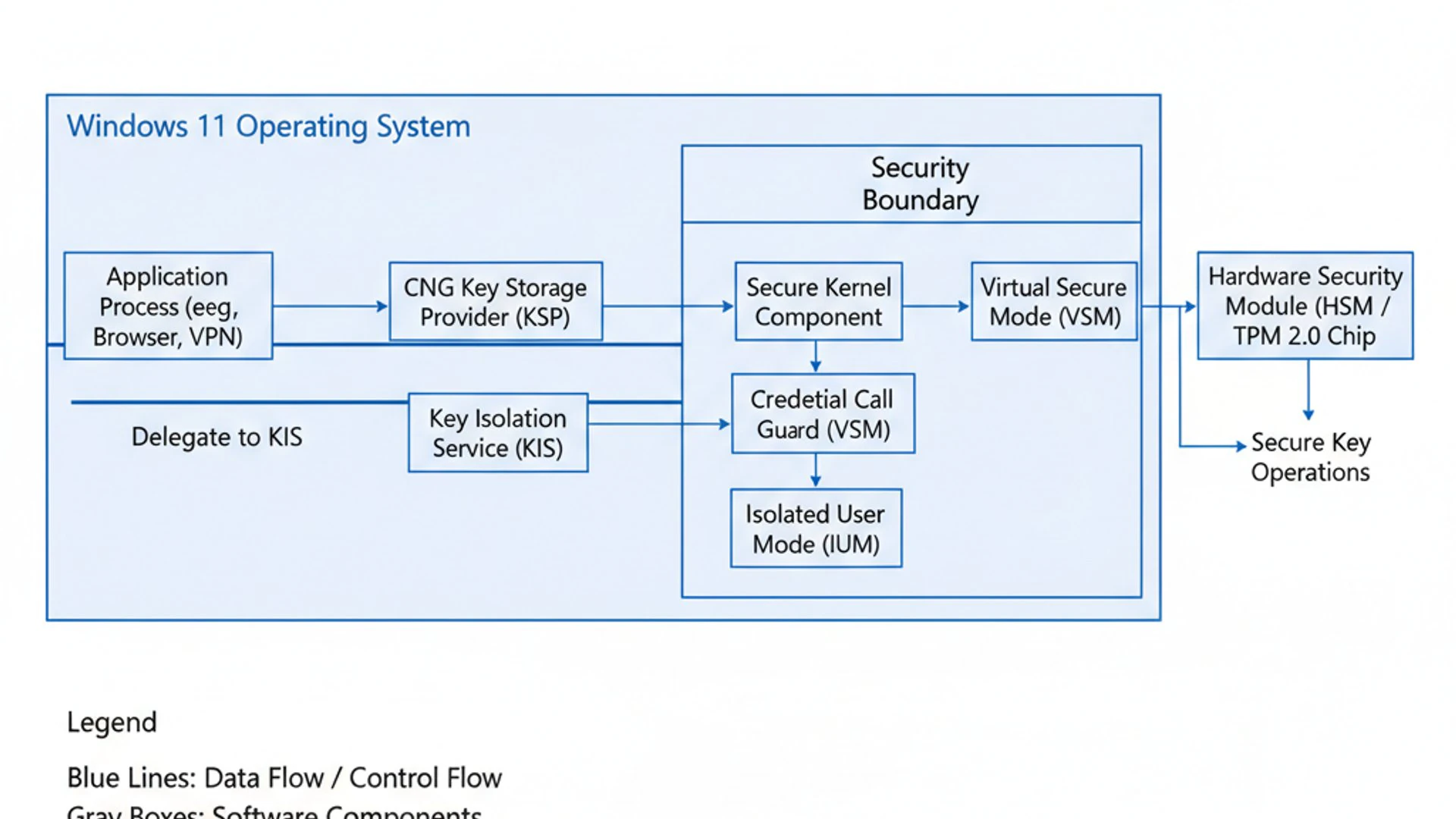
Windows 11, with its emphasis on modern security, integrates key isolation as a core component of its defense-in-depth strategy. This means that multiple layers of security work together to protect the system. Key isolation acts as a hardened vault within this structure, safeguarding the most critical assets. Its presence significantly elevates the overall security posture, making Windows 11 a more resilient platform against persistent and evolving cyber threats.
Protecting Sensitive Cryptographic Keys
Sensitive cryptographic keys are the digital equivalent of physical keys to a vault. They are used for a multitude of critical functions, including authenticating users, signing digital documents, establishing secure communication channels (like SSL/TLS for web browsing), and encrypting entire disk drives. If these keys fall into the wrong hands, the consequences can be catastrophic, leading to data breaches, identity theft, and unauthorized access to systems.
CNG Key Isolation on Windows 11 protects these keys by ensuring they are generated, stored, and used within a highly secure, isolated environment. This environment is designed to be impervious to attacks originating from less privileged parts of the operating system or from malicious applications. It prevents key material from being exposed in plain text in memory, even momentarily, during cryptographic operations.
This protection extends to various types of keys, including those used for Encrypting File System (EFS), VPN connections, smart card authentication, and code signing. By safeguarding these foundational elements, key isolation upholds the integrity of the entire security chain, providing a robust barrier against compromise and ensuring the trustworthiness of digital interactions.
Mitigating Side-Channel Attacks
One of the most insidious threats that CNG Key Isolation on Windows 11 effectively counters is the side-channel attack. Unlike direct attacks that try to break the cryptographic algorithm itself, side-channel attacks exploit information leaked indirectly from the physical implementation of a cryptographic system. These leaks can be subtle, but highly revealing, and key isolation is designed to minimize or eliminate them.
The mitigation of side-channel attacks is a testament to the advanced design of Windows 11’s security architecture. By creating a secure execution environment, the operating system can control and minimize the observable side effects of cryptographic operations. This makes it significantly harder for attackers to gather enough information to reconstruct sensitive keys, even if they have physical access or high-privilege malware on the system.
Understanding Side-Channel Vulnerabilities
Side-channel vulnerabilities arise from unintentional information leakage during the execution of cryptographic algorithms. This leakage isn’t about breaking the math of encryption; it’s about observing its physical manifestation. Common side channels include:
- Timing Analysis: Observing the time it takes for cryptographic operations to complete. Different input values or key bits might cause slight variations in execution time, which can be statistically analyzed to deduce key material.
- Power Analysis: Measuring the power consumption of a device during cryptographic computations. The electrical activity often correlates with the operations being performed, revealing patterns that can expose key bits.
- Electromagnetic (EM) Radiation: Detecting electromagnetic emissions from a device. Cryptographic operations generate distinct EM signatures that can be captured and analyzed from a distance.
- Acoustic Analysis: In some cases, cryptographic operations can produce subtle sounds that, when amplified and analyzed, might reveal sensitive information.
These vulnerabilities are particularly dangerous because they can bypass traditional software-based security measures. An attacker doesn’t need to find a bug in the code; they just need to observe the system’s physical behavior. This makes them a significant concern for high-value targets and sensitive data.
How Key Isolation Counteracts These Threats
CNG Key Isolation on Windows 11 counteracts side-channel threats by creating an execution environment where the observable side effects of cryptographic operations are minimized or made uniform. This is achieved through several mechanisms:
- Constant-Time Operations: Within the isolated environment, cryptographic algorithms are often implemented to execute in constant time, regardless of the input key or data. This eliminates timing variations as a side channel.
- Memory Protection: Key material is kept within protected memory regions that are inaccessible to other processes, preventing memory-based side channels like cache timing attacks.
- Hardware-Backed Security: By offloading key operations to secure hardware components like the TPM, the system leverages their inherent resistance to physical probing and side-channel analysis. These modules are specifically designed to perform cryptographic functions in a way that minimizes observable leakage.
- Virtualization-Based Security (VBS): VBS creates a secure boundary, making it incredibly difficult for even kernel-mode malware to observe or interfere with the isolated processes. This virtual separation helps to mask the physical manifestations of cryptographic operations.
“By isolating cryptographic operations, Windows 11 ensures that the ‘how’ of encryption doesn’t betray the ‘what’ of the key, making side-channel attacks significantly harder to execute successfully.”
This multi-layered approach ensures that even if an attacker attempts to monitor power consumption or timing, the data they collect will be randomized or uniform, providing no useful information about the actual cryptographic key. It’s a sophisticated defense against highly advanced forms of cyber espionage.
How CNG Key Isolation Works on Windows 11
The technical implementation of CNG Key Isolation on Windows 11 is a marvel of modern security engineering, combining cutting-edge software and hardware technologies. It doesn’t rely on a single component but rather a synergistic integration of multiple layers, each contributing to the overall strength of the isolation. This layered approach ensures that even if one defense mechanism is somehow bypassed, others remain in place to protect the cryptographic keys.
Learn more at Trusted Platform Module (TPM) Overview.
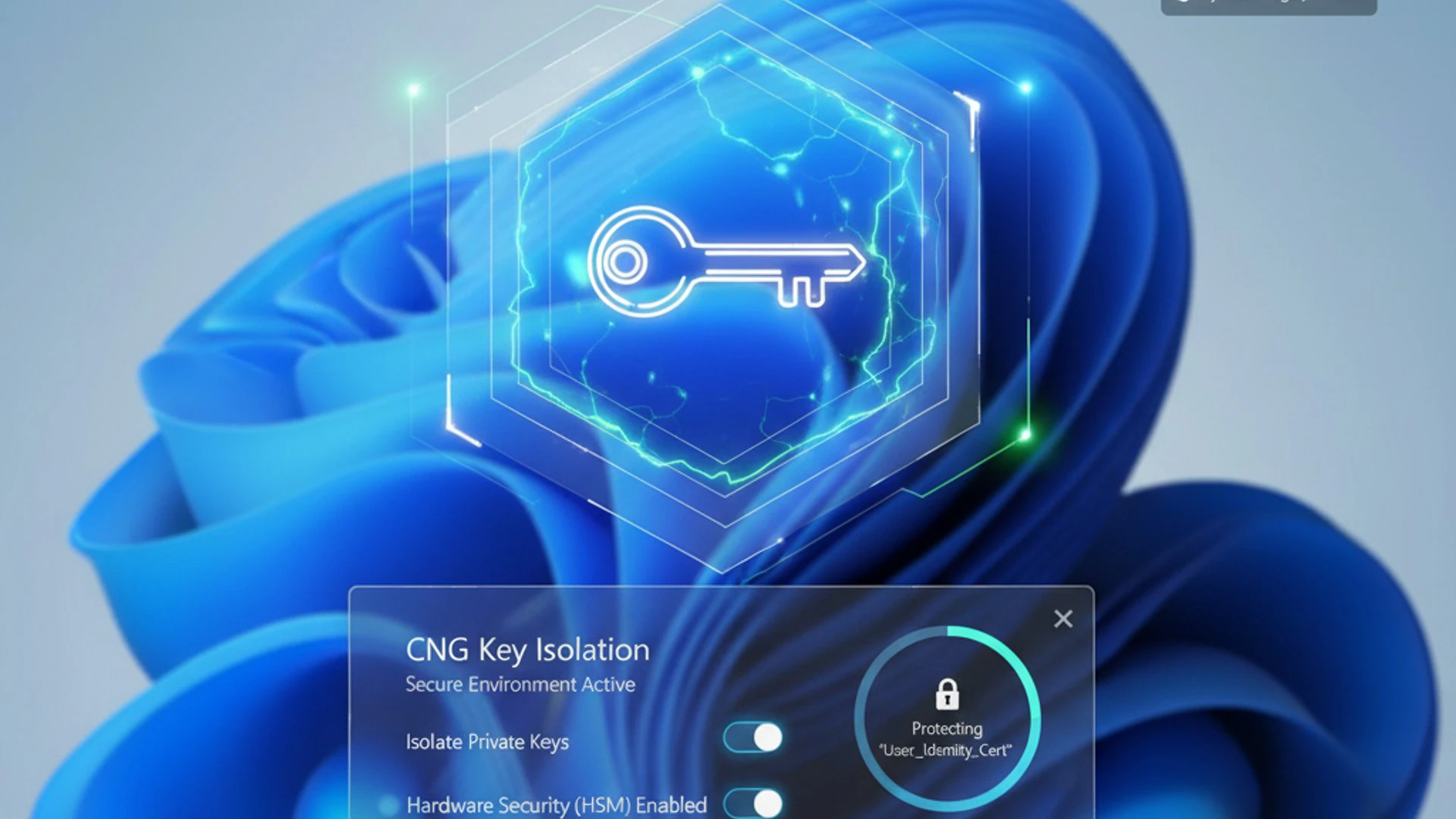
At its core, the system creates a highly privileged and isolated execution environment where sensitive cryptographic operations can occur without interference from the main operating system or other applications. This environment is carefully constructed to prevent any unauthorized access to key material, both during storage and while actively being used. The foundation for this isolation lies in virtualization and hardware-backed security features.
Secure Enclaves and Virtualization-Based Security (VBS)
A cornerstone of CNG Key Isolation on Windows 11 is the utilization of Virtualization-Based Security (VBS). VBS is a security technology that uses the hypervisor (a component that manages virtual machines) to create an isolated, memory-protected region from the rest of the operating system. This region, often referred to as a “secure enclave” or “Virtual Secure Mode (VSM),” is where critical system processes and sensitive data are protected.
Within this VBS-protected environment, Windows 11 can run a small, highly trusted operating system kernel called the “secure kernel.” This secure kernel hosts security-sensitive components, such as the Local Security Authority (LSA) process, which handles user authentication and cryptographic key management. By moving these critical functions into a VBS-protected enclave, they become extremely difficult for malware running in the standard Windows environment to compromise.
The secure enclave ensures that cryptographic keys, particularly those used for operations like device encryption, credential guard, and key isolation, are processed in an environment where they are shielded from kernel-mode malware. Even if an attacker manages to gain full control over the main Windows kernel, they would still be unable to access the keys residing within the VBS-protected secure enclave, providing an unprecedented level of protection.
Hardware-Backed Key Protection (TPM Integration)
Complementing VBS and secure enclaves, hardware-backed key protection, primarily through the Trusted Platform Module (TPM), forms another critical layer of CNG Key Isolation on Windows 11. The TPM is a specialized, secure microcontroller that stores cryptographic keys and performs cryptographic operations in a tamper-resistant environment. It acts as a hardware root of trust for the system.
Windows 11 leverages the TPM 2.0 standard, which offers enhanced capabilities for key generation, storage, and cryptographic operations. When a key is protected by the TPM, it means the key material never leaves the TPM’s secure boundaries. Instead, the TPM performs cryptographic operations (like signing or decryption) internally, returning only the result, not the key itself. This prevents software-based attacks from ever accessing the raw key material.
The TPM’s integration with CNG Key Isolation provides several benefits:
- Tamper Resistance: The TPM is designed to resist physical tampering, making it extremely difficult for attackers to extract keys even with direct access to the hardware.
- Anti-Hammering: It includes mechanisms to protect against brute-force attacks on passwords or PINs used to unlock keys.
- Platform Integrity: The TPM can attest to the integrity of the system’s boot process, ensuring that the secure environment for key isolation hasn’t been compromised before keys are used.
This combination of VBS-enabled secure enclaves and TPM-backed key storage creates a formidable defense, making CNG Key Isolation on Windows 11 one of the most robust cryptographic protection mechanisms available in a consumer operating system.
Benefits of Implementing CNG Key Isolation
The implementation of CNG Key Isolation on Windows 11 brings forth a multitude of significant benefits, extending far beyond merely securing cryptographic keys. It fundamentally elevates the overall security posture of the operating system, impacting everything from individual user privacy to enterprise-level compliance requirements. These advantages underscore why this feature is a non-negotiable component of modern digital security.
By creating a fortress around critical cryptographic assets, key isolation contributes to a more trustworthy computing environment. It instills confidence that sensitive operations, such as authentication, data encryption, and secure communications, are performed with the highest possible degree of integrity and confidentiality. This translates into tangible gains for both end-users and organizations alike, making Windows 11 a more secure platform for a diverse range of activities.
Enhanced Data Protection and Privacy
One of the most direct and impactful benefits of CNG Key Isolation on Windows 11 is the significant enhancement of data protection and user privacy. By safeguarding the cryptographic keys, the system ensures that encrypted data remains truly inaccessible to unauthorized entities. Whether it’s personal files, business documents, or sensitive communications, the integrity of their encryption hinges on the security of the keys.
Consider scenarios like full disk encryption (e.g., BitLocker) or secure email. If the keys for these protections are compromised, the data they protect becomes vulnerable. Key isolation prevents this by ensuring that the keys required for decryption or signing are processed in an environment isolated from potential threats. This means that even if malware manages to infiltrate your system, it cannot easily steal the keys needed to decrypt your sensitive information.
For individuals, this translates to greater peace of mind regarding their personal data, financial information, and online identities. For businesses, it means better protection for intellectual property, customer data, and internal communications, significantly reducing the risk of costly and reputation-damaging data breaches. The enhanced privacy stems directly from the assurance that cryptographic keys, the ultimate guardians of data, are held in an unassailable digital vault.
Compliance with Security Standards
For many organizations, adherence to various industry and governmental security standards is not optional; it’s a legal and operational necessity. CNG Key Isolation on Windows 11 plays a crucial role in helping organizations meet these stringent compliance requirements. Standards such as HIPAA, GDPR, PCI DSS, and various government mandates often include specific provisions for the protection of cryptographic keys and sensitive data.
By providing a robust, hardware-backed mechanism for key protection, Windows 11 with CNG Key Isolation can demonstrate compliance with requirements for:
- Strong Key Management: Ensuring keys are generated, stored, and used securely.
- Data at Rest Encryption: Protecting sensitive data stored on devices.
- Data in Transit Encryption: Securing communication channels.
- Protection Against Advanced Persistent Threats (APTs): Mitigating sophisticated attacks targeting key material.
The verifiable security provided by VBS and TPM integration often satisfies audit requirements for cryptographic module validation (e.g., FIPS 140-2). This makes it easier for IT departments to deploy Windows 11 knowing that its fundamental security architecture supports their compliance efforts, reducing audit complexities and potential penalties. It’s a strategic advantage for any organization operating in a regulated environment.
Managing and Monitoring CNG Key Isolation
While CNG Key Isolation on Windows 11 operates largely in the background, providing silent yet robust protection, administrators and advanced users can manage and monitor its status and configuration. Understanding how to interact with these settings is crucial for ensuring optimal security, troubleshooting potential issues, and tailoring the system’s cryptographic posture to specific organizational or personal needs. Proactive management ensures that this vital security feature is always functioning as intended.
The tools available range from simple status checks to more granular configuration options via Group Policy and the Registry. Proper management involves not just enabling the feature but also understanding its dependencies and ensuring that related components, such as the Trusted Platform Module (TPM), are correctly configured and operational. This section will guide you through these practical aspects, offering actionable advice for maintaining a secure environment.
Checking Key Isolation Status
To verify the operational status of CNG Key Isolation on Windows 11, you can use built-in Windows tools. The most straightforward method involves checking the status of Virtualization-Based Security (VBS), as key isolation heavily relies on it.
- System Information (
msinfo32):- Press
Win + R, typemsinfo32, and press Enter. - In the System Information window, scroll down to find “Virtualization-based security” and “Virtualization-based security services running.”
- If VBS is enabled and running, it indicates that the secure environment for key isolation is active. Look for “Running” next to these entries.
- Press
- Windows Security App:
- Open the Windows Security app (search for it in the Start menu).
- Navigate to Device security.
- Under “Core isolation,” click on “Core isolation details.” Here you can see if “Memory integrity” is enabled, which is a key component of VBS.
If these indicators show VBS or Core isolation as enabled, it’s a strong sign that CNG Key Isolation is actively protecting your cryptographic keys. If not, further investigation into your system’s hardware capabilities (e.g., TPM, virtualization support) and BIOS/UEFI settings might be necessary.
Group Policy and Registry Settings for Configuration
For more granular control over CNG Key Isolation on Windows 11, especially in enterprise environments, Group Policy and Registry settings are the primary tools. These allow administrators to enforce specific security policies across multiple machines.
Group Policy Editor (gpedit.msc):
- Press
Win + R, typegpedit.msc, and press Enter. - Navigate to
Computer Configuration > Administrative Templates > System > Device Guard. - Look for policies related to “Turn On Virtualization Based Security.” Enabling this policy is crucial for activating the underlying VBS infrastructure that supports key isolation.
- Within the same path, you might find settings related to “Secure Launch Configuration” and “Credential Guard,” which are closely tied to VBS and key protection.
Registry Editor (regedit.exe):
While Group Policy is preferred, the underlying settings are stored in the Registry. Exercise extreme caution when modifying the Registry directly.
- Relevant keys are often found under
HKEY_LOCAL_MACHINE\SYSTEM\CurrentControlSet\Control\DeviceGuard. - Specifically, the
EnableVirtualizationBasedSecurityDWORD value (1 for enabled, 0 for disabled) andRequirePlatformSecurityFeatures(e.g., 1 for Secure Boot, 2 for DMA protection) are important.
Always ensure that your hardware supports these features (UEFI firmware, Secure Boot, virtualization extensions enabled in BIOS/UEFI) before configuring them via Group Policy or Registry.
Configuring Key Storage Providers
Within the CNG framework, Key Storage Providers (KSPs) are responsible for managing cryptographic keys. Windows 11 offers several built-in KSPs, and third-party hardware security modules (HSMs) can also integrate as KSPs. Configuring these providers is essential for secure key management.
The default Microsoft Software Key Storage Provider stores keys in the file system, typically encrypted and protected by the Data Protection API (DPAPI). However, for enhanced security, the Microsoft Platform Crypto Provider (which leverages the TPM) is highly recommended.
To ensure keys are protected by the TPM:
- When generating new keys (e.g., for certificates), specify the “Microsoft Platform Crypto Provider” as the KSP. This can often be done through certificate enrollment wizards or programmatic calls to the CNG API.
- For existing keys, you might need to re-enroll certificates or migrate keys to a TPM-backed KSP if the application supports it.
Administrators can enforce the use of specific KSPs through Group Policy, ensuring that all generated keys meet a certain security standard. This is particularly important for enterprise environments where compliance and strong key protection are paramount.
Best Practices for Secure Key Management
Effective management of CNG Key Isolation on Windows 11 goes hand-in-hand with broader secure key management practices:
- Enable TPM 2.0: Ensure your system’s TPM is enabled and configured in UEFI/BIOS. This is foundational for hardware-backed key protection.
- Enable Secure Boot and VBS: These features create the secure environment necessary for key isolation to function optimally.
- Regularly Update Windows 11: Microsoft continuously releases security updates that patch vulnerabilities and enhance key isolation mechanisms.
- Use Strong Authentication: Employ multi-factor authentication (MFA) for accessing systems and applications that use cryptographic keys.
- Principle of Least Privilege: Grant users and applications only the minimum necessary permissions to access and use cryptographic keys.
- Backup Encrypted Keys Securely: For recovery purposes, securely back up keys (e.g., BitLocker recovery keys) in an offline, protected location.
- Monitor Security Events: Keep an eye on Windows Event Logs for security events related to cryptographic operations and key access, which can indicate potential issues.
By adhering to these best practices, you can maximize the protective capabilities of CNG Key Isolation on Windows 11 and maintain a robust security posture for your digital assets.
Common Scenarios and Use Cases
The practical applications of CNG Key Isolation on Windows 11 are broad and far-reaching, touching various aspects of digital security for both individual users and large organizations. Its underlying strength in protecting cryptographic keys translates directly into enhanced security for everyday tasks and complex enterprise operations. Understanding these common scenarios helps illustrate the tangible benefits and necessity of this advanced security feature.
From securing sensitive corporate data to enabling developers to build more secure applications, key isolation plays a pivotal role. It moves beyond theoretical security concepts into real-world implementations that safeguard against sophisticated cyber threats. Let’s explore some of the key areas where CNG Key Isolation makes a significant difference.
Enterprise Deployments and Data Encryption
In enterprise environments, where vast amounts of sensitive data are processed and stored, CNG Key Isolation on Windows 11 is an indispensable security component. Organizations deal with intellectual property, financial records, customer data, and other confidential information that demands the highest level of protection. Key isolation directly contributes to this by securing the cryptographic keys used for various enterprise security solutions.
Key use cases in enterprise deployments include:
- Full Disk Encryption (FDE): Solutions like BitLocker rely on strong cryptographic keys to protect entire disk volumes. Key isolation ensures that these master keys, often protected by the TPM, remain secure from compromise, even if the operating system is under attack. This is critical for laptops and mobile devices that are prone to theft or loss.
- Secure Boot and Measured Boot: While not directly key isolation, these features work in conjunction with the TPM to ensure the integrity of the boot process. The TPM can store hashes of boot components, and if any are tampered with, it can prevent the system from booting or using sensitive keys, thus protecting the key isolation environment itself.
- Credential Guard: This Windows 11 feature uses VBS to isolate and protect NTLM password hashes and Kerberos Ticket Granting Tickets (TGTs) from compromise. By leveraging the same secure enclaves as key isolation, Credential Guard prevents pass-the-hash and pass-the-ticket attacks, which are common in enterprise breaches.
- VPN and Remote Access: Keys used for establishing secure Virtual Private Network (VPN) connections (e.g., for Secure Socket Tunneling Protocol) or remote desktop sessions are protected by key isolation, ensuring the confidentiality and integrity of remote communications.
These applications underscore how key isolation forms a foundational layer of trust for enterprise security, enabling organizations to confidently deploy Windows 11 in highly regulated and security-conscious environments.
Developer Considerations for CNG API
For developers building applications on Windows 11, understanding and leveraging the CNG API, particularly its key isolation capabilities, is crucial for creating secure software. The CNG API provides a modern, flexible interface for cryptographic operations, and developers can explicitly choose how keys are handled and protected.
When using the CNG API, developers should consider the following:
- Key Storage Providers (KSPs): Developers can specify which KSP should be used when generating or importing keys. For maximum security, always prefer the “Microsoft Platform Crypto Provider” to leverage TPM protection, especially for long-lived, sensitive keys.
- Key Protection Flags: The CNG API allows setting various flags during key creation or import to enforce specific protection levels. For example, flags can dictate that a key is “exportable” or “non-exportable,” or that it requires user consent for use. Setting keys as non-exportable and requiring TPM protection ensures they remain within the secure hardware boundary.
- Secure Key Handling: Developers must ensure that key material is never exposed in plain text in application memory. The CNG framework handles much of this internally when using KSPs, but careful programming practices are still necessary, especially when dealing with key derivation or temporary key usage.
- Integration with VBS and Secure Enclaves: While direct interaction with VBS enclaves is typically handled by the operating system, developers should be aware that applications running within the VBS-protected environment benefit from enhanced key isolation. This is particularly relevant for system-level services or security agents.
By thoughtfully integrating with the CNG API and making conscious choices about key protection, developers can build applications that inherently benefit from the robust security offered by CNG Key Isolation on Windows 11, thereby enhancing the overall trustworthiness of their software.
Troubleshooting CNG Key Isolation Issues
While CNG Key Isolation on Windows 11 is designed to operate seamlessly in the background, like any complex system, issues can occasionally arise. These might manifest as cryptographic operations failing, performance degradation, or security features not activating as expected. Effective troubleshooting requires understanding the components involved and knowing where to look for clues. This section provides guidance on identifying and resolving common problems, along with insights into performance considerations.
Addressing these issues promptly ensures that your system maintains its high level of cryptographic protection. It’s important to approach troubleshooting systematically, checking dependencies and configurations step-by-step. Often, problems stem from misconfigurations or conflicts with other system components rather than a fundamental flaw in the key isolation mechanism itself.
Identifying and Resolving Conflicts
Troubleshooting CNG Key Isolation on Windows 11 often involves checking dependencies and resolving conflicts. Here are common areas to investigate:
- Hardware Compatibility:
- TPM: Ensure your system has a TPM 2.0 module and that it’s enabled in the UEFI/BIOS settings. If the TPM is disabled or not present, hardware-backed key protection will not function.
- Virtualization: Verify that CPU virtualization features (e.g., Intel VT-x, AMD-V) are enabled in your UEFI/BIOS. VBS, which underpins key isolation, requires these features.
- Secure Boot: Confirm that Secure Boot is enabled in UEFI/BIOS. It’s a prerequisite for VBS and many advanced security features.
- Driver Issues:
- Outdated or corrupted drivers, especially for chipset or security devices, can interfere with VBS and TPM operations. Ensure all system drivers are up to date.
- Group Policy/Registry Conflicts:
- Incorrectly configured Group Policy settings related to Device Guard, Credential Guard, or VBS can prevent key isolation from activating. Use
gpresult /h output.htmlto review applied policies. - Conflicting registry entries, especially if manually modified, can also cause issues.
- Incorrectly configured Group Policy settings related to Device Guard, Credential Guard, or VBS can prevent key isolation from activating. Use
- Software Interference:
- Some third-party security software, hypervisors (other than Hyper-V), or anti-cheat engines might conflict with VBS. Temporarily disabling such software can help diagnose if it’s the cause.
- Event Viewer Logs:
- Check the Windows Event Viewer (specifically under
Applications and Services Logs > Microsoft > Windows > DeviceGuardandTPM) for errors or warnings related to VBS, Credential Guard, or TPM initialization. These logs often provide specific error codes or messages that can guide troubleshooting.
- Check the Windows Event Viewer (specifically under
A common resolution path involves ensuring all hardware prerequisites are met, updating drivers, and then systematically reviewing Group Policy or Registry settings. If issues persist, consider using the Epochtools.app for system diagnostics or consulting Microsoft’s official documentation.
Performance Implications and Optimizations
Implementing CNG Key Isolation on Windows 11, particularly with VBS and TPM integration, introduces an additional layer of abstraction and processing. While modern hardware is designed to handle this efficiently, there can be minor performance implications, especially on older or lower-end systems.
Potential Performance Impacts:
- CPU Overhead: VBS introduces a slight overhead due to the hypervisor layer and the secure kernel running alongside the main OS. This is generally negligible on modern CPUs with hardware virtualization support.
- Memory Usage: The secure enclave requires a dedicated portion of system memory, which is then unavailable to the main OS. This is typically a small, fixed amount.
- Cryptographic Operations: While TPMs are efficient, offloading operations to hardware can sometimes introduce latency compared to purely software-based, non-isolated operations, though this is often offset by increased security.
Optimization Strategies:
- Ensure Hardware Acceleration: Verify that your CPU’s virtualization extensions (VT-x/AMD-V) are enabled in the BIOS/UEFI. This is critical for VBS performance.
- Keep Drivers Updated: Optimized drivers from your hardware manufacturer can improve the efficiency of TPM and virtualization components.
- System Resources: Ensure your system has adequate RAM and a modern CPU. While key isolation is designed to be lightweight, a system already struggling with resources might feel the impact more.
- Avoid Redundant Security Software: Running multiple virtualization-based security solutions or hypervisors concurrently can lead to conflicts and performance degradation.
- Monitor Performance: Use Task Manager or Performance Monitor to observe CPU, memory, and disk usage if you suspect performance issues. Pay attention to processes related to
System Guard Runtime MonitororLSA (lsass.exe)when VBS is active.
For most users on modern Windows 11 hardware, the performance impact of CNG Key Isolation is minimal and far outweighed by the significant security benefits it provides. Prioritizing security in this context is almost always the correct choice.
Future of Cryptographic Key Protection in Windows
The landscape of cybersecurity is constantly evolving, and so too are the mechanisms for cryptographic key protection. CNG Key Isolation on Windows 11 represents a significant leap forward, but it is by no means the final frontier. Microsoft, along with the broader security community, is continually researching and implementing new technologies to stay ahead of emerging threats. The future of cryptographic key protection in Windows will likely build upon the foundations laid by VBS and TPM, integrating even more advanced hardware and software innovations.
We can anticipate further enhancements in several key areas. These advancements will aim to make key isolation even more robust, transparent, and resilient against increasingly sophisticated attacks, including those leveraging quantum computing or novel side-channel techniques. The goal remains the same: to create an unassailable fortress for the digital keys that secure our world.
One major area of focus will be the continued integration of hardware security. Future CPUs may incorporate more sophisticated “secure enclaves” directly into their architecture, offering even stronger isolation guarantees than current VBS implementations. These hardware-enforced trusted execution environments (TEEs) could provide a more granular and immutable separation for cryptographic operations, making them impervious to even highly privileged software attacks.
Furthermore, the evolution of post-quantum cryptography (PQC) will necessitate changes in how keys are generated, stored, and used. As quantum computers pose a theoretical threat to current public-key cryptography, Windows will need to adopt quantum-resistant algorithms. This will require new KSPs and potentially new isolation techniques to protect these complex, larger keys from novel forms of attack. The principles of isolation will remain, but their implementation will adapt to the new mathematical realities.
Finally, we may see greater emphasis on attestation and verifiable boot processes. Ensuring that the entire software stack, from firmware to operating system, is untampered before sensitive keys are accessed or used will become even more critical. This could involve more dynamic and continuous attestation mechanisms, ensuring that the secure environment for key isolation is maintained throughout the system’s runtime. The journey towards absolute cryptographic key protection is ongoing, with Windows at the forefront of innovation.
Conclusion
In the intricate world of digital security, the protection of cryptographic keys stands as the ultimate safeguard for our data, identities, and communications. CNG Key Isolation on Windows 11 is a testament to Microsoft’s commitment to providing a highly secure computing environment. By leveraging a powerful combination of Virtualization-Based Security (VBS), secure enclaves, and hardware-backed protection via the Trusted Platform Module (TPM), Windows 11 creates an impenetrable fortress around these critical digital assets.
This sophisticated architecture ensures that sensitive cryptographic operations are conducted in an isolated, tamper-resistant environment, effectively mitigating threats ranging from common malware to advanced side-channel attacks. The benefits are profound: enhanced data protection, greater user privacy, and robust support for stringent regulatory compliance in enterprise settings. For developers, the CNG API offers the tools to build applications that inherently benefit from this heightened security.
While largely operating behind the scenes, understanding, managing, and monitoring CNG Key Isolation is crucial for maximizing its effectiveness. By following best practices for configuration, ensuring hardware compatibility, and staying informed about future advancements, users and organizations can harness the full power of this vital security feature. As cyber threats continue to evolve, the foundational role of CNG Key Isolation on Windows 11 will only grow in importance, solidifying its position as a cornerstone of modern operating system security.







Community
Comments (0)