Skip to content
Winsides.com

Windows Insides

Winsides.com

Windows Insides

  • Windows 11
  • Windows Features
  • Windows Security
  • Microsoft
    • Microsoft Copilot
    • Microsoft Powertoys
  • Shortcuts
    • Windows Shortcuts
    • Desktop Shortcuts
  • Video Tutorials
  • About
    • What’s New?!
    • About us
    • Contact us
    • Privacy Policy
    • Terms of Use
  • Follow us
    • Reddit
    • Dev.to
    • YouTube
    • Linked In
    • X
    • Tumblr
    • Facebook
    • Instagram
    • Buy Me A Coffee
  • Windows 11
  • Windows Features
  • Windows Security
  • Microsoft
    • Microsoft Copilot
    • Microsoft Powertoys
  • Shortcuts
    • Windows Shortcuts
    • Desktop Shortcuts
  • Video Tutorials
  • About
    • What’s New?!
    • About us
    • Contact us
    • Privacy Policy
    • Terms of Use
  • Follow us
    • Reddit
    • Dev.to
    • YouTube
    • Linked In
    • X
    • Tumblr
    • Facebook
    • Instagram
    • Buy Me A Coffee
Close

Search

Winsides.com

Windows Insides

Winsides.com

Windows Insides

  • Windows 11
  • Windows Features
  • Windows Security
  • Microsoft
    • Microsoft Copilot
    • Microsoft Powertoys
  • Shortcuts
    • Windows Shortcuts
    • Desktop Shortcuts
  • Video Tutorials
  • About
    • What’s New?!
    • About us
    • Contact us
    • Privacy Policy
    • Terms of Use
  • Follow us
    • Reddit
    • Dev.to
    • YouTube
    • Linked In
    • X
    • Tumblr
    • Facebook
    • Instagram
    • Buy Me A Coffee
  • Windows 11
  • Windows Features
  • Windows Security
  • Microsoft
    • Microsoft Copilot
    • Microsoft Powertoys
  • Shortcuts
    • Windows Shortcuts
    • Desktop Shortcuts
  • Video Tutorials
  • About
    • What’s New?!
    • About us
    • Contact us
    • Privacy Policy
    • Terms of Use
  • Follow us
    • Reddit
    • Dev.to
    • YouTube
    • Linked In
    • X
    • Tumblr
    • Facebook
    • Instagram
    • Buy Me A Coffee
Close

Search

Home/Windows Features/How to Enable ASP.NET 4.8 in Windows 11?

How to Enable ASP.NET 4.8 in Windows 11?

Vigneshwaran Vijayakumar
By Vigneshwaran Vijayakumar
May 8, 2024 3 Min Read
0

Enable ASP.NET 4.8 in Windows 11: ASP.NET 4.8 is a robust web application framework by Microsoft, facilitating dynamic web page creation, web services development, and web application building. Operating server-side, it leverages .NET Framework or .NET Core to execute code written in languages like C# or VB.NET. Its applications span from creating interactive web apps, and APIs, to enterprise systems, offering features for user authentication, data access, and scalability. ASP.NET 4.8 is often provided as an optional feature in Windows because not all users or systems may require it by default. In this article, we will check out How to Enable AP.NET 4.8 in Windows 11. Check out: How to Enable .NET Framework 4.8 Advanced Services in Windows 11?

  1. Click on the Start Menu and open the Control Panel.
  2. Switch the Control Panel view to Category.
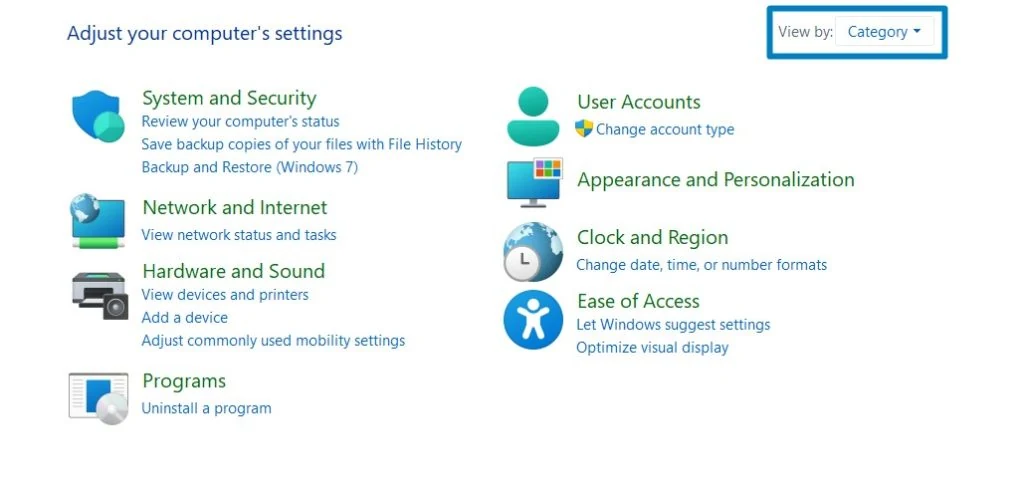
Category View
Category View
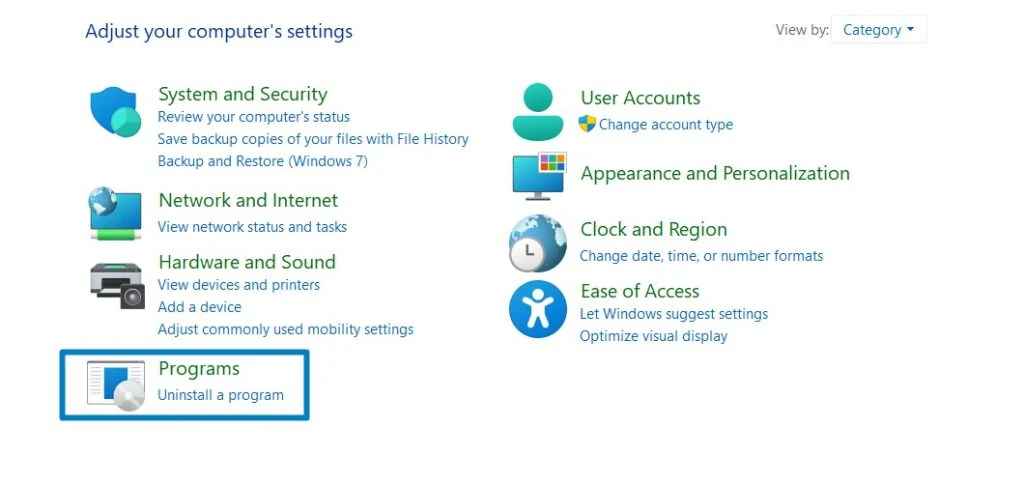
  1. Now, Click on Programs.
Programs
Programs
  1. Under Programs and Features, click on Turn Windows Features on or off.
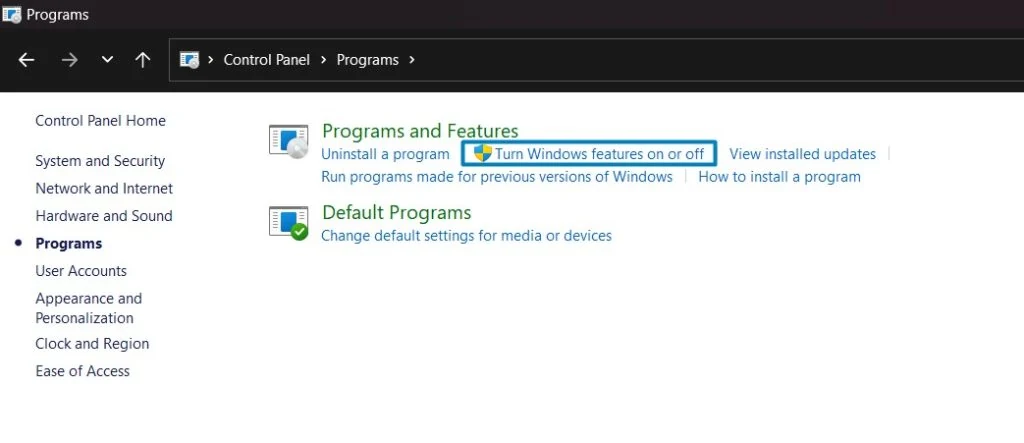
Turn Windows Features on or off
  1. Windows Features dialog box will open now. Search and locate .NET Framework Advanced Services from the list of services available and expand it.
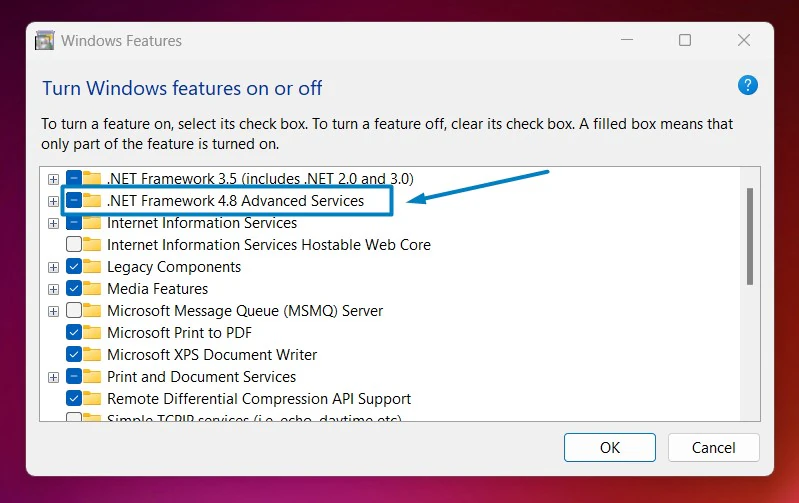
.NET Framework Advanced Services
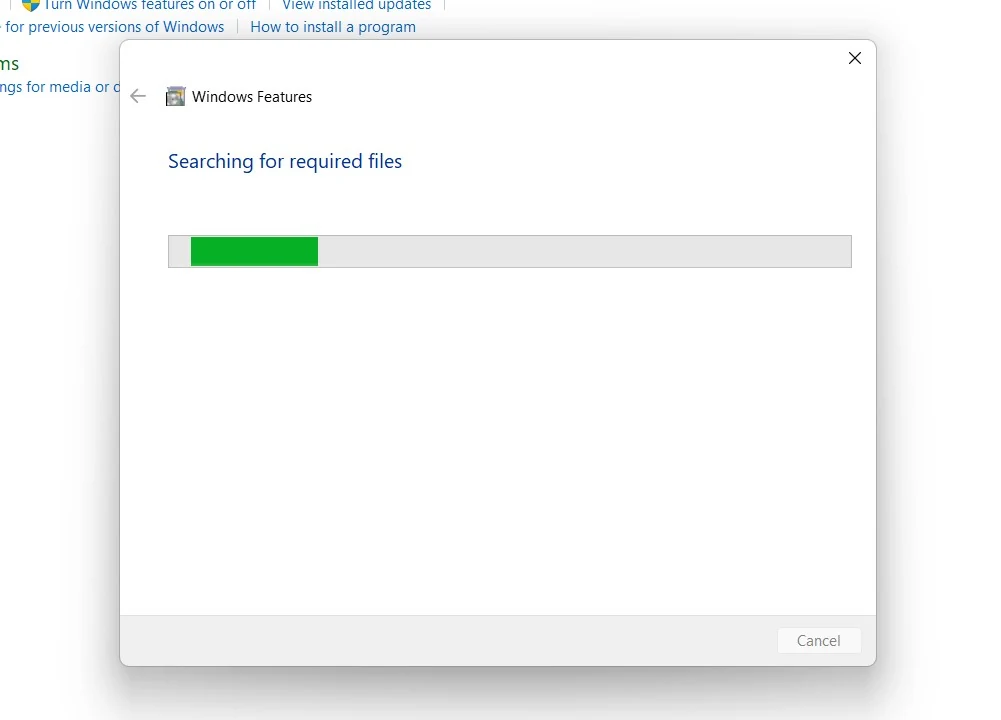
  1. You can find ASP.NET 4.8. Click on the check box next to this Service in Windows 11. Also, make sure that .NET Advanced Services is also enabled. Click OK. Windows will now search for the required files.
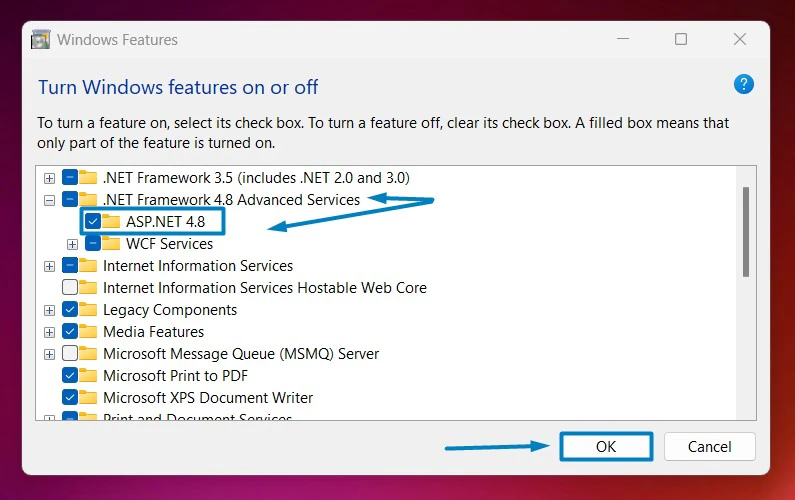
Enable ASP.NET 4.8
Enable ASP.NET 4.8
    Searching for the required files
    Searching for the required files
    1. After the process, Windows will apply the necessary changes.
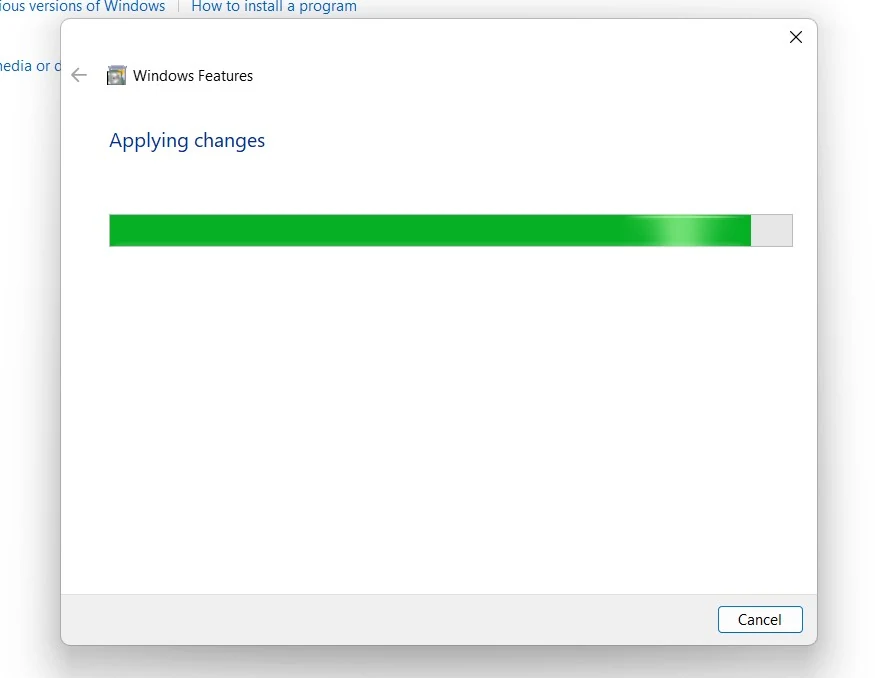
    Applying Changes
    Applying Changes
    1. The system will prompt for a restart. Click Close. Continue with Restart if prompted. It is recommended that changes made to the system reflect while using the environment.
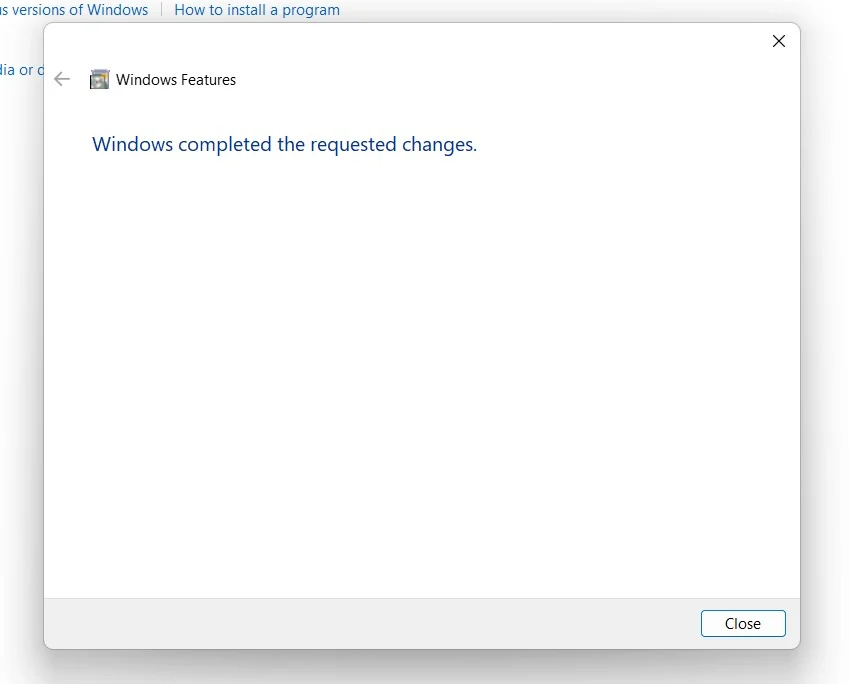
    Close
    Close
    1. ASP.NET 4.8 is now enabled on your Windows 11 laptop or PC. Enjoy Seamless Connectivity.

    Take away:

    ASP.NET 4.8 stands as a powerful web application framework, building upon the foundation of Active Server Pages (ASP) to offer developers and businesses a versatile platform for creating dynamic and interactive web solutions. Its inclusion as an optional feature in Windows 11 underscores its adaptability, catering to diverse user needs. Whether enabling ASP.NET 4.8 for web development prowess or opting for a streamlined system, its role in empowering modern web experiences and scalable enterprise solutions remains pivotal in the digital landscape. Happy Coding! Peace out!

    Tags:

    Enable ASP.NET 4.8 in Windows 11How to Enable in Windows 11windows 11
    Vigneshwaran Vijayakumar
    Author

    Vigneshwaran Vijayakumar

    Hello, I'm Vigneshwaran, the founder, owner, and author of WinSides.Com. With nearly a decade of experience in blogging across various domains and specializing in Windows-related tutorials for over five years, I bring a wealth of knowledge and expertise to WinSides.Com

    Follow Me
    Other Articles
    Microsoft Powertoys for Windows 11
    Previous

    Download and Install Microsoft Powertoys for Windows 11

    TCP Activation in Windows 11
    Next

    How to Enable TCP Activation in Windows 11?

    No Comment! Be the first one.

    Leave a Reply Cancel reply

    Your email address will not be published. Required fields are marked *

    • How to Enable Telnet Client in Windows 11?
    • How to Enable IIS [Internet Information Services] in Windows 11?
    • Download & Install Google App for Windows 11
    • How to Run Control Panel as Administrator on Windows 11?
    • How to Batch Rename Files using PowerRename in Windows 11?
    1. Vigneshwaran Vijayakumar
      Vigneshwaran Vijayakumar on How to Enable Windows PowerShell 2.0 in Windows 11?October 5, 2025

      Hello Mr. Mohamad El-Kheir, Thank you for contacting us. Microsoft has removed PowerShell version 2.0 completely from Windows 11 24H2…

    2. Avatar of Mohamad El-Kheir
      Mohamad El-Kheir on How to Enable Windows PowerShell 2.0 in Windows 11?October 5, 2025

      i have a MSI laptop with windows 11 Home Installed on it. how to install powershell v2.0 on it

    3. Vigneshwaran Vijayakumar
      Vigneshwaran Vijayakumar on DxDiag Windows 11 – What is it & How to use it for Troubleshooting?August 14, 2025

      Hey Myla Shannon Thank you for your valuable feedback. We are delighted to hear your compliment and excited to know…

    4. Avatar of Myla Shannon
      Myla Shannon on DxDiag Windows 11 – What is it & How to use it for Troubleshooting?August 14, 2025

      This content is incredibly informative.

    5. Avatar of seven
      seven on How to Enable IIS [Internet Information Services] in Windows 11?July 29, 2025

      I found this post very helpful.

    • About us
    • What’s New?!
    • Guest Posts on Winsides.com – Terms and Conditions
    • Publication Sitemap
    • Careers
    • Authors
    • Why Trust Winsides.com?
    • Content Removal Request
    • Terms of Use
    • Disclaimer
    • Contact us
    Copyright 2024-2026 - Winsides.com. All rights reserved.