

Modern Standby is the newer Windows sleep model that keeps the system in an S0 low-power idle state instead of entering traditional S3 sleep. Hardware and firmware determine which model a PC supports, so the result cannot be inferred reliably from the Windows edition or the presence of a Sleep button.
I reproduced the check on Windows 11 Home Single Language version 25H2, build 26220.7872, from a regular non-administrator terminal. This laptop reported Standby (S0 Low Power Idle) Network Disconnected as available. It also reported traditional S1, S2, and S3 standby as unavailable. The query only read capability information; it did not change a power plan, sleep state, firmware option, driver, or registry value.
What is Modern Standby?
Microsoft describes Modern Standby as the S0 low-power idle model. The PC remains in the working S0 state while Windows and the platform place hardware into low-power conditions. This design can resume quickly and can permit selected background activity without using the older S3 suspend state.
Modern Standby can operate with network connectivity available or disconnected during standby. Both are Modern Standby results because the decisive capability is S0 Low Power Idle, not the word Connected.
Table of contents
How can you check whether Modern Standby is supported?
- Open Windows Terminal, Command Prompt, or Windows PowerShell as a regular user.
- Enter
powercfg /a, and then press Enter. The long form ispowercfg /availablesleepstates. - Look under The following sleep states are available on this system.
powercfg /a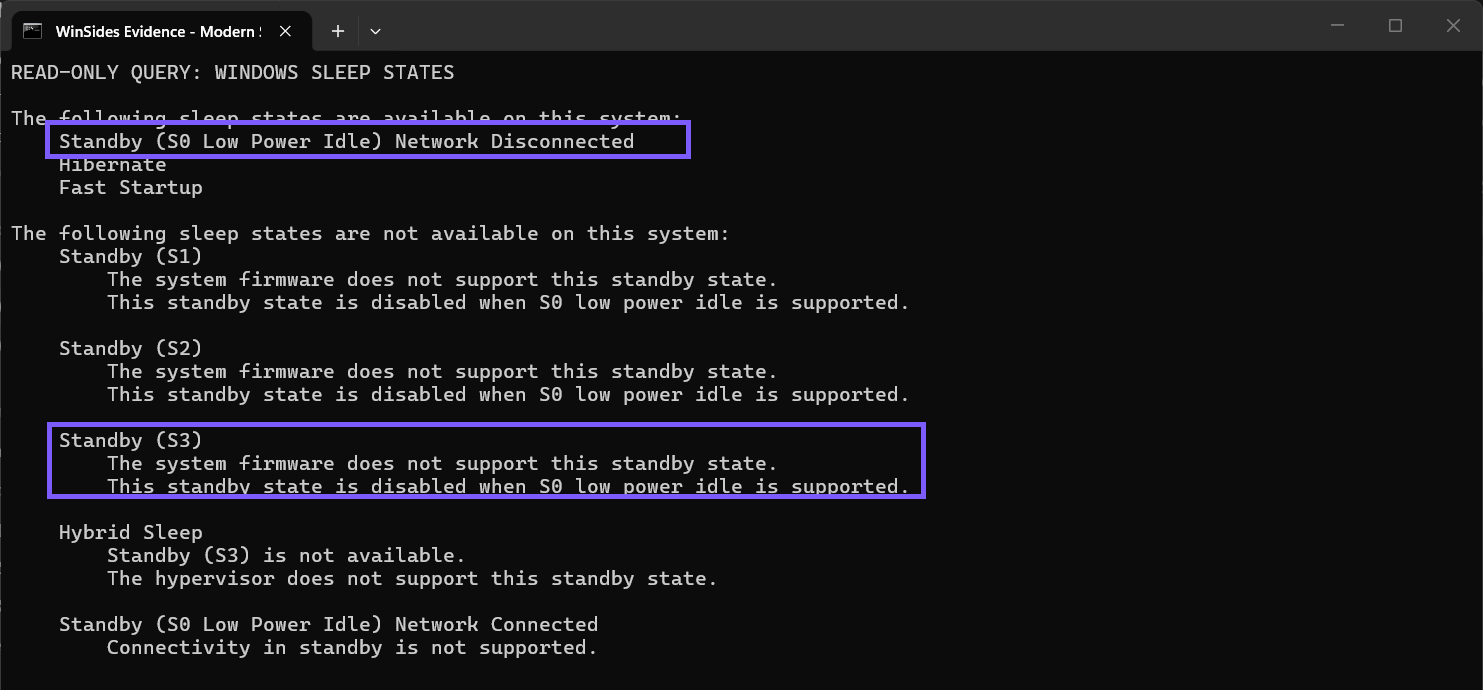
If the available section contains Standby (S0 Low Power Idle), the PC supports Modern Standby. If the available section lists Standby (S3) instead and S0 Low Power Idle is absent, the PC uses the traditional S3 sleep model.
What do Network Connected and Network Disconnected mean?
Network Connected means the platform can maintain supported network scenarios while it is in Modern Standby. Network Disconnected means standby networking is not available for the reported mode. The tested laptop displayed Network Disconnected and separately explained that connectivity in standby is not supported.
Do not treat Network Disconnected as a failure of Modern Standby. The S0 Low Power Idle label is the capability signal. Connectivity policy and hardware support are a separate part of the standby experience.
Why is Standby (S3) unavailable on a Modern Standby PC?
Microsoft documents Modern Standby and traditional S3 as different platform power models. A system that supports S0 low-power idle does not also expose S1-S3 as interchangeable Windows sleep choices. On the tested PC, the command explicitly said that S3 was disabled when S0 low-power idle is supported.
This is expected capability reporting, not evidence that a driver is broken. Avoid following unsupported registry or firmware instructions that promise to force one model into the other. Microsoft’s Modern Standby guidance says switching the platform power model is not a normal Windows setting change.
What do the other reported sleep states tell you?
- Hibernate means Windows can save the session to storage and power down more completely.
- Fast Startup uses hibernation technology for a faster boot path; it is not a standby mode.
- Hybrid Sleep normally combines S3 with a hibernation safety copy, so it can be unavailable when S3 is unavailable.
- S1 and S2 are older standby states that current PCs commonly do not expose.
The exact reasons shown beneath unavailable states matter. Firmware, hypervisor support, and the active platform model can each explain a missing state.
Does this command test Modern Standby health or battery drain?
No. powercfg /a reports capability. It does not put the PC to sleep, measure a recent session, or calculate standby battery use. A PC can support Modern Standby and still need separate troubleshooting for a driver, device, or background activity that consumes too much power.
If your broader goal is reducing battery use while the PC is awake, WinSides’ Windows 11 Energy Saver guide covers the separate feature that limits background activity. Energy Saver does not determine whether S0 low-power idle is supported.
What should you avoid after checking support?
- Do not add undocumented registry overrides to force S3 or S0 on a production PC.
- Do not change firmware sleep options without the PC manufacturer’s current model-specific guidance and a proven recovery path.
- Do not uninstall power-management drivers merely because S3 is unavailable on a Modern Standby system.
- Do not claim a battery problem from the capability list alone.
Close the terminal when you finish. No rollback is required because the reproduced command only read the system’s supported and unsupported sleep states.
Frequently Asked Questions
Does S0 Low Power Idle mean Modern Standby is supported?
Yes. Microsoft uses S0 low-power idle for the Modern Standby power model. The network-connected or disconnected suffix describes standby connectivity, not a different sleep model.
Do you need administrator rights to run powercfg /a?
No administrator prompt was required on the tested Windows 11 laptop. The command succeeded from a regular terminal and did not change system state.
Can a Modern Standby PC also use traditional S3 sleep?
Windows reports the platform model supplied by its hardware and firmware. On the tested S0 low-power idle PC, S3 was unavailable, which matches Microsoft’s description of the two models.
Does Network Disconnected mean Modern Standby is disabled?
No. The tested result still showed S0 Low Power Idle as available. Network Disconnected means standby connectivity is not supported for that mode.
Read the S0 or S3 capability line
Run powercfg /a and check the available section. S0 Low Power Idle confirms Modern Standby; S3 indicates the traditional sleep model when S0 is absent. Read any connectivity suffix and unavailable-state explanation separately, and leave firmware, registry, drivers, and power settings unchanged during this capability check.








Community
Comments (0)