

You can find the installed Microsoft Defender Security intelligence version in Windows Security > Virus & threat protection > Protection updates. The page also shows when that intelligence version was created and when Windows Security last updated it on the PC. You do not need to start a scan or select Check for updates just to read these values.
I reproduced the Windows Security route and a read-only PowerShell method on Windows 11 Home Single Language, version 25H2, build 26220.7872. The tested PC showed Security intelligence version 1.457.130.0. Version numbers and times change frequently, so treat the values in this guide as evidence of the tested state, not as the version every reader should currently have.
What is Microsoft Defender Security intelligence?
Microsoft's Windows Security guidance describes security intelligence as threat information used by Windows Security whenever it scans. The files help Microsoft Defender Antivirus recognize current malware and other threats. Older documentation and queue topics may call the same value the antivirus definition version or signature version; Microsoft now labels it Security intelligence in the Windows Security app.
This number is not the Windows version, Windows Security app version, Defender platform version, or antimalware engine version. Those components can update on different schedules. If you are troubleshooting a detection or update problem, record each requested component by its exact name instead of assuming one version represents the entire security stack.
Table of contents
What should you know before checking the version?
The procedure below is read-only until the Check for updates button is selected. Opening Protection updates does not download a package, change a protection setting, run a scan, or require rollback. This guide deliberately stops before the button because an update would create network and system state and is a different task.
On a managed device, policy, the active security provider, or organization controls can change what appears. If another antivirus is primary, Microsoft Defender can operate in another mode and the visible Windows Security route can differ. Record the active provider before using a missing field as evidence of a fault.
How can you find the Security intelligence version in Windows Security?
- Open Start.
- Type Windows Security.
- Open the matching Windows Security app.
- Select Virus & threat protection.
- Select Protection updates under Virus & threat protection updates.
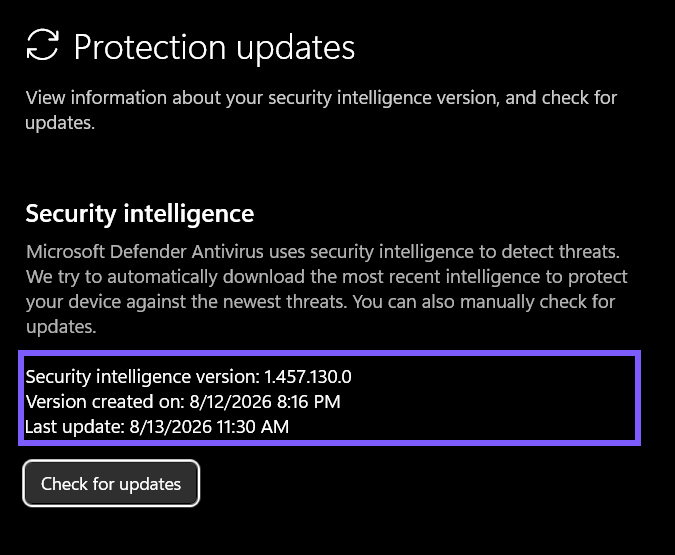
- Read the Security intelligence version row.
- Record Version created on and Last update if the timing matters.
- Close Windows Security without selecting Check for updates.
Microsoft's current Virus & threat protection documentation confirms the Protection updates route and explains that Windows normally downloads security intelligence automatically through Windows Update. The manual button is useful when an update is actually required, but it is not part of a version-only check.
What do Version created on and Last update tell you?
Version created on identifies the timestamp associated with the installed intelligence package. Last update is the time Windows Security reports for its most recent local update event. These rows answer different questions, so they do not have to show the same time.
In the reproduced UI, version 1.457.130.0 was created on August 12 at 8:16 PM, while Last update showed August 13 at 11:30 AM. That gap is plausible because a package can be created before a particular PC receives it. Do not calculate exact update latency without considering time zone, delivery source, policy, sleep state, and the meaning of the local fields.
How can you read the Defender signature version with PowerShell?
Microsoft documents Get-MpComputerStatus as the Defender cmdlet that reports antimalware status. On the tested PC, it succeeded in a normal, non-elevated PowerShell process. I used a narrow selection so the output did not expose unrelated identifiers or configuration:
Get-MpComputerStatus | Select-Object AntivirusSignatureVersion, AntivirusSignatureLastUpdated, DefenderSignaturesOutOfDateThe reproduced output reported AntivirusSignatureVersion 1.457.130.0, AntivirusSignatureLastUpdated August 12, 2026 at 8:16:34 PM, and DefenderSignaturesOutOfDate False. The version exactly matched Windows Security. The PowerShell timestamp aligned with the UI's package-creation time rather than its Last update row on this PC, so the two timestamp labels should not be presented as universally interchangeable.
This command reads status and does not request an update. Microsoft's dedicated version-check guidance instructs readers to run the cmdlet with administrator privileges, so normal-user access is not guaranteed even though it worked here. Organization controls can also affect access. If a non-elevated session is denied, stop and follow the administrator's approved diagnostic process instead of bypassing policy.
Why do Security intelligence, definition, and signature version refer to the same value?
Microsoft states that the Security intelligence version shown in Windows Security is what was previously called the Microsoft Defender Antivirus definition version. The PowerShell property retains the older AntivirusSignatureVersion name. That terminology difference explains why queue topics and scripts can describe one value in several ways.
Keep the current user-facing label in the article title and explain the older names for search and troubleshooting context. Do not rename platform or engine values as security intelligence. On the tested PC, for example, the Defender platform was 4.18.26070.9 and the engine was 1.1.26070.7—both intentionally different from intelligence version 1.457.130.0.
Does a higher version number prove Defender is fully up to date?
No single number proves the entire Defender installation is current. Security intelligence is updated frequently, while the engine and platform have their own versions. A version can also be appropriate for one delivery moment and stale later. Use the displayed times, the DefenderSignaturesOutOfDate status, update policy, and current Microsoft guidance together.
Do not compare only the last numeric segment between two PCs. Devices can receive updates at different times, and a managed device can follow organization policy instead of the same timing as an unmanaged home PC. Evaluate a managed device against its intended update channel and compliance policy.
Why might the page or result look different?
The Windows Security layout can vary by build, staged rollout, window size, security provider, and management policy. Microsoft's compatibility guidance explains that a third-party antivirus can affect Defender's mode and visible status. The tested PC reported Defender in Normal mode; that result should not be copied to a device where another product is intentionally primary.
If Protection updates is absent, first verify the active security provider and whether the device is managed. Do not remove another antivirus, enable services, edit policy, or change the Registry just to reproduce this screen. Those actions expand risk and need their own authoritative, reversible procedure.
What should you remove before sharing version evidence?
The version rows are generally low-risk, but a full Windows Security window can reveal device edition, managed status, provider names, notification badges, navigation state, and unrelated alerts. A PowerShell status dump can contain a computer identifier and many protection details when it is not narrowed.
Crop the screenshot to Protection updates and select only the needed PowerShell properties. The original ShareX frame for this article remains private. The public derivative excludes the navigation and privacy panels while retaining the version, two timestamps, and the unselected Check for updates button for context.
Frequently Asked Questions
Does opening Protection updates download a Defender update?
No. Opening the page displays the installed version. The manual update action begins only if you deliberately select Check for updates.
Is the Security intelligence version the same as the old definition version?
Yes. Microsoft says the Windows Security value is what was previously called the Microsoft Defender Antivirus definition version.
Why does PowerShell call it AntivirusSignatureVersion?
The Defender cmdlet retains signature terminology. On the tested PC, AntivirusSignatureVersion matched the Security intelligence version shown in the app.
Why is Protection updates missing on my PC?
The active antivirus provider, organization policy, Defender mode, or Windows Security layout can affect the page. Check those conditions before changing software or policy.
Record the exact label and context
Use Protection updates for the clearest visual answer, or query the narrow PowerShell properties when you need text output. Record the version and relevant time labels exactly, distinguish intelligence from platform and engine versions, and leave update actions untouched during a read-only check.
For more interesting articles, stay tuned to WinSides.com!




Community
Comments (0)