

You can check the installed Windows Terminal version from its About dialog. Open the menu beside the New Tab button, select About, and read the version shown under Windows Terminal. For a text result, a normal-user PowerShell query can read the version of the current user's packaged Terminal installation without opening the app.
I reproduced both methods on Windows 11 Home Single Language, version 25H2, build 26220.7872. The stable Terminal package and its About dialog both reported 1.24.11911.0. That number describes the tested installation on August 14, 2026. It does not assert that every PC should have the same version or that it is the newest release available now.
What does the Windows Terminal version identify?
The number belongs to the Windows Terminal app—the graphical host that displays shells in tabs and panes. Microsoft's Terminal overview explains that Terminal can host command-line programs such as Command Prompt, PowerShell, and Windows Subsystem for Linux distributions. Each hosted shell has its own version, so a PowerShell version printed inside a Terminal tab is not the Terminal app version.
The app version is also different from the Windows display version and OS build. Record the exact label that a support request asks for. “Windows 11 25H2,” “PowerShell 7.6.3,” and “Windows Terminal 1.24.11911.0” can all be correct on the same PC because they identify different components.
Table of contents
What should you know before opening About?
Reading the version does not require administrator privileges and does not change Terminal settings. On the tested build, opening About briefly displayed Checking for updates... before the status text cleared. No update button was selected, no installation prompt appeared, and no persistent setting changed. However, that automatic status check means the graphical route should not be described as strictly offline.
If network isolation matters, use the PowerShell package query below instead. The query reads local package registration for the current user. It does not request an update, launch Terminal, or inspect another user's profile.
How can you find the version in Windows Terminal About?
- Open Windows Terminal.
- Select the New Tab split-button menu—the down arrow beside the plus button.
- Select About.
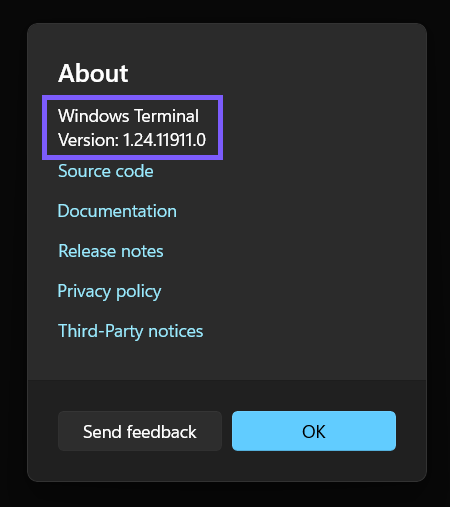
- Read the number after Version:.
- Select OK or close the window when finished.
On version 1.24.11911.0, About was a direct item in the New Tab menu; it was not under Settings. A future layout can move the command. If the menu looks different, use Terminal's command palette to search for an About action or use the package query rather than guessing through update controls.
How can you check the packaged Terminal version with PowerShell?
Microsoft documents Get-AppxPackage as a cmdlet that lists app packages installed for a user profile. Run this narrow command in a normal, non-elevated PowerShell window:
Get-AppxPackage -Name Microsoft.WindowsTerminal | Select-Object Name, Version, Status, ArchitectureThe reproduced command ran in PowerShell Core 7.6.3 at Medium integrity and exited with code 0. It returned package name Microsoft.WindowsTerminal, version 1.24.11911.0, status Ok, and X64 architecture. The version exactly matched the About dialog. Selecting only four fields keeps the result useful and avoids exposing an installation path or a long package identity that a helper did not ask for.
With no -User or -AllUsers parameter, the command checks the current user's package registration. Microsoft's cmdlet documentation says querying another profile requires administrator permissions, and -AllUsers is an elevated scope. Do not broaden the query merely to obtain the version for the account already signed in.
How can you distinguish stable Terminal from Terminal Preview?
Stable and Preview can be installed side by side, so query their package names separately:
Get-AppxPackage -Name Microsoft.WindowsTerminal | Select-Object Name, Version, Status
Get-AppxPackage -Name Microsoft.WindowsTerminalPreview | Select-Object Name, Version, Status
Only the stable package was present on the tested PC; the Preview query returned no package. Microsoft's Terminal FAQ distinguishes the stable and Preview package families and describes Preview as the channel where newer features are tested before moving to stable. A higher Preview number does not mean the stable installation is broken or behind its intended channel.
When sharing a result, include the package name with the number. A bare version cannot tell the reader whether it came from Stable, Preview, Canary, or another distribution.
Can you use wt --version?
Microsoft's tagged source for Terminal 1.24.11911.0 implements -v and --version and is intended to print the resolved app name and version before exiting. However, both wt.exe --version tests on this PC—one from PowerShell and one through Command Prompt—returned exit code 0 with no text and created a Terminal process. The process was then closed without a setting change.
There is also a documentation mismatch: Microsoft's current Learn option table calls itself the full list but does not include either version switch. The source proves the feature exists; the local result proves it cannot be assumed to surface correctly through every alias/package context. Use About or Get-AppxPackage as the dependable methods in this guide. If the switch does print a result on another PC, it describes only the Terminal executable reached by that wt alias or path; it does not enumerate Stable, Preview, portable, and other copies.
Why might Get-AppxPackage return nothing?
The most common explanations are that Terminal is not registered for the current user, a different channel is installed, or the copy is unpackaged. Microsoft's distribution guide documents packaged MSIX, preinstallation, unpackaged ZIP, and portable forms. Get-AppxPackage covers registered app packages; it is not an inventory tool for a portable folder.
If Terminal opens but the stable package query is empty, check About first and identify the distribution before changing anything. Do not browse or modify C:\Program Files\WindowsApps. For an unpackaged or portable copy, About is the safer source because it reports the running executable's own version without requiring package registration.
Does the installed number prove Terminal is current?
No. It proves what is installed at the time of the check. Packaged Store installations can receive automatic updates, while Microsoft's distribution comparison says unpackaged and portable copies do not. Managed Store policy, staged availability, architecture, or an intentionally selected Preview channel can also affect the version seen on a particular PC.
Compare versions only when you have an authoritative target for the same channel and distribution. This guide intentionally does not trigger Store, winget, GitHub, or in-app update actions. Checking a version and updating an app are separate tasks with different network and change-control consequences.
What should you remove before sharing Terminal version evidence?
The About dialog itself contains little personal information, but the terminal behind it can show account names, folder paths, commands, server names, or tokens. A full PowerShell package object can also expose installation paths and package identifiers that are unnecessary for a version question.
Crop a screenshot to About and select only Name, Version, Status, and Architecture in text output. The original ShareX frame for this article remains private. The public derivative excludes the visible shell line, tabs, window controls, taskbar, and desktop while preserving the complete About dialog for context.
Frequently Asked Questions
Do I need administrator permission to check the Terminal version?
No. About and the current-user Get-AppxPackage query worked in a normal, non-elevated session. Administrator permission is relevant only when broadening package inspection to other users.
Is the Terminal version the same as the PowerShell version?
No. Windows Terminal is the graphical host, while PowerShell is one shell it can run. Each component has its own version.
Why does the Preview query return nothing?
It means Windows Terminal Preview is not registered for the current user under that package name. The stable package can still be installed and working normally.
Does opening About install an update?
No update action was selected during reproduction, but About briefly performed an automatic update-status check. Use the local PowerShell query when a strictly local check is required.
Record the app, channel, and method together
Use About for the clearest visual answer or query the exact current-user package when you need local text output. Record Windows Terminal or Windows Terminal Preview beside the number, distinguish the app from its hosted shell and Windows build, and avoid undocumented version switches.
For more interesting articles, stay tuned to WinSides.com!
Community
Comments (0)