

To check the PowerShell version in Windows 11, read $PSVersionTable.PSVersion inside the shell process you want to identify. Windows PowerShell and PowerShell 7 are separate products, so check powershell.exe and pwsh.exe independently when both are installed.
I reproduced both standard-user reads on Windows 11 version 25H2, build 26220.7872. Windows PowerShell reported 5.1.26100.7859 with PSEdition Desktop. An explicit PowerShell 7 process reported 7.6.3 with PSEdition Core. No shell was installed, updated, removed, or reconfigured.
Why can Windows 11 have two PowerShell versions?
Windows PowerShell 5.1 is the built-in Windows product whose executable is powershell.exe. PowerShell 7 is the newer cross-platform product whose executable is pwsh.exe. They can exist side by side and can have different language, runtime, and module-compatibility behavior.
Microsoft's PowerShell-on-Windows guidance states that PowerShell 7 does not replace Windows PowerShell 5.1 and installs to a different directory. That is why a single version read is not necessarily a complete inventory.
Windows Terminal is only a host for command-line profiles. Opening a tab named PowerShell does not by itself prove which executable or version is running. Read the session's own version table and keep the executable or PSEdition label with the result.
Table of contents
How do you check the Windows PowerShell version?
- Open a Windows PowerShell profile in Windows Terminal or start
powershell.exeexplicitly. - Use a normal standard-user session.
- Enter:
$PSVersionTable | Select-Object PSVersion,PSEdition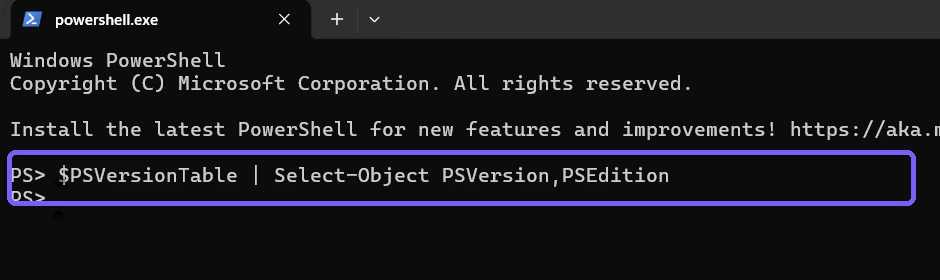
Press Enter. Record PSVersion and PSEdition together.
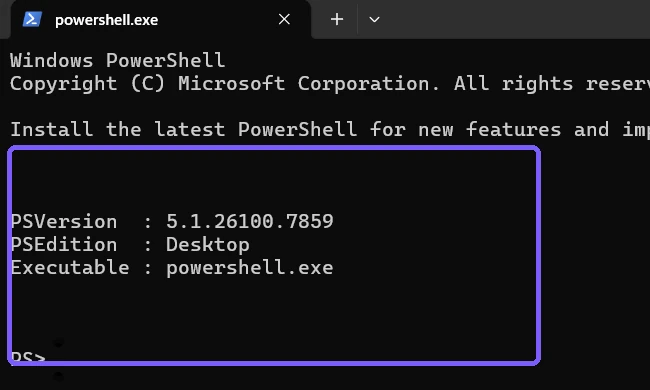
Microsoft's automatic-variables reference describes $PSVersionTable as a read-only hash table containing details about the version of PowerShell running in the current session. The PSVersion property is the version number; PSEdition distinguishes the edition family.
How do you check the PowerShell 7 version?
Run an explicit pwsh.exe query so the result cannot be confused with the surrounding Windows PowerShell host:
pwsh.exe -NoProfile -Command '$PSVersionTable | Select-Object PSVersion,PSEdition'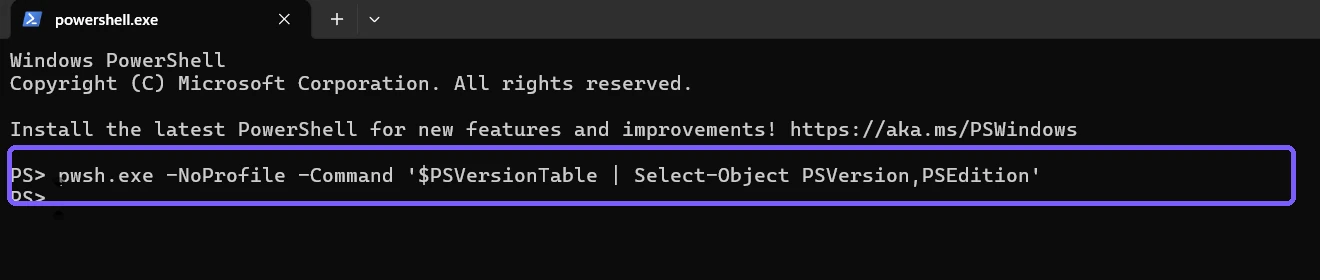
-NoProfile keeps personal profile scripts out of this diagnostic read. It does not uninstall or disable profiles; it only skips loading them for the one child process.
If Windows reports that pwsh.exe is not recognized, PowerShell 7 may be absent from PATH or not installed. That does not mean Windows PowerShell is missing. Record the exact message and decide separately whether installing PowerShell 7 is necessary.
What do PSVersion and PSEdition mean?
- PSVersion: the exact version of the running PowerShell engine.
- PSEdition Desktop: the full Windows PowerShell edition based on .NET Framework on this PC.
- PSEdition Core: PowerShell 6 or later based on modern .NET in this reproduced session.
- Executable:
powershell.exeidentifies Windows PowerShell;pwsh.exeidentifies PowerShell 7.
Do not infer the PowerShell version from the Windows build, Terminal version, .NET version, or a module version. Those products have independent lifecycles. Also do not assume the larger numeric version is automatically compatible with every older script.
Should you display the entire PSVersionTable?
The full table can be useful for support because it includes Git commit, operating-system, platform, compatible-version, remoting, serialization, and WSMan fields. For a simple version question, PSVersion and PSEdition are enough and produce a cleaner screenshot.
If support requests the full table, review it before sharing. The values are generally product metadata, but the surrounding prompt, working directory, terminal tabs, and profile output can expose personal or organizational information.
Why do different tabs show different versions?
Each Terminal profile can launch a different executable. A Windows PowerShell profile normally launches powershell.exe, while a PowerShell profile may launch pwsh.exe. Visual themes and tab titles are not reliable identity evidence because users can rename them.
Profiles can also start preview, portable, or side-by-side PowerShell installations. When exact identity matters, include $PSHOME or the process path in a separate trusted diagnostic record. This article avoids displaying paths because the version and edition answer the queue intent.
Does a version check update PowerShell?
No. Reading $PSVersionTable does not contact an update service or install anything. The reproduced pwsh.exe command starts the installed application with -NoProfile, reads two properties, and exits.
Do not run an installation, package-manager upgrade, Store update, MSI repair, or uninstall merely to make your number match the screenshot. Check application compatibility and organizational policy before changing PowerShell.
What should you do if the version is unexpected?
- Record which executable or Terminal profile started the session.
- Run the two-property query again in a fresh
-NoProfileprocess. - Compare PSVersion and PSEdition, not only the tab title.
- If a script requires a specific edition, test it in an authorized environment instead of changing the system immediately.
- On a managed PC, share the exact labeled result with the administrator.
On the reproduced PC, the two reads intentionally differ because both products are installed side by side. That is expected, not a mismatch to repair.
Is PowerShell version output safe to share?
The two selected properties do not contain a user name, credential, or personal file. A normal console can still expose a profile script message, account prompt, working path, command history, notification, or unrelated tab.
The retained evidence uses disposable sessions, an anonymous PS> prompt, and -NoProfile for the PowerShell 7 child process. No account identifier, personal path, credential, file, notification, or unrelated application appears. Exact Terminal and ShareX configuration hashes were restored.
Frequently Asked Questions
What command shows the running PowerShell version?
Read $PSVersionTable.PSVersion, or select PSVersion and PSEdition together for a clearer identity.
Is Windows PowerShell 5.1 the same as PowerShell 7?
No. They are separate products that can run side by side as powershell.exe and pwsh.exe.
Why does one tab show Desktop and another Core?
The tabs launched different PowerShell editions. Desktop identifies the reproduced Windows PowerShell process; Core identifies PowerShell 7.
Does -NoProfile delete profiles?
No. It skips loading profiles for that process only and does not modify or remove profile files.
Identify the process, version, and edition together
Read PSVersion and PSEdition inside the exact process you are troubleshooting. Check powershell.exe and pwsh.exe separately when both exist. Preserve their labels, and keep installation, updates, profile changes, policy, and compatibility testing as separate decisions.
For more interesting articles, stay tuned to WinSides.com!

Community
Comments (0)