

To list only Windows Subsystem for Linux (WSL) distributions that are running now, open a normal PowerShell tab and run wsl --list --running. The command filters out stopped distributions. If none are active, WSL reports that there are no running distributions instead of showing the complete installed inventory.
I reproduced this read-only check on Windows 11 Home Single Language version 25H2, build 26220.7872. The running-only command reported There are no running distributions. A separate wsl --list --verbose verification then showed three installed distributions—Ubuntu-20.04, Ubuntu, and Ubuntu-24.04—with State Stopped for every row. No distribution was launched, stopped, installed, converted, or removed.
What does a running WSL distribution mean?
A WSL distribution is running when its Linux environment currently has an active instance. It may have been opened from the Start menu, started with a WSL command, or kept alive by a Linux process. A registered distribution can remain installed while its State is Stopped, so “not running” does not mean “not installed.”
Microsoft's WSL command reference documents wsl --list --running as the filter for distributions that are currently running. The same reference documents the normal installed list and its verbose form. Use the running filter for a current-state question and the verbose installed list when you need the complete registration inventory.
The output is a moment-in-time observation. Another application, scheduled task, development tool, or user action can start or stop a distribution after the command finishes. Record the collection time when the result is part of troubleshooting.
Table of contents
How do you list running WSL distributions?
- Open Windows Terminal.
- Open a normal PowerShell tab. Administrator rights were not required for this reproduced inventory.
- Enter the supported running-only command:
wsl --list --running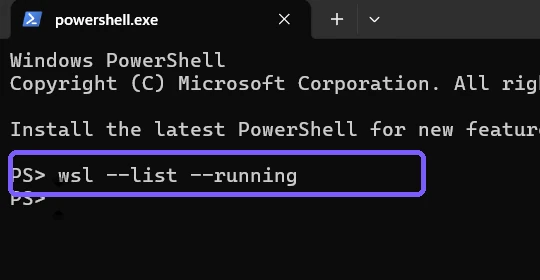
- Press Enter.
- If names appear, record them exactly before using any distribution-specific diagnostic command.
- If WSL reports that no distributions are running, treat that as a valid state—not as proof that WSL or every distribution is absent.
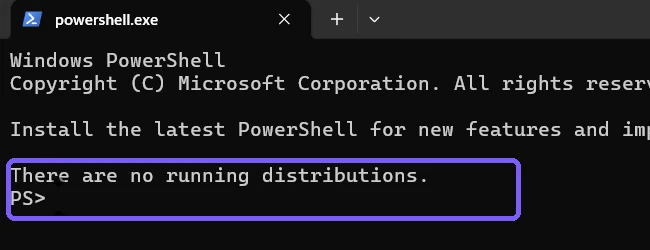
The command returned to the PowerShell prompt without opening Ubuntu or another Linux shell. It did not terminate anything. This distinction is important: listing is a read, while wsl --terminate and wsl --shutdown are state-changing commands and are not part of this procedure.
Does an empty running list mean WSL is not installed?
No. A running-only result can be empty while one or more distributions remain installed. The filter excludes every row whose current state is Stopped. This is exactly what happened on the reproduced PC: three distributions were registered, but none had an active instance.
Do not install or launch a distribution merely to make your output look like a screenshot. The valid answer may be a list of one or more names, or the explicit no-running message. The purpose is to observe the current state without changing it.
If the command instead reports that WSL is unavailable or not recognized, record the exact error. That is different from a successful no-running result and belongs to WSL availability troubleshooting.
How do you verify that installed distributions are stopped?
Use the verbose installed inventory as a separate cross-check:
wsl --list --verbose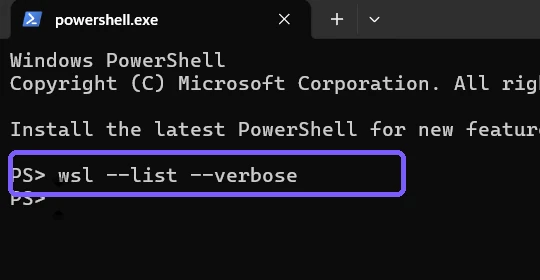
Press Enter, then compare the STATE column with the running-only result.
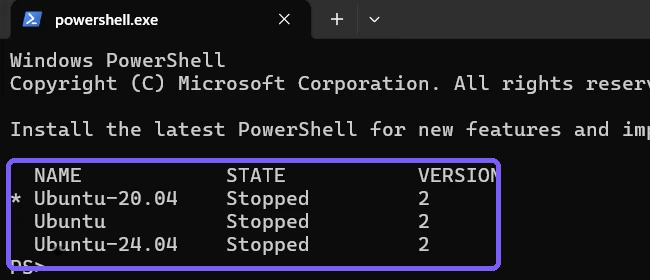
The asterisk marks Ubuntu-20.04 as the default distribution; it does not mean that distribution is running. The STATE column is the relevant field. VERSION 2 means each row uses the WSL 2 architecture and does not describe its current activity.
This verification is useful when someone says “WSL is missing” after seeing an empty running result. The installed table separates registration from activity: names in the table prove distributions are registered, while State Stopped explains why the running filter returned none.
How are installed, running, and online WSL lists different?
- Running:
wsl --list --runningreturns only distributions active at collection time. - Installed:
wsl --listorwsl --list --verbosereturns registered distributions whether running or stopped. - Online: the online catalog lists distributions available for installation and is not evidence that they are installed.
Choose the smallest view that answers the question. Use running when you are checking active Linux environments before maintenance. Use the installed inventory when you need names, default selection, state, and WSL generation. Use the online catalog only when planning an installation.
Do not combine switches without confirming their documented meaning. The supported command reproduced here is exactly wsl --list --running. The verbose command is run separately as a verification step so its complete installed table cannot be confused with the filtered result.
What if no distributions are installed?
If the verbose installed list also has no registered names, decide whether the PC is supposed to use WSL. To enable the Windows component intentionally, follow the separate guide to enable Windows Subsystem for Linux. If WSL is ready but you need a guest operating system, use the dedicated procedure to install Ubuntu with WSL 2.
Those actions change system state and may download software. They require their own authorization, evidence, and rollback planning. This running-list article does not silently turn an inventory check into an installation.
On a work or school PC, policy may restrict WSL. Share the exact error and Windows build with the administrator rather than attempting to bypass management controls.
Why check running distributions before maintenance?
A running inventory can reveal active Linux work before you choose a disruptive WSL action. If a name appears, pause and identify what is using it. A terminal, editor, container tool, background service, or script may depend on that instance.
An empty running list reduces uncertainty, but it is not permission to delete or reconfigure anything. It only describes activity at that moment. Confirm the intended maintenance scope, affected data, and recovery plan separately.
For repeatable support notes, capture both the running-only result and the verbose installed table. Together they distinguish “nothing is active” from “nothing is registered” without starting a distribution to investigate it.
What should you do if the two checks disagree?
Run both commands again from the same Windows account and record the time. A distribution can change state between reads. If the running filter shows a name but the later verbose table says Stopped, the workload may have exited between commands. That is possible and should not be “corrected” by launching it again.
Confirm that the running command contains --list --running and that the verification command contains --list --verbose. Preserve the full error when a switch is misspelled. Avoid terminating a distribution merely to produce an empty list; that would change the very state being measured.
Is the running WSL list safe to share?
Standard distribution names are usually low risk, but imported or custom distributions can contain organization, project, customer, or personal labels. Review every visible name before sharing. Also inspect the prompt, working directory, tabs, notifications, and taskbar.
The retained screenshots use an anonymous PS> prompt in disposable standard-user Terminal sessions. They show no account name, personal path, credential, Linux file, notification content, or unrelated document. The final frame is a fresh read-only installed-state verification captured before Terminal closed and exact Terminal and ShareX configuration hashes were restored.
Frequently Asked Questions
What command lists only running WSL distributions?
Run wsl --list --running in PowerShell or Command Prompt. It filters the registered inventory to distributions active at that moment.
Why does WSL say there are no running distributions?
No registered distribution was active when the command ran. Installed distributions can all be Stopped, as the reproduced verbose table confirms.
Does the running-list command start or stop Linux?
No. The reproduced command only read current state. No distribution started or stopped.
Do you need administrator rights to list running WSL distributions?
No administrator prompt was required for the reproduced running and verbose inventory commands.
Separate current activity from installed inventory
Run wsl --list --running to observe active distributions without changing them. If the result is empty, use wsl --list --verbose separately to determine whether distributions are installed but Stopped. Record the time and exact output, and keep launch, termination, shutdown, installation, conversion, and removal as separately authorized tasks.
For more interesting articles, stay tuned to WinSides.com!









Community
Comments (0)