

Windows 11 can inventory installed physical memory through the Win32_PhysicalMemory CIM class. Its read-only properties let you calculate each module's capacity, see the configured clock speed reported by Windows, and interpret the official SMBIOS memory-type code without opening the laptop or changing a firmware setting.
I reproduced this check in a regular non-administrator PowerShell window on Windows 11 Home Single Language version 25H2, build 26220.7872. Windows reported two 8 GiB modules configured at 3200 MHz. Both returned SMBIOS memory type 26, which the official table identifies as DDR4. No diagnostic, stress test, firmware profile, timing, voltage, virtual-memory setting, driver, service, file, Registry value, or physical module changed.
What RAM details does this check show?
- Module is a simple display number added by the command. It is not a physical slot label.
- CapacityGiB converts the provider's byte count to gibibytes for each returned memory device.
- ConfiguredMHz displays ConfiguredClockSpeed, the configured clock speed reported by the device in megahertz.
- SMBIOSType keeps the original official numeric type so the interpretation is auditable.
- MemoryType converts common current codes to labels such as DDR4 or DDR5.
Microsoft's Win32_PhysicalMemory reference documents Capacity, ConfiguredClockSpeed, and SMBIOSMemoryType as read-only properties. This is a focused module inventory; the general WinSides guide to checking System Information in Windows 11 covers broader system summaries rather than this per-module size, speed, and type view.
Table of contents
How can you check RAM size, speed, and type with PowerShell?
Open Windows Terminal or Windows PowerShell, then run this read-only command:
$typeNames = @{
  20='DDR'; 21='DDR2'; 22='DDR2 FB-DIMM'; 24='DDR3'
  26='DDR4'; 27='LPDDR'; 28='LPDDR2'; 29='LPDDR3'
  30='LPDDR4'; 34='DDR5'; 35='LPDDR5'
}

Get-CimInstance -ClassName Win32_PhysicalMemory |
  ForEach-Object -Begin { $n = 0 } -Process {
    $n++
    $label = $typeNames[[int]$_.SMBIOSMemoryType]
    if (-not $label) { $label = "Code $($_.SMBIOSMemoryType)" }
    [pscustomobject]@{
      Module        = $n
      CapacityGiB   = [math]::Round($_.Capacity / 1GB, 2)
      ConfiguredMHz = $_.ConfiguredClockSpeed
      SMBIOSType    = $_.SMBIOSMemoryType
      MemoryType    = $label
    }
  } | Format-Table -AutoSize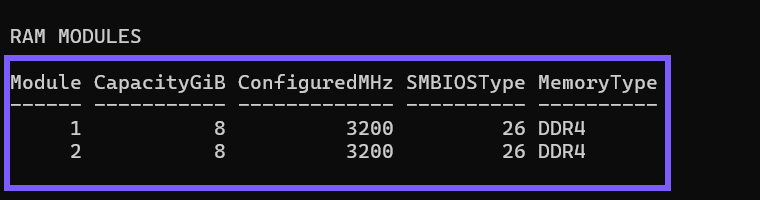
Close the terminal when you finish. The command calls Get-CimInstance, calculates display fields in memory, and formats the output. It does not call a setter or write the inventory anywhere, so no rollback is needed.
How do you calculate total installed RAM?
CapacityGiB is shown per returned module. Add the values to obtain the total represented by this physical-memory inventory. The tested output contains 8 GiB plus 8 GiB, for 16 GiB total.
This value can differ from memory currently available to applications. Hardware-reserved memory, firmware, virtualization, the operating system, drivers, and running programs affect usable and free memory. This inventory also does not prove which physical slot contains a module because the restrained command intentionally omits locator strings.
What does ConfiguredMHz mean?
ConfiguredMHz comes from ConfiguredClockSpeed, which Microsoft defines as the configured clock speed of the memory device in megahertz. It is not a live bandwidth benchmark, latency measurement, memory-controller frequency, transfer-rate calculation, or guarantee that an advertised profile is active.
Marketing materials often use effective transfer-rate terminology, while firmware and inventory tools can label values differently. Compare like-for-like fields, and use documentation from the computer or memory manufacturer before diagnosing a mismatch. Do not enable XMP, EXPO, overclocking, or a voltage change merely to make an inventory number look different.
How does the command identify DDR4 or DDR5?
SMBIOSMemoryType contains the numeric memory-type value from the SMBIOS Memory Device structure. The command preserves that number and adds a label for common values. On the tested laptop, code 26 decoded to DDR4.
The current DMTF SMBIOS specification is the authoritative source for the Type 17 Memory Device table. It includes 26 for DDR4, 34 for DDR5, and 35 for LPDDR5. Keeping the original number visible helps you verify a result when standards add another type.
Why might the memory type show a number instead of DDR?
The fallback label Code N means the short mapping in this display command did not contain the returned numeric value. It does not mean the RAM is damaged or incompatible. A newer SMBIOS revision can add a type, and firmware or virtualization can also return a generalized value.
Look up the exact number in the current DMTF table and check computer-manufacturer documentation. Do not edit firmware, replace a module, flash a BIOS, or install an unknown inventory utility merely to force a familiar label.
Is this output enough to buy a RAM upgrade?
No. Capacity, configured speed, and memory type are useful starting points, but a compatible upgrade can also depend on form factor, supported capacity, ranks, voltage, timings, soldered memory, available slots, processor memory-controller limits, firmware support, and the manufacturer's approved configurations.
Use the exact computer model and its current service or support documentation before purchasing or opening the device. This article intentionally omits part numbers, serial numbers, bank labels, and device locators because they are not needed to satisfy the queue intent and can disclose unnecessary hardware details.
What are the limits of this RAM inventory?
The CIM provider reports what firmware, Windows, and any virtualization layer expose. A missing or generalized field is not proof of a failed module. The query is not a memory test and cannot establish stability, error rate, channel mode, thermal behavior, performance, upgrade compatibility, or physical condition.
If you suspect memory faults, follow a separate, current diagnostic workflow and protect open work before any reboot-based test. Do not run diagnostics or change production-laptop firmware as part of a simple inventory check.
Frequently Asked Questions
Do you need administrator rights to run this RAM check?
No administrator prompt was required on the tested laptop. Managed systems can apply different CIM access rules.
Why does the command show two 8 GiB modules instead of 16 GiB?
The class returns physical memory devices. Add each CapacityGiB value for the represented total; two 8 GiB results equal 16 GiB.
Does 3200 MHz prove an XMP or EXPO profile is enabled?
No. It is the ConfiguredClockSpeed value reported by the provider, not proof of a particular firmware profile, effective transfer rate, or live performance.
Does SMBIOS type 26 mean DDR4?
Yes. The official SMBIOS Memory Device table assigns value 26 to DDR4. Preserve the numeric value when sharing a result so the interpretation can be checked.
Treat the result as a restrained module inventory
Use Win32_PhysicalMemory to inspect each returned module's capacity, configured clock speed, and official SMBIOS type without changing Windows or firmware. Add module capacities for the represented total, keep the original type code visible, and consult model-specific support information before making an upgrade decision.
For more interesting articles, stay tuned to WinSides.com!






Community
Comments (0)