

Introduction to 0xC004C003
0xC004C003 is a Windows activation error that usually points to a product key or license validity problem. Microsofts activation error guidance says you may see this error because the Windows 11 product key entered is not valid. It also explains that product keys are unique and assigned to a specific user to install on a single device. If a key has been used, or attempted to be used, on multiple devices, it can be marked as not valid. In that case, Windows needs a different key that is unique to the device.
That makes this error different from a simple internet outage or a KMS connectivity failure. A PC can be online, browsing normally, fully updated, and still fail activation with 0xC004C003 if the license path is wrong. The installed Windows edition might not match the key. The key might have been sold incorrectly by a reseller. A refurbished or second-hand PC might include a key that was already used elsewhere. A motherboard replacement can change the device identity tied to a digital license. A work image might have installed a volume key on a personal device. The visible code is one line; the cause depends on the license story behind the machine.
Use official Microsoft references while troubleshooting. Microsofts Windows activation error guidance includes 0xC004C003 and explains the invalid-key scenario. Microsofts Activate Windows page explains activation methods and activation settings. The reactivating after a hardware change page covers the Microsoft account and device-linking path after major repairs. For administrators and advanced troubleshooting, Microsofts slmgr.vbs options page documents commands for viewing license information and attempting activation.
This article explains how to fix 0xC004C003 safely. It does not recommend leaked product keys, public activation servers, cracks, patched licensing files, or command bundles from unknown sources. If a key is invalid, reused, blocked, counterfeit, or incompatible with the installed edition, those shortcuts do not solve the real problem. The permanent fix is to restore the correct license path: a valid key for the installed edition, a matching digital license, reseller or OEM support, Microsoft activation support, or the proper organization-managed activation route.
Table of contents
Key Takeaways
- 0xC004C003 usually means Windows rejected the product key or activation entitlement. Microsoft says the entered Windows 11 key may not be valid.
- Product keys are unique. Microsoft notes that keys are assigned to a specific user for installation on a single device, and repeated use across devices can make a key invalid.
- Edition matters. A Windows Home, Pro, Enterprise, or Education key must match the edition installed on the device.
- Second-hand and reseller devices need extra care. If a reseller promised Windows activation and the key fails, contact the reseller with proof of purchase.
- OEM devices should activate through the manufacturer path. If a new PC fails on first boot, Microsoft recommends contacting the device manufacturer.
- Hardware changes can break activation matching. Motherboard replacement or independent repair may require the Activation Troubleshooter, Microsoft account path, OEM help, or a new license.
- Do not use unofficial keys or activators. Invalid-key errors are license problems; bypass tools can create security and legality problems without fixing ownership.
What 0xC004C003 Means in Plain English
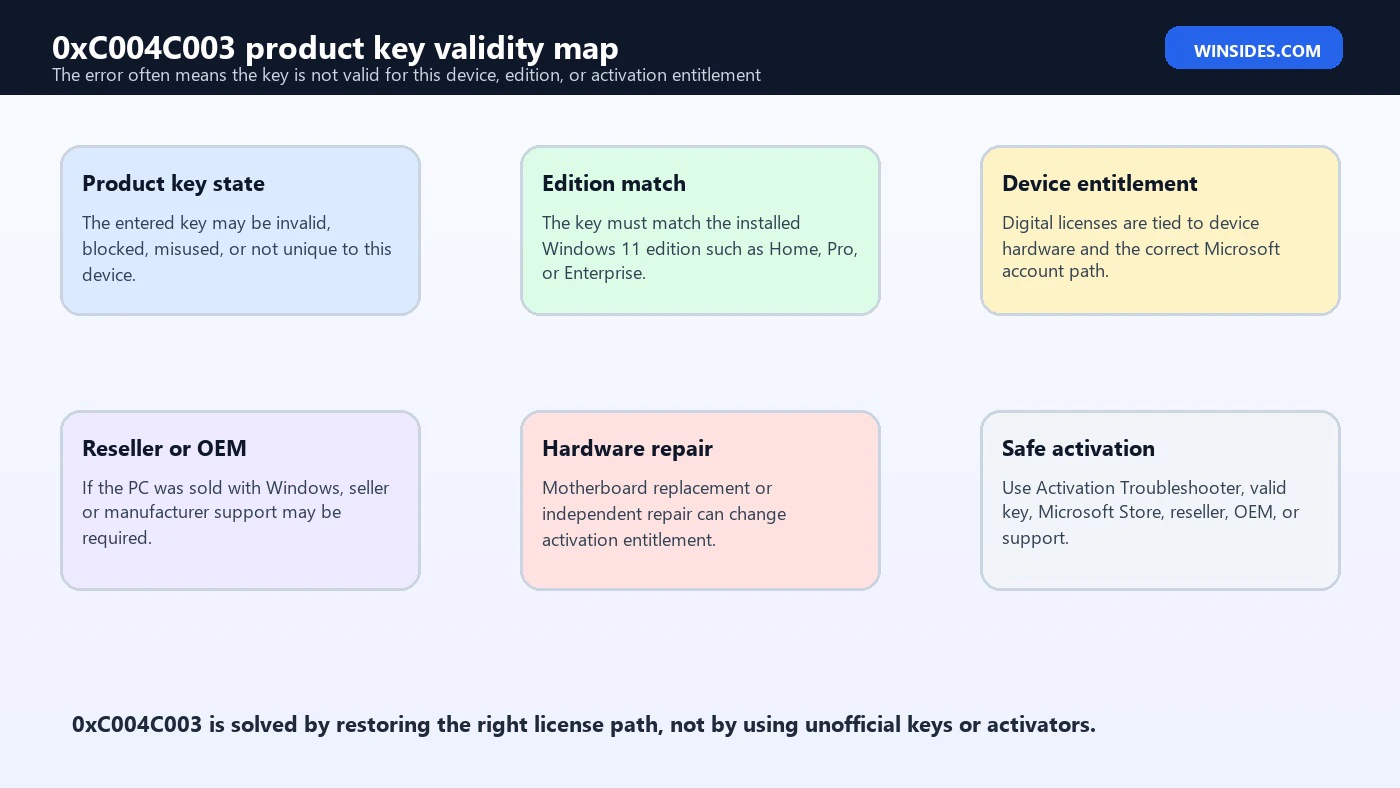
The error means Windows activation did not accept the key or entitlement being used for this device. Microsofts wording is direct: the product key entered is not valid, and if a key was used or attempted on multiple devices, it can be marked as not valid. That does not automatically mean the user did anything wrong. It can happen after buying a device from a reseller, receiving a refurbished PC with a bad key, replacing hardware, reinstalling the wrong edition, or entering a key meant for a different license channel.
Think of activation as a match between four things: the installed edition, the key or digital license, the device identity, and the activation service. If any of those are wrong, Windows can fail activation. A valid Windows 11 Pro key cannot activate Windows 11 Enterprise. A digital license for a previous motherboard may not match a board replaced by an independent repair shop. A key used on many machines may be blocked. A product key from a suspicious marketplace may never have been legitimate.
The goal is to identify which part of the match failed. If the edition is wrong, install the correct edition or use a key for the installed edition. If the key is invalid or reused, get a valid unique key. If the reseller supplied a bad key, contact the reseller. If the PC was new with Windows preinstalled and failed immediately, contact the manufacturer. If hardware changed, use the Activation Troubleshooter and Microsoft account reactivation path where available.
Common Causes of 0xC004C003
| Cause | What it means | Best first check |
|---|---|---|
| Invalid product key | Windows does not accept the entered key as valid for activation. | Verify source, proof of purchase, and exact key entry. |
| Key used on multiple devices | A key assigned to one device was reused or attempted elsewhere. | Use a unique valid key for this device. |
| Wrong edition installed | The license is for a different Windows edition than the one installed. | Check Settings > System > Activation and Windows edition. |
| Reseller or refurbished PC issue | The seller may have supplied a non-valid or reused key. | Contact the reseller with purchase details. |
| OEM activation issue | A new preinstalled device failed activation on first use. | Contact the device manufacturer. |
| Hardware repair | Motherboard replacement changed the activation identity. | Use Activation Troubleshooter or contact repair/OEM support. |
| Volume key on personal PC | A business image or unauthorized tool installed the wrong activation channel. | Return to a valid retail/OEM/digital license path. |
| Counterfeit or gray-market key | The key source may not be legitimate. | Buy a genuine Windows license from a trusted source. |
The repair depends on the row that matches your situation. If the PC is new and preinstalled, your evidence goes to the manufacturer. If the device came from a reseller, your evidence goes to the seller. If you built the PC and bought a key separately, your evidence is the purchase receipt and key source. If a major hardware change happened, the Activation Troubleshooter and Microsoft account link matter. If the installed edition is wrong, changing the key alone may not be enough.
Start in Activation Settings
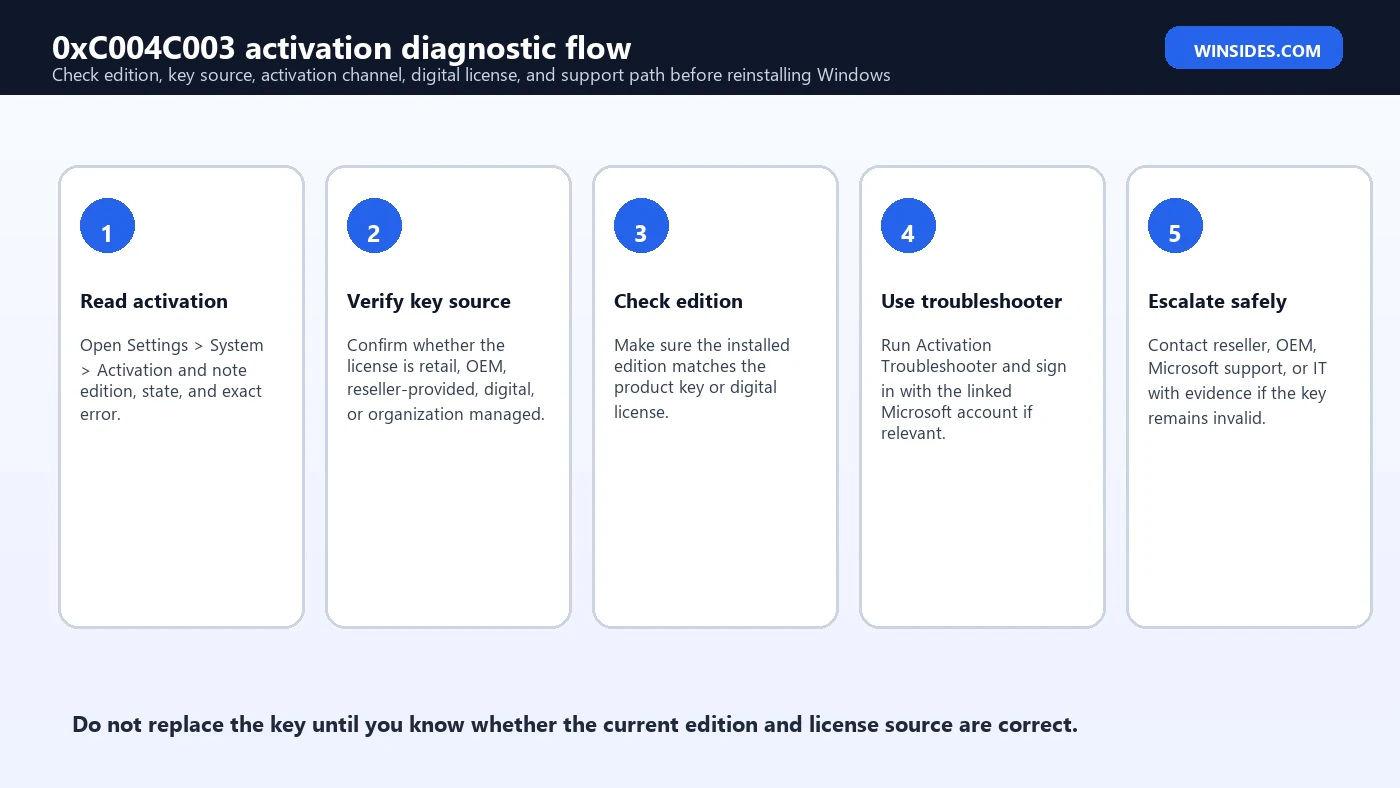
Open Settings, select System, and then Activation. Record the Windows edition, activation state, and exact error. Do not rely only on memory. If the device says Windows is not activated and shows 0xC004C003, check whether the Activation Troubleshooter button appears. Microsoft recommends running the Activation Troubleshooter for Windows 11 activation errors because it can automatically run diagnostics and resolve many simple activation problems.
Also check the edition shown on that page. Many activation issues come from installing the wrong edition during setup. If your digital license is for Windows 11 Home but Windows 11 Pro is installed, activation will not match. If your key is for Pro but Enterprise is installed, activation will not match. Microsofts activation guidance for edition mismatch errors explains that the installed edition must match the key or digital license. The same principle matters when diagnosing 0xC004C003.
If the page offers Go to Microsoft Store, Change product key, or Troubleshoot, those options tell you the expected path. Go to Microsoft Store is for buying or activating a digital license. Change product key is for entering a valid 25-character key. Troubleshoot is for repairing activation state, especially after hardware changes or edition mismatch scenarios. Use the option that matches your license story.
Use slmgr for Evidence, Not Guesswork
Advanced users and administrators can use slmgr.vbs to view activation details. Microsoft documents slmgr /dli for license information, slmgr /dlv for detailed license information, slmgr /xpr for activation expiration information, slmgr /ipk for installing a product key, and slmgr /ato for attempting activation. Use these commands to collect evidence before changing anything.
slmgr /dlv
slmgr /xpr
slmgr /dlv can show the installed channel, partial product key, license status, activation ID, and other details. If a personal device unexpectedly shows a volume activation channel, that is a clue that the wrong key or image was installed. If a company device shows a volume channel, contact IT before changing it. If the status points to an invalid key, replacing it with another unknown key is not a safe fix. The key source and edition must be verified.
Avoid exposing full keys. The partial product key is normally enough for troubleshooting. Never post your full key in a public forum, screenshot, or support thread. If you contact a reseller, OEM, Microsoft support, or IT department, provide purchase proof, device details, error code, and partial-key evidence according to their instructions.
Check Product Key Source and Proof
A product key is not just a string that activates any copy of Windows. Microsoft describes keys as unique and assigned to a specific user for installation on a single device. That is why very cheap keys from unknown marketplaces are risky. They may be stolen, volume-license keys sold incorrectly, keys already used on other devices, keys from another region or program, or keys that later become blocked. The error 0xC004C003 can be the first visible sign that the key source was not valid.
Gather proof before escalating. Look for the purchase email, Microsoft Store order, retailer invoice, packaging, Certificate of Authenticity information, OEM documentation, or reseller listing. If the key came with a used or refurbished PC, note exactly what the seller promised. If the seller advertised an activated Windows 11 license and activation fails, the seller should help resolve it or provide a valid license. If the PC came from a major manufacturer with Windows preinstalled and fails immediately, the manufacturer is the right support path.
If you cannot prove the key is legitimate, be realistic. Activation support may not be able to validate a key from an unknown or unauthorized source. The stable fix may be purchasing a genuine license from Microsoft or a trusted retailer and installing the correct edition. It is better to solve the license problem cleanly once than to keep chasing blocked keys.
Fix Edition Mismatch First
Edition mismatch can look like a key problem because Windows is asking the activation service to validate the wrong combination. If your key is for Windows 11 Home, Windows 11 Pro will not activate with it. If your license is for Pro, Enterprise will not activate with it. Microsofts activation error guidance for edition mismatch explains that you need a product key that matches the version and edition installed, or you need to install the edition that matches your digital license.
Check the installed edition in Settings and with winver. Then compare it to your purchase proof or device documentation. If the wrong edition was installed during a clean install, the best fix may be reinstalling the correct edition rather than buying another key. If the Activation Troubleshooter detects a valid digital license for a different edition, Microsoft says it can notify you and provide instructions to install the correct edition in supported scenarios.
For organization devices, do not downgrade or change editions without IT guidance. Enterprise and Education editions may be assigned through organizational licensing, subscription activation, provisioning, or management policies. A home user should not use Enterprise media or volume keys just because they appear online. The installed edition should reflect the license you actually own.
Digital License and Microsoft Account Checks
Many Windows 11 devices activate with a digital license instead of a typed product key. A digital license is associated with the device and can also be linked to a Microsoft account. If Windows was activated before and then reinstalled, it should normally reactivate automatically once the same edition is online. If it does not, check whether you installed the same edition, signed in with the correct Microsoft account, and made major hardware changes since the previous activation.
Microsofts hardware-change guidance explains the importance of being signed in with the same Microsoft account before making a significant hardware change. After a major change such as motherboard replacement, the Activation Troubleshooter can offer a reactivation path when the license is eligible. This is especially relevant when 0xC004C003 appears after a repair or rebuild. The key may not be the problem; the device identity tied to the digital license may have changed.
If you have multiple Microsoft accounts, sign in with the account that originally held the digital license. If the PC was activated through a work or school account, organization policy may be involved. If Windows came preinstalled and the motherboard was replaced, the OEM or repair facility may need to help because the original hardware-bound license might no longer match.
When the Device Came from a Reseller
Microsofts 0xC004C003 guidance specifically mentions reseller scenarios. If you bought a device from a reseller of Windows 11 and expected the key to be valid, contact the reseller. This is practical advice because the reseller controls the sale record, warranty promise, and product description. If they supplied a reused or non-valid key, you need them to correct the license or refund the purchase according to their policies.
Before contacting the reseller, collect evidence: purchase date, invoice, listing screenshot, device serial number if relevant, Windows edition installed, activation error screenshot, and any key or activation claim they provided. Do not send a full product key unless the support channel is trusted and asks for it. A reputable reseller should be able to explain whether the device should have an OEM digital license, a retail key, or another valid activation path.
Be especially cautious with refurbished devices. Some refurbishers are legitimate and provide proper licensing. Others install a temporary, reused, or volume key that fails later. If the key was marked invalid because it was used on multiple devices, only a unique valid license fixes the problem permanently. Reinstalling Windows repeatedly will not make a bad key legitimate.
When the Device Was New with Windows Preinstalled
Microsofts activation guidance also says that if a device was purchased with Windows 11 preinstalled and you receive 0xC004C003 when turning it on for the first time, contact the device manufacturer. That scenario is usually an OEM support issue. The manufacturer is responsible for the Windows license state promised with the device, and they can verify serial number, model, shipment, embedded firmware key, and warranty state.
Do not rush to buy another Windows license for a brand-new device that was sold with Windows included. First, confirm that the installed edition matches the device specification, connect to the internet, run Windows Update, restart, and use Activation Troubleshooter if available. If the error remains, contact OEM support with the purchase proof and error details. The manufacturer may need to repair the license provisioning or replace the device.
If you manually reinstalled Windows immediately after buying the device, make sure you installed the same edition that came with the PC. Installing Pro on a device licensed for Home, or installing Enterprise from work media, can create activation failure even when the embedded OEM license is valid for a different edition.
When Hardware Was Repaired or Replaced
Hardware repair can change activation. Microsofts activation error page notes that if your device was recently repaired at an independent repair facility, you should contact them to see if the repairs require a new Windows 11 license. This usually matters when the motherboard was replaced because Windows licensing and digital entitlement are strongly tied to device hardware. Storage, memory, or graphics changes are less likely to affect activation, but motherboard replacement is significant.
Use the Activation Troubleshooter first if the license was linked to your Microsoft account and you are eligible for reactivation after hardware change. If the motherboard was replaced by the device manufacturer under warranty, OEM support may need to handle activation. If an independent shop installed a different board, ask whether they transferred the original board identity, used a genuine replacement path, or warned that a new license might be required.
If the device was originally licensed through an organization, hardware replacement may require IT involvement. Company activation may depend on a volume channel, subscription activation, device management, or activation assignment. Do not try to solve a managed-device licensing issue with a personal key unless IT explicitly tells you to do that.
Safe Product Key Entry
If you have a valid product key that matches the installed edition, enter it through Settings. Go to System > Activation, choose Change product key, and enter the 25-character key carefully. You can also use slmgr /ipk from an elevated terminal, but Settings is safer for most users because it keeps the process in the supported Windows interface. After installing the key, activate from Settings or use slmgr /ato if you are comfortable with command-line tools.
slmgr /ipk XXXXX-XXXXX-XXXXX-XXXXX-XXXXX
slmgr /ato
Do not use placeholder keys, keys from videos, or keys posted in comments. A key that installs is not necessarily a key that activates. Microsofts slmgr documentation notes that /ipk tries to install a 5-by-5 product key and returns an error if it is not valid and applicable to the installed operating system. Activation still depends on the key being legitimate and authorized for the device.
If activation fails after entering a key you believe is valid, check the edition again, then contact the seller, Microsoft support, or OEM support with proof of purchase. Avoid repeated key swapping from unknown sources. That usually makes the licensing state harder to explain and can hide the original issue.
What to Do If the Key Is Truly Invalid
If Microsoft activation says the key is invalid, reused, or not unique to your device, there is no technical trick that turns it into a valid license. The permanent fix is a valid license. That could mean the reseller provides a replacement key, the OEM corrects a preinstalled-device issue, Microsoft support helps with an eligible digital license, the repair shop resolves a hardware-change licensing problem, or you purchase a genuine Windows license from Microsoft or a trusted retailer.
This can be frustrating, especially when the PC works normally. But activation is a licensing state, not a performance state. Windows can run while still reporting that activation failed. The watermark, personalization restrictions, and compliance risk are symptoms of the license problem. If the key was blocked because it was used across multiple devices, local resets, driver updates, DNS changes, and registry edits will not solve the root cause.
If the device is mission-critical, gather documentation before making changes. Screenshot activation state, save proof of purchase, record edition, note recent hardware changes, and capture slmgr /dlv partial-key details. That gives support teams enough evidence to decide whether the issue is key validity, edition mismatch, digital license mismatch, OEM provisioning, or reseller fraud.
What Not to Do
Do not download activation cracks, KMS emulators, patched licensing DLLs, command scripts, or registry bundles from unknown sites. They can install malware, weaken the PC, break updates, or create a licensing state that later fails again. They also do not provide a legitimate Windows license. If 0xC004C003 means the key is not valid, bypassing activation does not fix the key. It only hides the problem temporarily, if at all.
Do not post full product keys publicly. Do not buy keys from sellers who cannot provide proper proof. Do not keep trying random keys until one appears to work. Do not reinstall the wrong edition repeatedly. Do not blame the network before checking key validity and edition. These mistakes waste time and can make a support case more difficult.
Do not assume every activation error after repair means Microsoft is wrong. If a motherboard was replaced, the licensing relationship may genuinely have changed. That does not mean you are out of options, but it does mean the correct path is Activation Troubleshooter, Microsoft account reactivation, OEM support, repair-shop support, or a new license if required.
Safe Repair Checklist
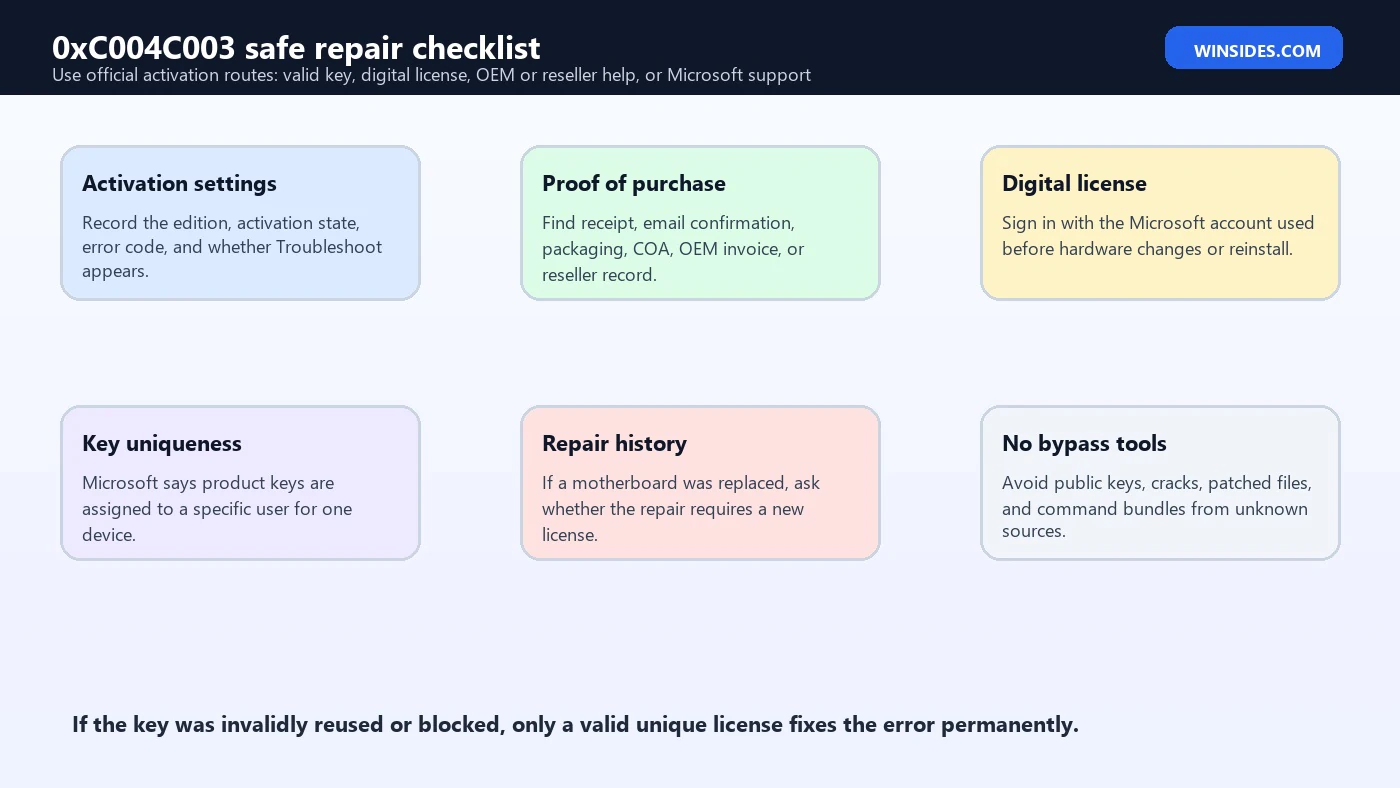
- Record the basics. Note Windows edition, activation state, exact error code, and whether the device is personal or organization-managed.
- Run Activation Troubleshooter. Use Settings > System > Activation > Troubleshoot when available.
- Verify the edition. Make sure the installed edition matches the key or digital license.
- Check the key source. Confirm receipt, reseller, OEM, Microsoft Store order, or other proof of purchase.
- Check Microsoft account. Sign in with the account linked to the digital license if relevant.
- Review hardware changes. Motherboard replacement or independent repair can require reactivation help or a new license.
- Contact the right party. Reseller for sold keys, OEM for preinstalled devices, repair shop for repair-related changes, Microsoft for account/license support, IT for managed PCs.
- Use a valid license only. If the key is invalid or reused, obtain a unique genuine key or digital license.
Evidence to Collect Before Support
| Evidence | Why it matters | Who may need it |
|---|---|---|
| Error screenshot | Confirms the exact code and current activation message. | Reseller, OEM, Microsoft, IT |
| Windows edition | Shows whether the key and installed edition match. | All support paths |
| Proof of purchase | Shows where the key, device, or license came from. | Reseller, Microsoft, OEM |
| Device serial number | Helps OEMs verify preinstalled Windows entitlement. | OEM support |
| Repair invoice | Shows whether motherboard or major hardware was replaced. | Repair shop, OEM, Microsoft |
| Microsoft account status | Helps digital license and hardware-change reactivation. | Microsoft support |
| Partial key from slmgr | Identifies installed key context without exposing the full key. | IT or advanced support |
| Organization ownership | Determines whether volume activation or IT policy applies. | IT department |
Good evidence shortens the support path. A reseller cannot fix a hardware-change digital license issue if the problem belongs to Microsoft account reactivation. An OEM cannot fix a key bought separately from an unknown marketplace. Microsoft support cannot validate a vague claim without purchase or account context. The more accurately you identify the license path, the faster 0xC004C003 becomes solvable.
Frequently Asked Questions
What is 0xC004C003?
It is a Windows activation error that usually means the product key or activation entitlement is not valid for the device. Microsoft says the entered Windows 11 key may not be valid, especially if it was used or attempted on multiple devices.
Can I fix 0xC004C003 for free?
Sometimes. If the problem is edition mismatch, digital license linking, hardware-change reactivation, OEM provisioning, or a reseller mistake, the supported path may restore activation. If the key is truly invalid or reused, you need a valid license.
Why did this happen after reinstalling Windows?
You may have installed a different edition than the one tied to your digital license or product key. Reinstall the edition that matches your license or enter a valid key for the installed edition.
Why did this happen after repair?
A motherboard replacement can change the device identity used by Windows activation. Use Activation Troubleshooter, sign in with the linked Microsoft account, and contact the OEM or repair shop if needed.
What if I bought the PC from a reseller?
Microsoft recommends contacting the reseller if you expected the Windows 11 key to be valid. Provide purchase proof, device details, and the activation error.
What if the PC was new with Windows preinstalled?
Microsoft recommends contacting the device manufacturer if a new preinstalled Windows 11 device shows this error when first turned on.
Can slmgr fix 0xC004C003?slmgr can show license details, install a valid key, and attempt activation, but it cannot make an invalid, reused, blocked, or incompatible key legitimate.
Should I use a cheap online key?
Be careful. If the seller cannot prove legitimacy, the key may later be marked invalid. Use Microsoft, trusted retailers, OEM support, reseller warranty, or organization IT paths.
Conclusion: Fix the License Story, Not Just the Code
0xC004C003 is ultimately a license-validity problem. Microsofts own guidance says the Windows 11 product key entered may not be valid and that keys are unique for one device. That means the right fix is not a random command or a leaked key. The right fix is to match the installed Windows edition with a valid product key or digital license that belongs to the device.
Start with Activation settings, run the Activation Troubleshooter, confirm the edition, verify the key source, check Microsoft account linkage, and review recent hardware repairs. If a reseller supplied the device or key, contact the reseller. If Windows came preinstalled and failed on first boot, contact the manufacturer. If a motherboard was replaced, follow the hardware-change reactivation path or ask the repair provider whether a new license is required.
Use Microsofts activation error guidance, Activate Windows page, hardware-change reactivation documentation, and slmgr.vbs reference to stay on safe ground. If the existing key is invalid or reused, obtain a genuine unique license rather than trying to bypass activation.
For more interesting articles, stay tuned to Winsides.com!





Community
Comments (0)