

Windows 11 can report whether a mounted volume is classified as Removable, Fixed, Remote, CD-ROM, or RAM Disk without disabling, ejecting, or changing the device. The built-in Get-Volume cmdlet exposes the read-only DriveType property.
I reproduced the check on Windows 11 Home Single Language version 25H2, build 26220.7872, from a regular non-administrator PowerShell window. Fixed drives C and D reported Fixed, while mounted drive E reported Removable. The command changed no file, device, volume, partition, disk, mount state, Registry value, service, or storage policy.
What does DriveType mean in Windows?
Microsoft's MSFT_Volume definition documents DriveType as a read-only property. Its values distinguish Unknown, Invalid Root Path, Removable, Fixed, Remote, CD-ROM, and RAM Disk volumes.
DriveType describes the mounted volume as Windows reports it. It does not identify the exact connector, brand, model, bus, hardware-removal policy, or whether the device is safe to unplug at a particular moment.
Table of contents
How can you check whether a drive is removable?
- Open Windows Terminal or Windows PowerShell. The reproduced check did not require administrator rights.
- Run the following read-only command.
- Match the drive letter with its DriveType value.
Get-Volume |
  Where-Object { $_.DriveLetter -and $_.Size -gt 0 } |
  Sort-Object DriveLetter |
  Select-Object DriveLetter, FileSystem, DriveType,
    @{Name='FreeGiB'; Expression={ [math]::Round($_.SizeRemaining / 1GB, 1) }},
    @{Name='UsedGiB'; Expression={ [math]::Round(($_.Size - $_.SizeRemaining) / 1GB, 1) }},
    @{Name='TotalGiB'; Expression={ [math]::Round($_.Size / 1GB, 1) }} |
  Format-Table -AutoSize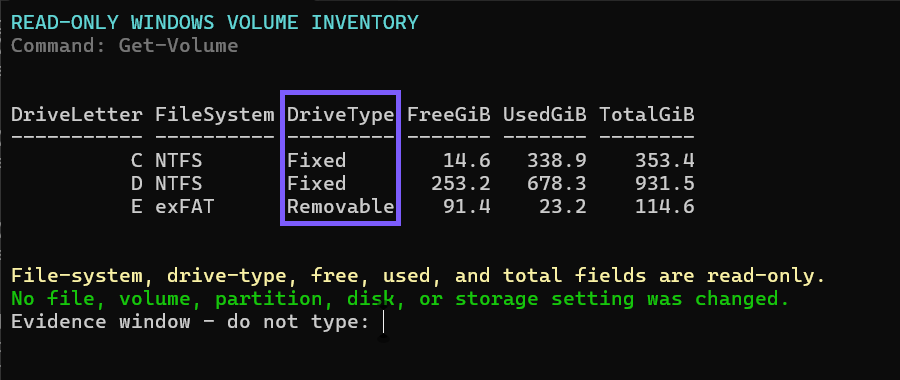
Close the terminal when you finish. No rollback is required because the command retrieves volume properties and performs no device or storage write.
What does a Removable result tell you?
Removable means Windows reports that volume under the removable drive-type category. On the tested laptop, E was the only mounted volume with that result.
The classification does not grant permission to unplug the device immediately. Finish active writes and use the normal Windows eject or safe-removal workflow when the device and connection support it.
What does a Fixed result tell you?
Fixed means Windows reports the volume under the fixed drive-type category. Internal system and data volumes commonly appear this way, as C and D did in the reproduced results.
Do not infer that every Fixed result is physically internal or impossible to disconnect. Hardware bridges, USB enclosures, controller drivers, and device-removal policies can affect how storage is exposed.
Does Removable mean the drive uses USB?
No. DriveType is not a USB-bus detector. Microsoft's GetDriveType documentation explicitly says that determining whether a drive is USB-type requires separate device removal-policy information.
A USB-connected storage device can be reported as Fixed, and removable media can use other connection types. Check the storage bus or device properties separately when the interface matters.
Why might a removable drive be missing?
The command filters for volumes with a drive letter and positive Size. A disconnected device, empty card-reader slot, inaccessible provider, offline volume, letterless volume, or media that failed to mount will not appear in this result.
Reconnect or troubleshoot the device without formatting it. If the media should contain data, stop before initialization, cleanup, or repair operations that could change it.
Does this command eject or disable the drive?
No. Get-Volume retrieves volume objects. The reproduced workflow did not call a device-disable command, take a disk offline, unmount a volume, change a policy, or send an eject request.
It is safe to repeat the read-only query, but the result can change after connecting, disconnecting, mounting, or reconfiguring storage.
Frequently Asked Questions
Do you need administrator rights to read DriveType?
No administrator prompt was required on the tested Windows 11 laptop. A managed device or particular storage provider can impose different access limits.
Can a USB drive report Fixed?
Yes. DriveType and USB bus type are separate properties, and a controller or enclosure can expose USB-connected storage as Fixed.
Does Removable mean it is safe to unplug now?
No. The result is a classification, not an active-write or safe-removal check. Finish writes and use the supported Windows eject workflow.
Will the command reveal a model or serial number?
Not in the reproduced command. It omits labels, models, serial numbers, unique IDs, device paths, and controller details.
Read the volume type without changing the device
Use Get-Volume to match mounted drive letters with Removable, Fixed, or another reported DriveType. Treat that value as a volume classification, not proof of USB connectivity or permission to unplug the hardware.
For more interesting articles, stay tuned to WinSides.com!





Community
Comments (0)