

Introduction to Event ID 4728 Privileged Group Membership
Event ID 4728 Privileged Group Membership is a high-value Windows Security event because it records that a member was added to a security-enabled global group. Microsofts Audit Security Group Management documentation states that 4728 is the global-group counterpart of Event 4732, which records a member being added to a security-enabled local group. The key difference is scope: Event 4728 is generated for domain global security groups, so it is directly relevant to Active Directory privilege and domain access control.
For administrators and security teams, this event is important because group membership is how Windows and Active Directory grant access. A single membership addition can give a user access to a file share, application role, server administration path, help desk function, delegated OU administration, or full domain control. When the group is privileged, the event becomes more than an informational record. It becomes evidence of a privilege grant that must be validated.
The official Microsoft Audit Security Group Management page explains that the subcategory generates events for security group changes, including members being added or removed. It also confirms that 4728 is the same event model as Event 4732, except that 4728 is for global security groups and generates only for domain groups. This guide uses that Microsoft field model, plus Event 4624 for logon correlation and Microsofts security identifier documentation for SID interpretation.
Not every Event 4728 is malicious. Help desk teams add users to access groups. Application owners add users to role groups. Administrators add temporary members during incidents. Identity teams add service accounts to delegated groups. But every privileged group addition should have a clear reason, an authorized actor, a known member, an approved target group, and an expiry or review plan. If any of those pieces are missing, 4728 deserves investigation.
Table of contents
Key Takeaways
- Event ID 4728 records a member added to a security-enabled global group. Microsoft documents it as the domain/global group version of Event 4732.
- 4728 generates only for domain groups. Local group additions use 4732, while universal group additions use 4756.
- The three core questions are who added, who was added, and which group changed. Read Subject, Member, and Group fields together.
- Privileged groups need immediate validation. Domain Admins, Enterprise Admins, Schema Admins, Account Operators, Server Operators, delegated admin groups, and application admin groups should be monitored closely.
- SubjectLogonId can connect the change to a logon session. Correlate it with Event 4624 on the same domain controller or collected log stream.
- Nested group additions can be just as risky as direct user additions. Adding a group to a privileged group can grant access to many accounts at once.
- Every privileged membership addition should have approval, ownership, purpose, and expiry. Missing change context is itself a security and governance problem.
What Event ID 4728 Means
Event ID 4728 means a member was added to a security-enabled global group in Active Directory. Security-enabled groups are used in access control decisions. Global groups are domain groups commonly used to collect users, computers, or service accounts from the same domain and grant permissions through access groups, role groups, or nested group designs. When a member is added, the effective access for that member can change immediately or after token refresh, depending on session, logon, resource, and application behavior.
Microsofts Audit Security Group Management page states that 4728 has the same fields, XML, and monitoring recommendations as 4732, with the group type difference being the key distinction. This is useful because the Event 4732 documentation exposes the field model: Subject identifies the account that requested the operation, Member identifies the account or group that was added, Group identifies the target group, and Additional Information can include privileges used during the operation.
In real investigations, 4728 is often a pivot point. If the target group is low risk and the member was added by an expected help desk account with a matching ticket, it may be normal. If the target group controls domain administration, server administration, backup access, identity management, or sensitive applications, the event should be reviewed quickly. If the subject account is unexpected, the member is a disabled or stale account, or the change happened outside a change window, escalate.
Event 4728 vs 4732 and 4756
Security group membership events differ mainly by group type. Event 4728 is for a member added to a security-enabled global group. Event 4732 is for a member added to a security-enabled local group. Event 4756 is for a member added to a security-enabled universal group. Microsofts Audit Security Group Management documentation explains that the global and universal versions use the same field model and recommendations as the local-group event, with group type and domain applicability as the difference.
| Event | Group type | Typical scope |
|---|---|---|
| 4728 | Security-enabled global group | Domain global group membership change. |
| 4732 | Security-enabled local group | Local or domain local group membership change. |
| 4756 | Security-enabled universal group | Universal group membership change in Active Directory. |
| 4729 | Global group member removed | Companion event for removals from global groups. |
| 4737 | Global group changed | Group attribute or configuration changed. |
This distinction matters because the blast radius differs. A local administrators group addition on one server is severe for that server. A global group addition can change access across many resources if that group is nested into domain local groups, application roles, administrative groups, or access control lists. A universal group addition can cross domain boundaries in a forest. During triage, classify the group before judging severity.
Anatomy of Event ID 4728
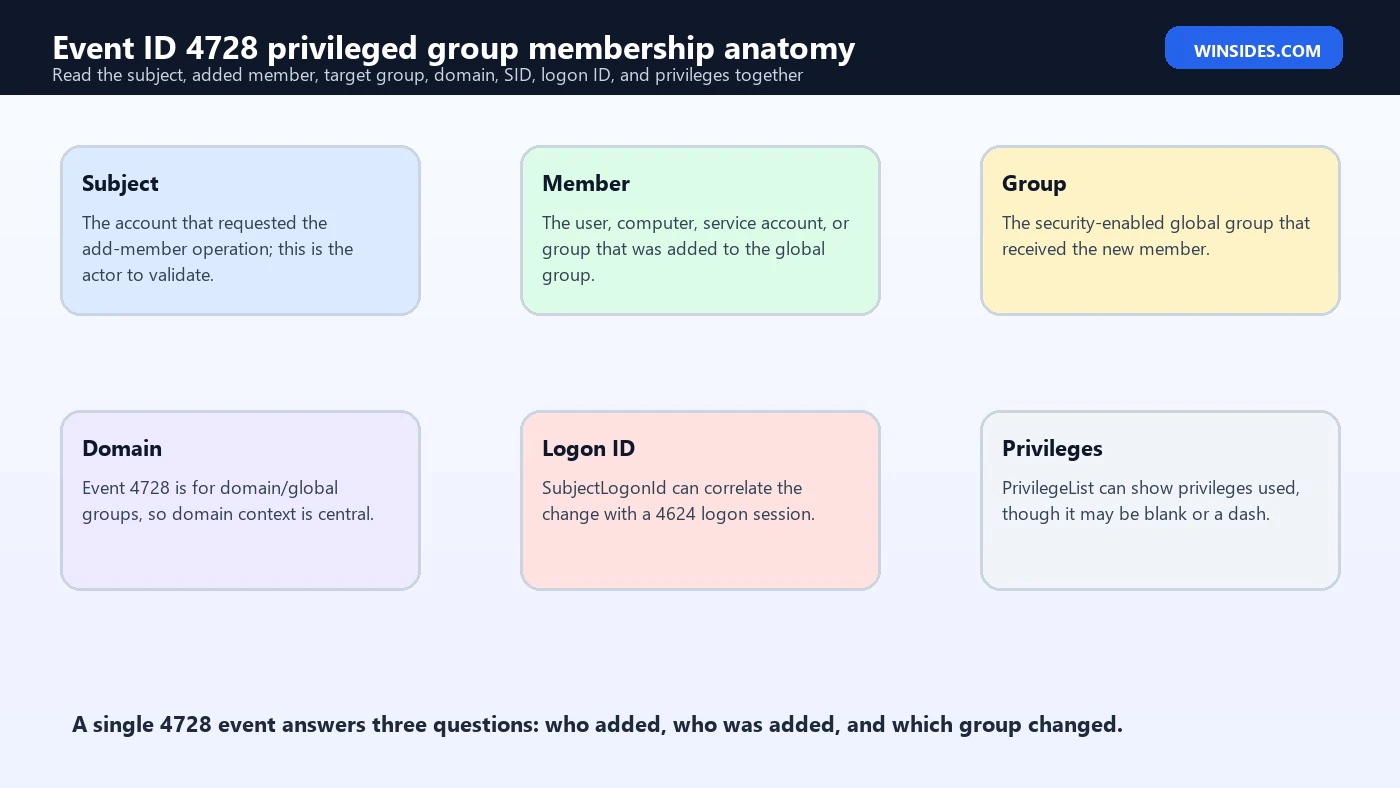
The Event 4732 field documentation, which Microsoft says applies to 4728 except for group type, divides the event into Subject, Member, Group, and Additional Information. For 4728, those fields tell you who requested the addition, which account or group was added, which global group received the member, and whether privilege information was captured.
| Field area | Common XML field | Investigation use |
|---|---|---|
| Subject | SubjectUserName, SubjectDomainName, SubjectUserSid | The actor that requested the add-member operation. Validate authorization. |
| Subject logon | SubjectLogonId | Correlate with Event 4624 to identify the actor session and access path. |
| Member | MemberName, MemberSid | The account or group added to the global group. Validate owner, status, and risk. |
| Group | TargetUserName, TargetDomainName, TargetSid | The group that received the new member. Determine privilege and blast radius. |
| Additional | PrivilegeList | Privileges used during the operation, if captured. May be a dash. |
| Computer | Domain controller or reporting host | Where the event was recorded. Use it for correlation and replication context. |
Subject is not the same as Member. Subject is the account that performed or requested the add operation. Member is the account, group, computer, or service identity that was added. Group is the target security-enabled global group. Many bad investigations confuse these fields and end up blaming the new member instead of validating the actor who changed membership.
Why SIDs Matter in Membership Events
Names are convenient, but SIDs are the durable identity anchors in Windows security logs. Microsofts SID documentation explains that security identifiers uniquely identify security principals such as users, groups, computers, and security contexts. This matters for Event 4728 because account names can be renamed, duplicated across domains, or unresolved in Event Viewer. The SID remains the stronger identifier.
Use the Subject SID to identify the actor. Use the Member SID to identify who was added. Use the Target SID to identify the group. If a name cannot be resolved, do not ignore the event. Unresolved SIDs can appear for deleted accounts, trust issues, cross-domain references, stale objects, or collection problems. In a privileged group membership change, an unresolved SID deserves extra attention, not less.
When writing SIEM rules, store both names and SIDs. Names make dashboards readable. SIDs make correlation reliable. If an attacker renames an account, or if a service account is reused across environments with similar names, SID-aware logic reduces confusion.
High-Value Groups to Monitor
Microsofts group-membership monitoring recommendations call out high-value local or domain security groups such as built-in local administrators, Domain Admins, Enterprise Admins, and similar groups. In practice, every organization should maintain its own high-value group list. The list should include identity administration groups, infrastructure administration groups, privileged application groups, backup administration groups, security tooling groups, database administrator groups, and delegated OU administration groups.
- Domain Admins, Enterprise Admins, Schema Admins, Account Operators, Server Operators, Backup Operators, and DNS Admins where applicable.
- Privileged Access Management or just-in-time access groups that grant temporary domain rights.
- Groups nested into local Administrators on servers, workstations, jump hosts, or domain controllers.
- Groups that manage identity systems, certificate services, federation, VPN, endpoint security, backup, monitoring, or deployment tools.
- Application administrator groups for finance systems, HR systems, databases, source control, CI/CD, cloud connectors, or privileged management platforms.
- Groups that grant access to sensitive shares, password vaults, BitLocker recovery keys, scripts, service credentials, or break-glass procedures.
A group does not need to have Domain Admins in the name to be privileged. A group that can reset passwords, modify GPOs, manage certificates, change backup jobs, administer endpoint agents, or access a password vault can be just as sensitive. Treat 4728 as a trigger to evaluate the real access granted by the target group, including nesting.
Common Legitimate Causes
Many Event 4728 records are legitimate. A help desk analyst may add a user to a role group. A project owner may approve temporary access. An administrator may add a service account to an application group. An identity team may add a group as part of onboarding. A security team may add an emergency response account during a live incident. The presence of 4728 does not automatically mean compromise.
Legitimate changes should still have evidence. The actor should be allowed to make the change. The target group should match the request. The member should match the approved identity. The timing should fit a change window or access request. The access should be temporary when privilege is temporary. If the event cannot be matched to an approval record, investigate even if the actor is an administrator.
For day-to-day operations, the best practice is to make group additions traceable. Tickets, access request IDs, privileged access management approvals, expiry dates, manager approval, and resource owner approval should be connected to group membership changes. Event 4728 tells you the change happened; governance tells you whether it should have happened.
Common Suspicious Patterns
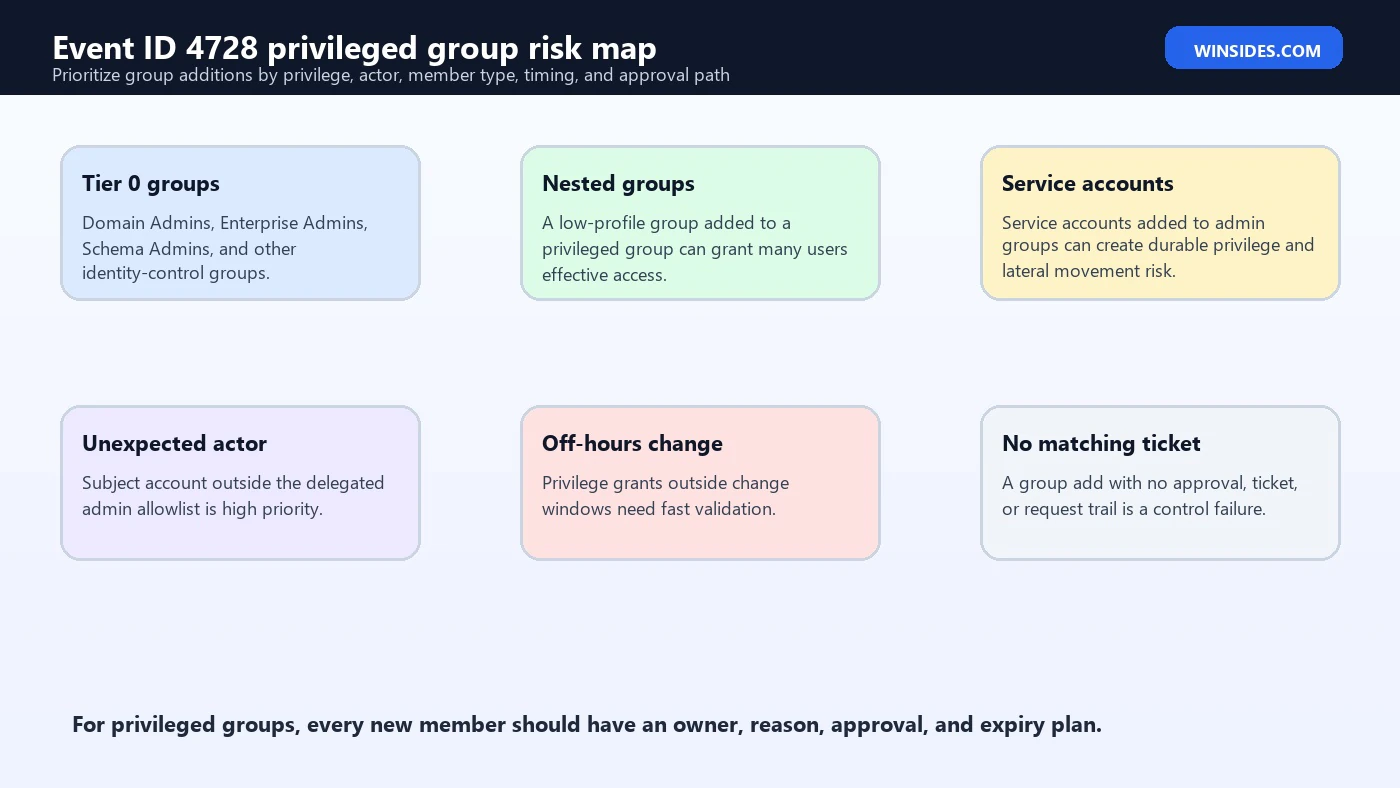
Suspicious 4728 patterns usually involve privilege, surprise, timing, or indirection. An unexpected subject account adding a member to a high-value group is obvious. A low-profile nested group added to a privileged group can be less obvious but just as dangerous. A disabled account, stale account, service account, external account, or computer account added to a user-oriented admin group can reveal misuse or poor controls. An off-hours change with no ticket needs fast validation.
- Member added to Domain Admins, Enterprise Admins, Schema Admins, Account Operators, DNS Admins, or other Tier 0 groups.
- A service account, computer account, disabled account, guest account, or stale account added to an admin group.
- A group added to a privileged group, creating nested membership and indirect access.
- Subject account outside the allowlist of delegated group administrators.
- Group additions outside business hours, change windows, or privileged access request windows.
- Multiple group additions by the same subject in a short time window.
- Member added shortly after a suspicious logon, password reset, ticket-granting event, or process creation event.
- Privileged group addition followed by remote logon, service installation, scheduled task creation, GPO change, or credential access.
Nested Group Risk
Nested groups are one of the easiest ways to miss the real impact of Event 4728. If a user is added directly to a privileged group, the risk is visible. If a group is added to a privileged group, every effective member of that nested group may gain access. The event may show a harmless-looking group name, but the real blast radius depends on that groups membership, nested membership, and where it is used elsewhere.
During triage, ask whether MemberName is a user, computer, service account, or group. If it is a group, enumerate the effective membership. Check whether the nested group is dynamic, synced from another identity source, managed by an application owner, or controlled by a different team. A delegated application group nested into a privileged Active Directory group can create an unintended privilege bridge.
Nested group abuse is also a persistence technique. An attacker may add a group they control to a privileged group, then later add users to that controlled group. If monitoring focuses only on direct additions to Domain Admins, later changes may happen elsewhere and still grant effective access. Monitor both high-value groups and groups nested into them.
Correlating the Subject with Event 4624
The SubjectLogonId field can help connect Event 4728 to a logon session. Microsofts Event 4732 field documentation notes that Logon ID can correlate with recent events such as Event 4624, which records successful logons. If you can match the SubjectLogonId with a 4624 logon event on the same system or within your collected logs, you can learn how the actor authenticated before making the group change.
This is critical during investigations. A domain admin adding a member through a normal administrative workstation during a change window may be expected. The same subject account adding a member after an unusual RDP session, VPN login, or logon from a new host is more serious. If the actor account was compromised, the group change may be persistence or privilege escalation rather than routine administration.
Correlate with additional events as needed: password reset events, account enablement, account creation, Kerberos authentication, process creation, remote logon, scheduled task creation, service installation, GPO change, directory service changes, and privileged access management logs. Event 4728 tells you the group changed; the surrounding timeline tells you why and by whom.
How to Query Event ID 4728 with PowerShell
You can query Event 4728 from the Security log on domain controllers or from a central collector. The event volume is usually lower than process creation or failed logon events, so it is a good candidate for direct monitoring. On a domain controller, run the query with sufficient rights to read the Security log.
Get-WinEvent -FilterHashtable @{LogName='Security'; Id=4728; StartTime=(Get-Date).AddDays(-7)} |
  Select-Object TimeCreated, MachineName, Id, Message |
  Format-List
For structured analysis, parse XML fields rather than scraping message text. The 4732 XML model documented by Microsoft includes MemberName, MemberSid, TargetUserName, TargetDomainName, TargetSid, SubjectUserSid, SubjectUserName, SubjectDomainName, SubjectLogonId, and PrivilegeList. Microsoft states 4728 uses the same fields, with the event applying to security-enabled global groups.
$events = Get-WinEvent -FilterHashtable @{LogName='Security'; Id=4728; StartTime=(Get-Date).AddDays(-7)}
$events | ForEach-Object {
  $xml = [xml]$_.ToXml()
  $data = @{}
  foreach ($d in $xml.Event.EventData.Data) { $data[$d.Name] = $d.'#text' }
  [pscustomobject]@{
    Time = $_.TimeCreated
    DomainController = $_.MachineName
    Actor = "$($data.SubjectDomainName)\$($data.SubjectUserName)"
    ActorSid = $data.SubjectUserSid
    ActorLogonId = $data.SubjectLogonId
    AddedMember = $data.MemberName
    AddedMemberSid = $data.MemberSid
    TargetGroup = "$($data.TargetDomainName)\$($data.TargetUserName)"
    TargetGroupSid = $data.TargetSid
    Privileges = $data.PrivilegeList
  }
}
PowerShell Triage for High-Value Groups
Once the event is parsed, filter for the groups that matter most. Maintain a list of high-value groups in code, configuration, or SIEM lookup tables. Include exact names and SIDs when possible. Names are easier to read, but SIDs are more reliable for long-term correlation.
$highValueGroups = @(
  'Domain Admins',
  'Enterprise Admins',
  'Schema Admins',
  'Account Operators',
  'Server Operators',
  'Backup Operators',
  'DNS Admins'
)

$events = Get-WinEvent -FilterHashtable @{LogName='Security'; Id=4728; StartTime=(Get-Date).AddDays(-1)}
$events | ForEach-Object {
  $xml = [xml]$_.ToXml(); $data = @{}
  foreach ($d in $xml.Event.EventData.Data) { $data[$d.Name] = $d.'#text' }
  if ($highValueGroups -contains $data.TargetUserName) {
    [pscustomobject]@{
      Time = $_.TimeCreated
      Actor = "$($data.SubjectDomainName)\$($data.SubjectUserName)"
      Member = $data.MemberName
      Group = "$($data.TargetDomainName)\$($data.TargetUserName)"
      DC = $_.MachineName
    }
  }
}
In production, this logic should live in SIEM detections or identity monitoring rather than on-demand scripts only. The PowerShell examples are useful for validation, incident response, and lab testing. A mature environment should alert when high-value groups change, enrich the alert with owner and approval data, and route it to the right team immediately.
What to Validate After a 4728 Alert
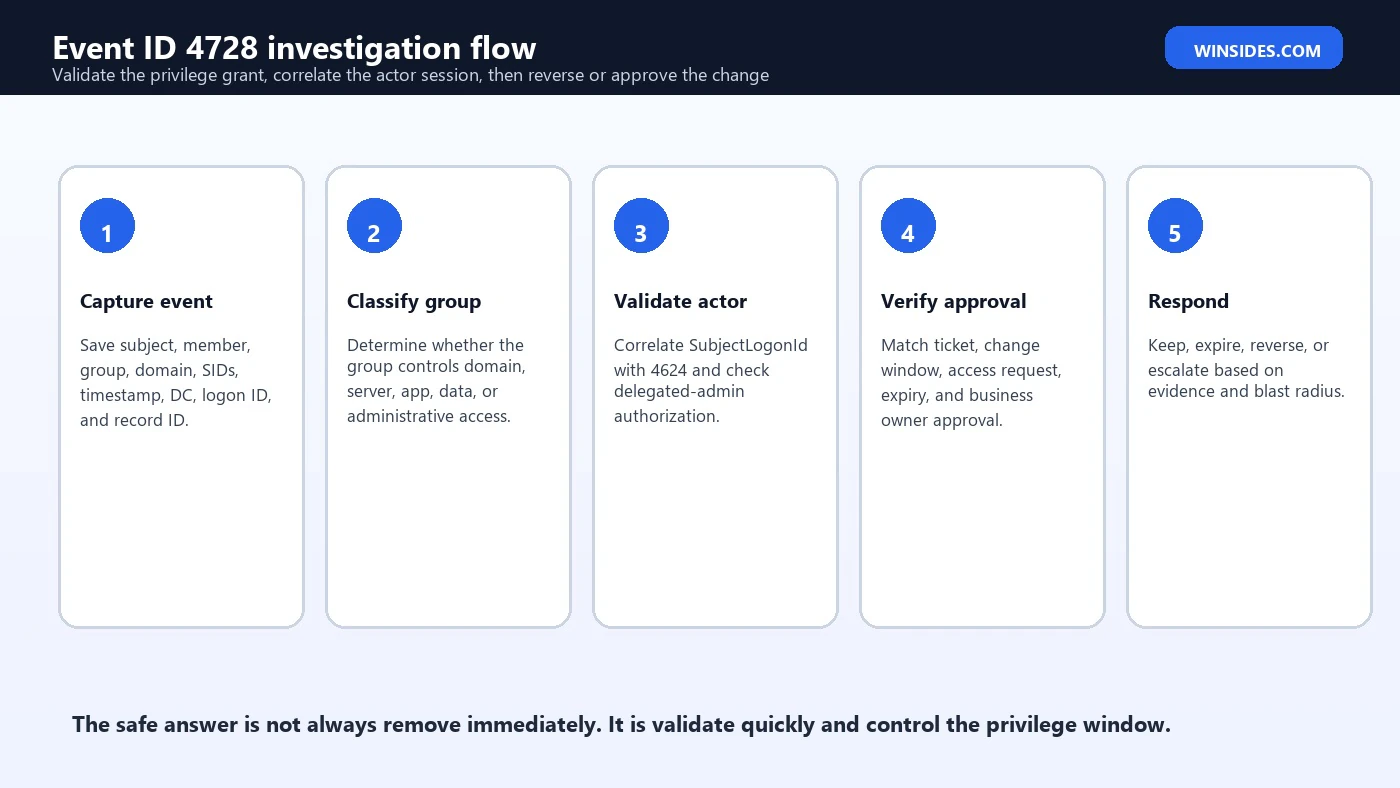
A good Event 4728 investigation validates five things: the actor, the member, the group, the approval, and the blast radius. Skipping any one of those can lead to a bad decision. Removing a legitimate emergency admin during an outage can hurt operations. Leaving a malicious membership in place can give attackers domain control. The goal is quick, evidence-based validation.
- Actor: Is the Subject account authorized to add members to this group? Was the actor session normal?
- Member: Is the added account active, expected, owned, and appropriate for the group?
- Group: What access does the target group grant directly and through nesting?
- Approval: Is there a ticket, access request, change record, privileged access approval, or owner confirmation?
- Timing: Did the change occur during a maintenance window, incident, onboarding, or unusual time?
- Duration: Is the membership permanent, temporary, or missing an expiry date?
- Follow-on activity: Did the new member log on, access sensitive resources, create processes, change policy, or perform admin actions?
SIEM Detection Ideas
Event 4728 is a strong SIEM signal because group additions are less noisy than many other Security log events and often represent real access change. The best detections combine group criticality, actor allowlists, member risk, timing, and approval context. A basic rule that alerts on every 4728 can be useful in a small environment, but larger organizations should enrich and prioritize.
- Alert on any member added to high-value groups such as Domain Admins, Enterprise Admins, Schema Admins, DNS Admins, Account Operators, and privileged access groups.
- Alert when the Subject account is not in the delegated-administrator allowlist for the target group.
- Alert when the added member is a service account, computer account, disabled account, stale account, guest account, or external trust account.
- Alert when MemberName represents a group and the target group is privileged, because nested membership can widen access.
- Alert on group additions outside approved change windows or privileged access request windows.
- Alert when multiple group additions happen from the same actor in a short period.
- Alert when a high-value group addition is not followed by a matching expiry or removal event for temporary access.
- Alert when group addition is followed by admin logons, process creation, GPO changes, service creation, scheduled tasks, or credential access activity.
Microsofts monitoring recommendations for the related group-membership event include watching high-value groups, high-value accounts, non-active accounts, allowlist-only actions, account type mismatches, external accounts, restricted-use computers, and naming convention violations. Those recommendations translate directly into Event 4728 monitoring because Microsoft documents 4728 as the global-group version of the same event model.
Response Workflow
Response should be fast but not careless. Removing a member from a privileged group may be the right move if the change is unauthorized, but it can also disrupt a legitimate incident response, maintenance window, or emergency repair. The safest workflow is to validate the change quickly, contain risk if the change is suspicious, and preserve enough evidence to reconstruct what happened.
- Capture evidence. Save the raw event XML, domain controller, time, actor, member, group, SIDs, logon ID, and related alerts.
- Classify urgency. Tier 0 groups and unknown actors are urgent. Low-risk access groups may follow normal review.
- Check approval. Look for ticket, PAM approval, change request, manager approval, or resource owner confirmation.
- Validate actor session. Correlate SubjectLogonId with Event 4624 and check source host, logon type, and time.
- Review member activity. Check whether the added account used the new access after the membership change.
- Decide action. Keep, expire, remove, disable, rotate credentials, or escalate to incident response depending on evidence.
- Close the loop. Document the decision, add missing expiry, improve allowlists, and tune detection if needed.
If the event is unauthorized and the group is privileged, remove the membership, preserve logs, review the actor account for compromise, check for follow-on activity, and search for related group changes. If the actor account may be compromised, disabling or resetting only the added member is not enough. The subject account had the authority to grant access and may have made other changes.
Preventing Privileged Group Drift
Privileged group drift happens when emergency access, one-time project access, service accounts, nested groups, or old administrators remain in groups longer than needed. Event 4728 tells you when a member is added, but prevention requires lifecycle control. Every privileged membership should have an owner, reason, approver, review date, and expiry where possible.
Use privileged access management or just-in-time access for highly sensitive groups. Limit permanent members. Prefer role-based groups with documented owners. Review nested groups regularly. Avoid adding broad user groups to admin groups. Keep service accounts out of interactive admin groups unless there is a documented, narrow reason. Monitor removals as well as additions so temporary access does not become permanent.
Group hygiene is also detection hygiene. If group membership is messy, every alert takes longer to validate. If group ownership is clear, allowlists are current, and access requests are linked to changes, Event 4728 can be triaged quickly and confidently.
Common Mistakes When Reading Event 4728
- Confusing Subject and Member. Subject is the actor; Member is what was added.
- Ignoring nested groups. A group added to a privileged group can grant access to many accounts.
- Only monitoring Domain Admins. Many delegated and application groups can be equally sensitive.
- Trusting names without SIDs. Names can change or collide; SIDs provide stronger identity correlation.
- Skipping logon correlation. SubjectLogonId and Event 4624 can reveal how the actor accessed the system.
- Not checking approval. Authorized actor does not automatically mean approved change.
- Forgetting expiry. Temporary access without removal becomes standing privilege.
Frequently Asked Questions
What is Event ID 4728 Privileged Group Membership?
Event ID 4728 records that a member was added to a security-enabled global group in Active Directory. It is especially important when the target group grants privileged access.
Is Event 4728 the same as Event 4732?
Microsoft documents 4728 as the global-group version of 4732. Event 4732 is for security-enabled local groups. Event 4728 is for security-enabled global groups and generates only for domain groups.
What are the most important fields in Event 4728?
Start with SubjectUserName, SubjectUserSid, SubjectLogonId, MemberName, MemberSid, TargetUserName, TargetDomainName, TargetSid, Computer, and TimeCreated. Together they tell you who added, who was added, which group changed, and where the event was recorded.
Why is 4728 important for privileged groups?
Group membership grants access. Adding a user, service account, computer account, or nested group to a privileged group can create administrative access, persistence, or lateral movement opportunity.
Should I remove the member immediately?
If the change is clearly unauthorized and privileged, remove or contain according to incident process. If the change may be legitimate, validate approval quickly. The goal is to reduce risk without disrupting approved emergency or maintenance work.
How do I know who made the group change?
Use the Subject fields. Then correlate SubjectLogonId with Event 4624 to understand the actor logon session, source, and access path.
What if the added member is a group?
Enumerate the nested group membership and ownership. A nested group can grant many users effective access, and it can be used as a stealthier privilege path than adding a user directly.
What events should I monitor with 4728?
Monitor companion group events such as removals and group changes, plus 4624 logons, process creation, service creation, scheduled task creation, GPO changes, account changes, and privileged access management logs.
Conclusion: Treat Group Additions as Access Changes
Event ID 4728 Privileged Group Membership is important because it records a real access-changing action: a member was added to a security-enabled global group. For low-risk groups, that may be routine administration. For privileged groups, it can grant domain control, server administration, sensitive application access, or indirect access through nesting. The event should be read as an access decision, not just a directory change.
The reliable investigation pattern is simple: identify the subject, identify the member, identify the group, validate approval, and assess blast radius. Then correlate the subject logon session with Event 4624 and review follow-on activity. If the target group is high value, move quickly. If the member is a group, service account, stale account, or unexpected identity, widen the investigation. If there is no ticket, owner, or expiry, treat that as a control gap even if the change is ultimately legitimate.
The long-term goal is to make every privileged group addition explainable. Maintain high-value group lists, delegated actor allowlists, access request records, expiry dates, nested group reviews, and SIEM detections. When those controls are healthy, Event 4728 becomes a precise signal that helps you protect Active Directory privilege instead of a mysterious line in the Security log.
For Microsoft references, use the official Audit Security Group Management documentation for the 4728 event family, the archived Event 4732 field model that Microsoft maps to 4728 for global groups, Event 4624 for logon correlation, and Microsofts security identifier documentation for SID context.
For more interesting articles, stay tuned to Winsides.com!







Community
Comments (0)