

Windows 11 can identify a drive's file system without formatting, repairing, or changing the drive. The built-in Get-Volume cmdlet exposes the read-only FileSystem property for every volume that the Storage provider returns.
I reproduced the check on Windows 11 Home Single Language version 25H2, build 26220.7872, from a regular non-administrator PowerShell window. The tested PC returned NTFS for fixed drives C and D and exFAT for removable drive E. The command changed no file, file-system structure, allocation table, volume, partition, disk, Registry value, service, or storage setting.
What is a drive's file system?
A file system defines how a volume stores and retrieves files and directories. Microsoft's file-system overview explains that a volume is the highest-level organization that contains directories and files.
The file-system name belongs to a volume. It is not the same thing as the disk's partition-table style, storage interface, hardware type, health status, or encryption state.
Table of contents
How can you find each drive's file system in PowerShell?
- Open Windows Terminal or Windows PowerShell. The reproduced check did not require administrator rights.
- Run the following read-only command.
- Match each DriveLetter with the value in the FileSystem column.
Get-Volume |
  Where-Object { $_.DriveLetter -and $_.Size -gt 0 } |
  Sort-Object DriveLetter |
  Select-Object DriveLetter, FileSystem, DriveType,
    @{Name='FreeGiB'; Expression={ [math]::Round($_.SizeRemaining / 1GB, 1) }},
    @{Name='UsedGiB'; Expression={ [math]::Round(($_.Size - $_.SizeRemaining) / 1GB, 1) }},
    @{Name='TotalGiB'; Expression={ [math]::Round($_.Size / 1GB, 1) }} |
  Format-Table -AutoSize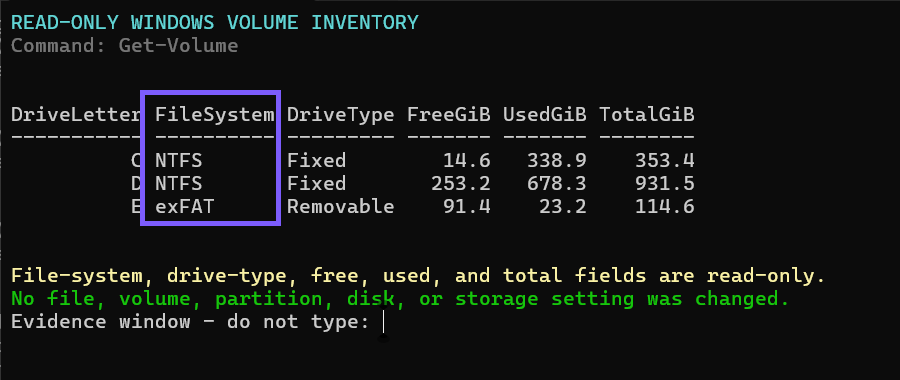
Close the terminal when you finish. No rollback is required because the command reads properties from volume objects and does not invoke any formatting, conversion, repair, or write operation.
What does an NTFS result mean?
NTFS is the default file system for modern Windows installations. Microsoft documents features such as access-control lists, encryption support, disk quotas, links, and metadata journaling. A typical Windows system volume therefore reports NTFS.
An NTFS result identifies the volume format only. It does not prove that the underlying drive is an SSD, that the disk is healthy, or that enough free space remains.
What does an exFAT result mean?
exFAT is a file system commonly used on removable storage and for cross-device compatibility. The tested removable E drive reported exFAT, but a removable drive can use another supported format and a particular exFAT volume is not automatically removable.
Microsoft's comparison shows that exFAT and NTFS support different features. Check the destination device and workload requirements before choosing a format; do not reformat a working drive merely to match an example.
Why might the FileSystem field be blank?
A blank value can appear when Windows can see a volume object but cannot report a recognized mounted file system for it. Unformatted media, inaccessible media, unsupported providers, empty card-reader slots, or a volume without a normal drive letter can produce different results.
Stop before formatting, initializing, or repairing media that should contain data. A blank or unfamiliar result is a reason to protect the data and investigate, not permission to write a new file system.
Does Get-Volume change or format the drive?
No. Microsoft's Get-Volume documentation describes a retrieval command that returns volume objects. The reproduced workflow selected read-only properties and did not call Format-Volume, DiskPart, Disk Management, or a conversion utility.
Formatting is a separate destructive operation that can erase accessible data. It is deliberately outside this guide.
Is a file system the same as GPT or MBR?
No. GPT and MBR describe a disk's partition-table style. NTFS, exFAT, FAT32, and ReFS describe file systems used by volumes. One physical disk can contain multiple volumes, and those volumes can have properties that differ from the disk-level partition style.
Keep the two checks separate so you do not infer a disk's partition style from a volume's FileSystem value.
Frequently Asked Questions
Do you need administrator rights to run Get-Volume?
No administrator prompt was required for the reproduced read-only query on the tested Windows 11 laptop. A particular provider or managed device can impose different access limits.
Can one Windows 11 PC use more than one file system?
Yes. The tested PC used NTFS on two fixed drives and exFAT on one removable drive. Each mounted volume reports its own file-system property.
Does NTFS mean the drive is healthy?
No. NTFS identifies the volume's file system. Hardware health, operational status, free space, encryption, and performance are separate properties.
Will this command reveal a volume label or serial number?
Not in the reproduced command. It selects DriveLetter, FileSystem, DriveType, and rounded space values and omits labels, serial numbers, unique IDs, paths, and hardware models.
Read the file system without changing the drive
Use Get-Volume to match each mounted drive letter with its reported file system. Interpret NTFS, exFAT, or a blank value as volume information, keep it separate from disk-level properties, and never format media just to make its result resemble another drive.
For more interesting articles, stay tuned to WinSides.com!





Community
Comments (0)