

Introduction to KDC_ERR_S_PRINCIPAL_UNKNOWN
KDC_ERR_S_PRINCIPAL_UNKNOWN is a Kerberos error that appears when the Key Distribution Center cannot find the service principal the client requested. In RFC 4120, error code 7 is defined as server not found in the Kerberos database. In a Windows Active Directory environment, that usually means the requested Service Principal Name, or SPN, is missing, malformed, registered under a different name than the client is using, or being searched in the wrong domain or trust path.
This is different from KRB_AP_ERR_MODIFIED. With KRB_AP_ERR_MODIFIED, the KDC found an SPN and issued a service ticket, but the target service could not decrypt it. With KDC_ERR_S_PRINCIPAL_UNKNOWN, the KDC cannot issue the service ticket in the first place because it cannot map the requested service principal to an account. The service may be healthy, the password may be correct, and the server may be online, but Kerberos fails before the ticket reaches that service.
The important Microsoft references are the Kerberos authentication overview, which explains KDC and Active Directory integration, the setspn command reference, which documents SPN lookup and registration, and the klist command reference, which can request, list, and purge Kerberos tickets. For the exact error-code meaning, the authoritative protocol reference is RFC 4120.
This guide explains what the error means, how to find the exact SPN being requested, why aliases and ports matter, how IIS and SQL Server commonly trigger it, how to use setspn -Q, setspn -S, and klist get, and how to fix the missing-principal problem without creating duplicate SPNs or hiding the issue behind NTLM fallback.
Table of contents
Key Takeaways
- KDC_ERR_S_PRINCIPAL_UNKNOWN means the KDC cannot find the requested service principal. The service ticket is not issued because the SPN cannot be mapped to an account.
- The exact requested SPN matters. Kerberos uses the service class, host name, port, realm, and name form requested by the client.
- Missing SPNs are common for IIS, SQL Server, custom services, aliases, and listener names. The service may work by server name but fail by friendly name.
- Use
setspn -Qbefore adding anything. Query the exact SPN and variants so you understand what already exists. - Use
setspn -Swhen adding SPNs. Microsoft recommends it because it checks for duplicates before the write. - DNS success is not Kerberos success. A CNAME or VIP can resolve while the Kerberos SPN for that same name is missing.
- Clear tickets after fixing the registration. Use
klist purgeor sign out and back in so the client requests fresh tickets.
What the Error Means in the Kerberos Flow
Kerberos authentication has a clear ticket flow. A user signs in and receives a Ticket Granting Ticket. When an application needs to access a network service, the client asks the KDC for a service ticket to a particular SPN. The SPN is the Kerberos name of the service, not merely an IP address. It usually has the form serviceclass/host, such as HTTP/portal.contoso.com, CIFS/fileserver.contoso.com, LDAP/dc01.contoso.com, or MSSQLSvc/sql01.contoso.com:1433.
The KDC searches Active Directory for an account whose servicePrincipalName attribute matches the requested SPN. If it finds exactly the right account, it can issue a service ticket. If it cannot find the requested service principal, the ticket request fails with KDC_ERR_S_PRINCIPAL_UNKNOWN. The target application server may never see the request because the failure happens at the domain controller stage.
This is why restarting the application server often does nothing. The server cannot decrypt a ticket it never received. You need to fix the name mapping that allows the KDC to locate the service principal. That may mean changing the client connection name, correcting DNS, registering the missing SPN, fixing the service account, or resolving a realm/trust lookup problem.
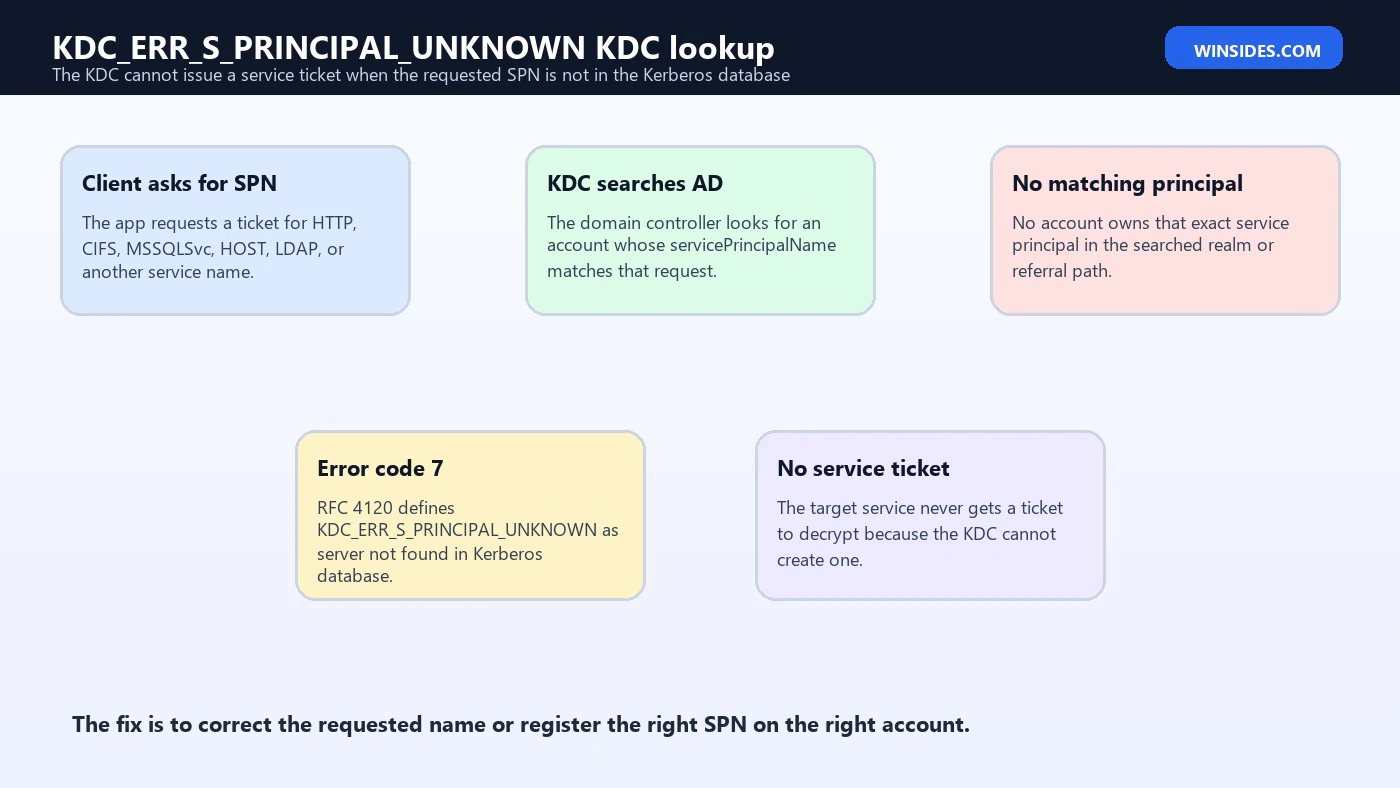
KDC_ERR_S_PRINCIPAL_UNKNOWN vs KRB_AP_ERR_MODIFIED
| Error | Where it fails | Typical meaning |
|---|---|---|
| KDC_ERR_S_PRINCIPAL_UNKNOWN | At the KDC during service-ticket request | The requested server principal or SPN is not found in the Kerberos database. |
| KRB_AP_ERR_MODIFIED | At the target service when decrypting a ticket | A ticket was issued, but it was encrypted for a different account or key than the target service uses. |
| KDC_ERR_PRINCIPAL_NOT_UNIQUE | At the KDC during lookup | More than one principal matches, so the KDC cannot choose a unique service. |
Keeping those errors separate saves time. If the KDC says the service principal is unknown, start by proving what SPN the client requested and whether that SPN exists. If the target service says the ticket was modified, start by checking whether the SPN exists on the wrong account or whether the account key is stale. Both are Kerberos identity problems, but they fail at different points.
Start by Capturing the Exact Requested SPN
The biggest mistake is troubleshooting the name you think the client should be using instead of the name it actually requested. Kerberos is name-sensitive. A web browser may request HTTP/intranet, HTTP/intranet.contoso.com, or HTTP/portal.contoso.com depending on the URL, DNS suffixes, and application behavior. SQL clients may request a listener name and port. File-share clients may request CIFS for a DFS path, alias, or server FQDN. Capture the exact SPN first.
You can often find the requested name in application logs, Kerberos operational logs, domain controller security events, packet traces, or by using klist get from a test client. Microsoft documents klist get as a way to request a ticket to the target computer specified by an SPN. If klist get returns the same error, you have a clean reproduction without the full application stack.
klist get HTTP/portal.contoso.com
klist get MSSQLSvc/sql-listener.contoso.com:1433
klist get CIFS/files.contoso.com
Once you know the exact SPN, write it down. The service class, slash, host name, FQDN vs short name, port, and realm all matter. Do not add broad guesses to Active Directory. Query first, understand the intended owner, then register only the SPNs the service actually needs.
Use setspn to Query Before You Fix
The setspn tool is the primary Windows command-line utility for reading, modifying, and deleting the SPN directory property on Active Directory accounts. Microsoft documents setspn -Q for querying SPNs, setspn -L for listing an accounts SPNs, setspn -S for safely adding an SPN after duplicate checking, and setspn -X for duplicate searches.
setspn -Q HTTP/portal.contoso.com
setspn -Q HTTP/portal
setspn -Q MSSQLSvc/sql-listener.contoso.com:1433
setspn -F -Q */portal.contoso.com
setspn -L CONTOSO\WebAppSvc
If setspn -Q finds nothing for the exact requested SPN, that supports the KDC_ERR_S_PRINCIPAL_UNKNOWN diagnosis. If it finds a similar but not identical SPN, that may explain why one URL works and another fails. If it finds the SPN in another domain or on a surprising account, you may be dealing with a realm, trust, migration, or account ownership issue. If it finds duplicates, you may see a related principal-not-unique problem instead.
Root Cause: Missing SPN on a Domain Service Account
A missing SPN is common after a service is moved from a computer identity to a domain service account. For example, IIS may have worked while the site used the web server computer account, then failed after the application pool was moved to CONTOSO\WebAppSvc. SQL Server may work locally but fail remotely after the service account changes. A custom Windows service may run perfectly with NTLM fallback but fail when Kerberos is required because no SPN maps the service name to the domain account.
The correct fix is to register the SPN on the account that actually runs or represents the service. Use setspn -S, not setspn -A, because Microsoft recommends -S to verify duplicates before adding. The service account must also have the right password and permissions, but KDC_ERR_S_PRINCIPAL_UNKNOWN specifically tells you that the requested principal lookup failed.
setspn -S HTTP/portal.contoso.com CONTOSO\WebAppSvc
setspn -S HTTP/portal CONTOSO\WebAppSvc
Do not register the same SPN on both the computer account and the service account. That turns a missing-principal problem into a duplicate-principal problem. Decide which account owns the service identity, register the required SPNs there, and remove stale SPNs from retired accounts after verification.
Root Cause: DNS Alias, CNAME, VIP, or Friendly Name
DNS resolution and Kerberos identity are separate layers. A CNAME can point portal.contoso.com to web03.contoso.com, and the browser can reach the web server perfectly. But Kerberos still asks for a ticket to HTTP/portal.contoso.com because that is the name in the URL. If no account owns that HTTP SPN, the KDC returns KDC_ERR_S_PRINCIPAL_UNKNOWN even though DNS is correct.
The same idea applies to NLB names, reverse proxies, load balancers, SQL listeners, DFS names, legacy aliases, and application connection strings. The name users or applications connect to must have a Kerberos service principal mapping. The physical server name is not enough when clients use a different logical name.
Before adding SPNs, draw the path: client URL or UNC path, DNS record, load balancer or alias, target service, service account, and desired SPN owner. If multiple servers answer one name, choose a shared identity model that all nodes can use. Do not register the same SPN on each individual node account.
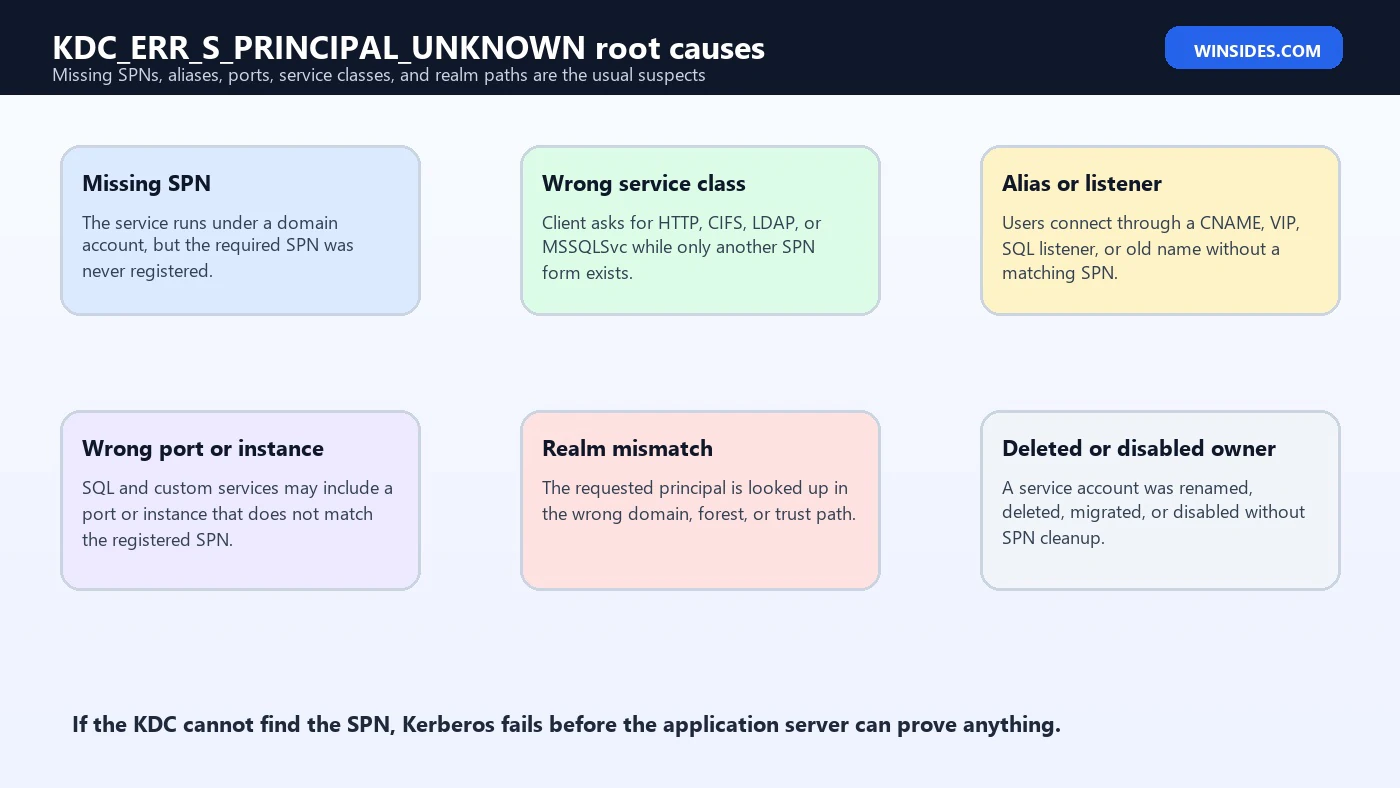
IIS and HTTP Service Principal Names
IIS commonly triggers KDC_ERR_S_PRINCIPAL_UNKNOWN when Windows Integrated Authentication is enabled and the site is accessed by a name that does not have a matching HTTP SPN. The problem often appears after adding a friendly URL, changing an app pool identity, adding a load balancer, moving a site to a new server, or replacing a server name with a CNAME.
For IIS, identify the URL that clients use and the identity that should decrypt Kerberos tickets. If the application pool runs under a domain service account, the HTTP SPNs for the site names commonly belong on that account. If the site runs under the computer identity and users connect by the server name, the computer account may be enough. If users connect by alias, listener, or VIP, register that name deliberately on the right identity.
setspn -Q HTTP/intranet.contoso.com
setspn -Q HTTP/intranet
setspn -S HTTP/intranet.contoso.com CONTOSO\WebAppSvc
setspn -S HTTP/intranet CONTOSO\WebAppSvc
If one URL works and another fails, compare the SPNs for both names. The working URL often has a matching SPN while the failing friendly name does not. That is a clean diagnostic clue.
SQL Server, Listeners, Instances, and Ports
SQL Server Kerberos is sensitive to the connection name and port. Clients may request MSSQLSvc/sql01.contoso.com:1433, an instance-style SPN, a listener name, or a short-name variation depending on the connection string and driver behavior. If the KDC cannot find that exact MSSQLSvc principal, authentication can fail before SQL Server receives a Kerberos service ticket.
Start by identifying the SQL Server service account and the exact connection string. Then query likely SPNs. If SQL runs under a domain service account or group managed service account, register the needed SPNs on that account. If the connection uses an availability group listener or DNS alias, the listener name needs its own Kerberos identity design.
setspn -Q MSSQLSvc/sql01.contoso.com:1433
setspn -Q MSSQLSvc/sql-listener.contoso.com:1433
setspn -S MSSQLSvc/sql-listener.contoso.com:1433 CONTOSO\SqlSvc
Be careful with named instances and dynamic ports. A port change can make a previously correct SPN incomplete. If the SQL service account changed, old SPNs may remain on the former account while new SPNs were never created on the new account. Query both the old and new accounts before deleting anything.
File Shares, CIFS, DFS, and Old Server Names
For file shares, clients often request CIFS or host-related SPNs. Access by the real server name usually works when the computer account has its default host SPNs. Access by alias, DFS path, clustered file-server name, or old migration name may fail if that logical name is not represented by an SPN that the KDC can find.
If users can access \files01\share but not \oldfiles\share, do not stop at DNS. Query the CIFS and host SPN forms for the name users actually type. In clustered or alias-heavy designs, confirm which computer object or service account should own the logical name. The answer depends on whether the endpoint is a standalone server, failover cluster, DFS namespace, appliance, or service account based application.
setspn -Q CIFS/oldfiles.contoso.com
setspn -Q HOST/oldfiles.contoso.com
setspn -Q CIFS/files01.contoso.com
Realm, Domain, and Trust Path Problems
KDC_ERR_S_PRINCIPAL_UNKNOWN can also appear when the requested service principal is looked up in the wrong realm or when referrals across domains and forests do not lead to the domain that owns the service. In Windows terms, that can involve DNS suffixes, UPN suffixes, forest trusts, selective authentication, service names in another domain, or applications that construct SPNs with the wrong domain portion.
For cross-domain scenarios, query from the right scope. Microsoft documents setspn -F for forest-level queries and -T for targeting domains or forests. If a service lives in a different domain than the client, a domain-local query may falsely suggest the SPN is missing. Conversely, if the SPN exists only in an old domain after migration, the client may be asking the wrong place.
setspn -F -Q HTTP/app.contoso.com
setspn -T contoso.com -Q HTTP/app.contoso.com
setspn -T fabrikam.com -Q HTTP/app.fabrikam.com
This does not mean every error is a trust problem. Most are simpler: missing SPN, wrong name, wrong port, or alias. But if the same service crosses forest boundaries, query broadly enough to avoid a false conclusion.
Service Class Differences Matter
A service principal name is not only a host name. The service class at the front matters. HTTP/portal.contoso.com and CIFS/portal.contoso.com are different service principals. MSSQLSvc/sql01.contoso.com:1433 is different again. Registering a CIFS SPN does not satisfy a browser asking for HTTP, and registering HTTP does not satisfy SQL Server. This is why administrators can look at an account and say it has an SPN, while Kerberos still returns KDC_ERR_S_PRINCIPAL_UNKNOWN for the service the client actually requested.
Microsofts setspn documentation lists built-in SPN service classes recognized for computer accounts when a host SPN exists, such as cifs, http, ldap-related host use, rpc, schedule, and others. That substitution behavior can make normal computer-name access work without explicit manual registration. But when you use domain service accounts, aliases, listener names, or non-default service identities, you should not rely on vague host coverage. Query the exact service class requested by the client.
The safest habit is to write SPNs in three pieces: service class, name, and optional port or instance. For example, HTTP/portal.contoso.com means the HTTP service for the portal FQDN. MSSQLSvc/sql01.contoso.com:1433 means SQL Server at that FQDN and port. CIFS/files.contoso.com means file sharing for that name. If any piece is wrong, the KDC may be unable to locate the requested server principal.
Short Name vs FQDN Problems
Short names and fully qualified domain names are another quiet source of this error. A browser may use HTTP/intranet when users type a short URL, but HTTP/intranet.contoso.com when the bookmark uses the FQDN. SQL clients and file-share clients can behave similarly. If only one form is registered, one connection path may work while another fails.
Do not assume you need both forms for every service. Some environments intentionally standardize on FQDNs. Others support short names for legacy applications. The point is to match the SPN registration to supported client connection names. If users or applications are allowed to use both forms, query and register both forms on the correct account, using setspn -S for each required SPN.
When troubleshooting, test both forms explicitly. A clean result looks boring: the same intended service account owns every supported name form, and unsupported aliases are either removed from DNS or redirected through a documented path. A messy result is when users have ten different shortcuts, only two have SPNs, and the help desk sees intermittent authentication behavior depending on which shortcut someone clicked.
Duplicate Avoidance While Fixing a Missing SPN
A missing SPN fix can easily create the next Kerberos incident if it is done carelessly. Suppose HTTP/portal.contoso.com is missing, so someone adds it to the web server computer account. Later another administrator notices the application pool runs under CONTOSO\WebAppSvc and adds the same SPN there. The original KDC_ERR_S_PRINCIPAL_UNKNOWN is gone, but now the environment has a duplicate SPN, which can cause principal-not-unique errors or decryption failures.
That is why the order matters. Query first. Identify the service identity. Add with setspn -S. Then document the ownership decision. If the SPN was temporarily placed on the wrong account during emergency response, schedule cleanup. Kerberos identity mapping should not be left to memory or folklore after the outage is over.
In large domains, also think about forest scope. A domain-level query can miss an SPN in another domain, and a migration can leave stale SPNs behind. Use broader queries when the service name might have moved across domains or forests. The goal is to know whether the name is truly missing, present in the wrong place, or duplicated elsewhere.
Validate Kerberos, Not Just Application Success
After registering the missing SPN, the application may start working. That is good, but it is not enough proof that Kerberos is healthy. Some applications can fall back to NTLM silently. Others succeed because a cached connection remains open. If the business requirement is Kerberos, validate Kerberos directly.
Use klist on a client after connecting to the service and check whether a service ticket exists for the expected SPN. For web applications, browser behavior and zone settings can affect whether integrated authentication attempts Kerberos. For SQL Server, check the authentication scheme from SQL if appropriate. For file shares, inspect the CIFS ticket. The validation should prove that the client obtained the expected Kerberos service ticket after the change.
klist purge
klist get HTTP/portal.contoso.com
klist

REM Then access the application through the same URL, UNC path, or connection string users use.
If the service works but Kerberos tickets are absent, do not call the incident fully fixed. You may have only moved the application to NTLM fallback. That may be acceptable in a temporary recovery window, but it should be documented as such and corrected if Kerberos delegation, mutual authentication, auditing, or security policy requires Kerberos.
Safe Fix Sequence
- Capture the exact SPN requested by the client or application.
- Use
setspn -Qto check whether that exact SPN exists. - Query short-name, FQDN, alias, port, and listener variants only to understand the design, not to add everything.
- Identify the account that actually runs or represents the service.
- Use
setspn -Sto register the missing SPN on the correct account. - Remove stale SPNs only after confirming they are wrong and after recording a rollback path.
- Clear client tickets with
klist purgeor sign out and back in. - Retest the exact URL, UNC path, SQL connection string, or application path that failed.
- Check for NTLM fallback so the application is not merely hiding the Kerberos issue.
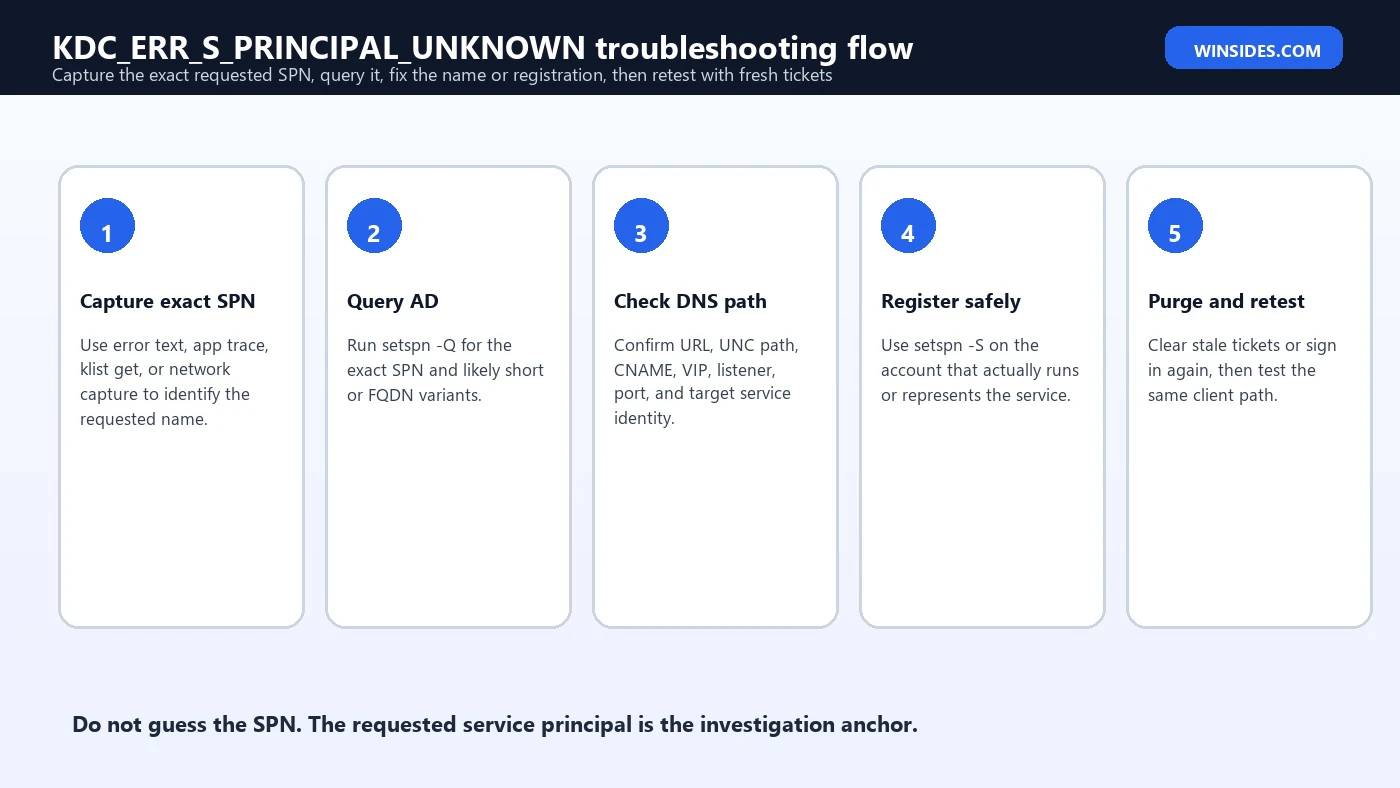
Command Reference
| Goal | Command | Why it helps |
|---|---|---|
| Request a test ticket | klist get HTTP/portal.contoso.com | Reproduces KDC lookup without the full application stack. |
| Query exact SPN | setspn -Q HTTP/portal.contoso.com | Shows whether AD has a matching service principal. |
| Query forest-wide | setspn -F -Q HTTP/portal.contoso.com | Useful when domains, migrations, or trusts are involved. |
| List account SPNs | setspn -L CONTOSO\WebAppSvc | Shows what a service account already owns. |
| Add safely | setspn -S HTTP/portal.contoso.com CONTOSO\WebAppSvc | Adds only after duplicate checking. |
| Find duplicates | setspn -X | Helps prevent a missing-principal fix from becoming a duplicate-principal problem. |
| Clear tickets | klist purge | Forces a fresh Kerberos ticket request after the fix. |
What Not to Do
- Do not add every possible SPN variant without understanding the client connection name.
- Do not register the same SPN on multiple accounts.
- Do not use
setspn -Awhensetspn -Scan check for duplicates. - Do not assume DNS resolution proves Kerberos identity is configured.
- Do not switch to NTLM as the permanent fix unless the security design explicitly accepts that tradeoff.
- Do not delete old SPNs from production accounts without documenting current ownership and rollback.
- Do not forget short-name and FQDN differences when users access services in more than one way.
Prevention Checklist
Preventing KDC_ERR_S_PRINCIPAL_UNKNOWN is mostly about disciplined service naming. Any time a new URL, DNS alias, SQL listener, load-balanced name, DFS path, or custom service endpoint is introduced, the Kerberos identity should be part of the change plan. If the service uses a domain account, the required SPNs should be documented next to the service account, not rediscovered during an outage.
- Document every SPN required by each IIS site, SQL instance, listener, file alias, and custom service.
- Use
setspn -Sin deployment runbooks instead of duplicate-blind SPN creation. - Review SPNs whenever a service account changes.
- Review SPNs whenever an application gains a new DNS alias, CNAME, VIP, listener, or friendly URL.
- Use consistent short-name and FQDN policy for applications and users.
- Include Kerberos testing in migrations from server-name access to alias-based access.
- Run duplicate checks periodically so repairs do not create future ambiguity.
Frequently Asked Questions
What does KDC_ERR_S_PRINCIPAL_UNKNOWN mean?
It means the KDC could not find the requested server principal in the Kerberos database, so it could not issue a service ticket.
Is KDC_ERR_S_PRINCIPAL_UNKNOWN the same as KRB_AP_ERR_MODIFIED?
No. KDC_ERR_S_PRINCIPAL_UNKNOWN happens before ticket issuance. KRB_AP_ERR_MODIFIED happens after a ticket is issued but the target service cannot decrypt it.
What is the most common cause?
A missing SPN for the exact name the client uses, especially after adding aliases, load-balanced names, SQL listeners, or domain service accounts.
How do I find the missing SPN?
Capture the exact requested name, then run setspn -Q for that SPN and likely short or FQDN variants.
Should I add the SPN to the computer account or service account?
Add it to the account that actually runs or represents the service. IIS, SQL Server, and custom services often use domain service accounts.
Why does DNS work but Kerberos fail?
DNS only resolves the name to an address. Kerberos also needs an SPN that maps that service name to an Active Directory account.
Can klist fix the error?
No. klist can request, display, or purge tickets. It helps test and refresh after the SPN registration is fixed.
Why does a SQL listener cause this error?
The listener name and port may require an MSSQLSvc SPN on the SQL service account or listener identity. The physical node SPN may not be enough.
Can a cross-forest trust cause this?
Yes, if the principal is looked up in the wrong realm or the referral path does not lead to the domain that owns the service SPN.
Is NTLM fallback a real fix?
Usually no. It may make the application work while leaving Kerberos broken. Fix the SPN or service-name design when Kerberos is required.
Conclusion: Make the Requested SPN Real
KDC_ERR_S_PRINCIPAL_UNKNOWN is a missing-principal problem. The client asked the KDC for a service ticket to a name, and the KDC could not find that server principal in the Kerberos database. That failure happens before the target service receives a ticket, so the right troubleshooting path starts with the requested SPN, not with random service restarts.
The fix is usually straightforward once the name is known: query the SPN, identify the service identity, register the missing SPN safely with setspn -S, clear stale tickets, and retest the same client path. The trick is discipline. Kerberos cares about the exact service class, host name, alias, listener, port, and realm. Treat those details as the evidence, and the error becomes much less mysterious.
For more interesting articles, stay tuned to Winsides.com!









Community
Comments (0)