

Introduction to Kerberoasting Detection
Kerberoasting Detection is the defensive process of finding suspicious Kerberos service ticket request patterns before attackers can turn weak service-account passwords into domain access. MITRE ATT&CK tracks Kerberoasting under T1558.003, describing it as activity where adversaries obtain Kerberos service tickets that can be abused offline if the underlying service-account secret is weak. For defenders, the goal is not to reproduce the attack. The goal is to spot unusual ticket requests, identify exposed service accounts, and harden the environment before a cracked password becomes lateral movement or privilege escalation.
Windows gives defenders a useful starting point: Event ID 4769, which records that a Kerberos service ticket was requested. Kerberoasting activity leaves traces in this event because service tickets are requested from domain controllers. The signal becomes stronger when you combine Event 4769 fields with SPN inventory, encryption type, requester behavior, service account age, account privileges, client source, and surrounding endpoint activity.
Microsofts Service Principal Names documentation explains that SPNs identify service instances and are used by Kerberos authentication to associate a service instance with a service sign-in account. That is why SPN-bearing service accounts are central to Kerberoasting risk. Microsofts Event 4624 documentation is also useful because logon context helps identify the requester session behind suspicious ticket activity.
A strong Kerberoasting detection program has two sides. The first is detection logic: monitoring TGS request patterns, especially RC4 requests, high-volume SPN targeting, rare requesters, and high-value service accounts. The second is prevention: long random service-account passwords, group managed service accounts where possible, AES-only Kerberos where practical, least privilege, SPN hygiene, and quick rotation when risk is discovered. Detection catches activity; hygiene reduces the value of the tickets if an attacker obtains them.
Table of contents
Key Takeaways
- Kerberoasting Detection starts with Event ID 4769. Domain controllers log Kerberos service ticket requests when enabled through Kerberos Service Ticket Operations auditing.
- Ticket encryption type is a major clue. RC4 service tickets are higher risk, especially when AES should be expected for modern service accounts.
- Volume and rarity matter. One user requesting many distinct SPNs in a short period is more suspicious than normal application-driven ticket traffic.
- SPN inventory is required. You need to know which accounts own SPNs, what services they support, and whether they are privileged or stale.
- Service account hygiene reduces impact. Long random passwords, gMSAs, least privilege, and RC4 reduction make Kerberoasting less useful to attackers.
- False positives are common without baselines. Application servers, scanners, management tools, and enterprise apps can legitimately request many service tickets.
- Detection should trigger both security triage and account review. A Kerberoasting alert is a reason to investigate the requester and harden the targeted service accounts.
What Kerberoasting Means Defensively
Kerberoasting is a credential-access technique that abuses how Kerberos service tickets work. In normal Kerberos authentication, users request service tickets for services identified by SPNs. Those tickets are legitimate and necessary. The risk appears when an attacker requests tickets for service accounts and then attempts to recover weak service-account passwords offline. Because the offline work does not happen on the domain controller, defenders need to catch the ticket request pattern and reduce the value of service-account secrets.
Defensively, Kerberoasting is not just an alert name. It is a combination of identity telemetry and account hygiene. If a domain has many user-based service accounts with old passwords, RC4 enabled, broad privileges, and SPNs, the environment is attractive. If service accounts use long random passwords or group managed service accounts, have limited rights, and prefer stronger encryption, the same ticket-request activity has less practical value for an attacker.
This is why Kerberoasting Detection should never stop at the requester. The source account and machine matter, but the targeted service accounts matter too. A burst of suspicious requests against low-value accounts with strong random passwords is different from requests against old privileged service accounts that still accept RC4. The detection must answer both: who requested the tickets, and what would happen if any targeted account were compromised?
Why Event ID 4769 Matters
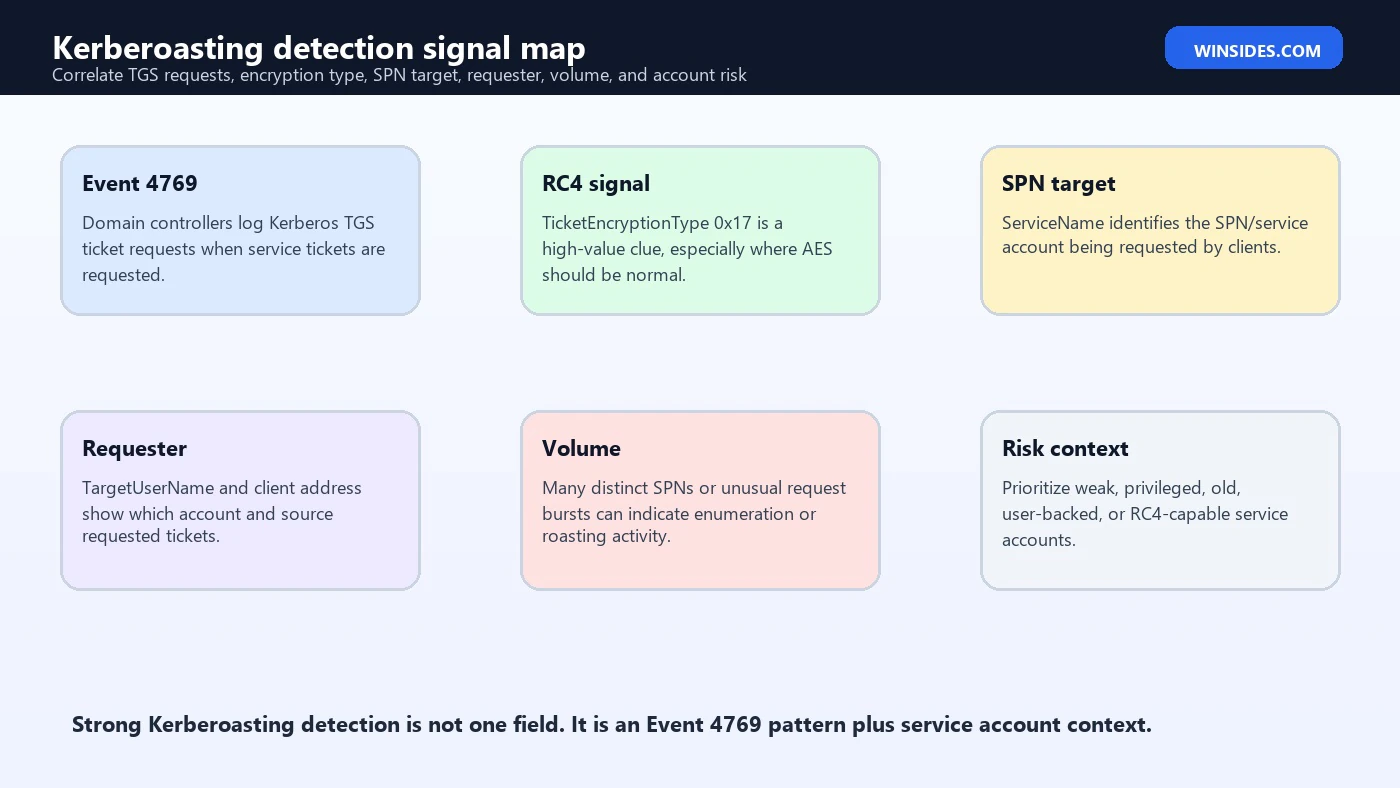
Event ID 4769 records Kerberos service ticket requests. Microsoft documents it as a Security log event generated on domain controllers when a Kerberos service ticket is requested. It includes fields such as account information, service information, network information, ticket options, ticket encryption type, and other Kerberos details. In newer Windows updates, Microsoft has added additional fields such as ticket hashes and richer encryption-support information, which can improve correlation and analysis.
The key fields for Kerberoasting Detection include the requesting account, service name, service SID if available, client address, ticket options, ticket encryption type, failure code, logon GUID, and time. The service name usually maps to the SPN target. The requester is the user or computer account asking for a ticket. The encryption type tells you whether RC4 or AES was used. The client address and domain controller identify where the request came from and where it was recorded.
Event 4769 is necessary but not sufficient. Normal business activity also produces service ticket requests. File shares, SQL Server, IIS, application servers, mail systems, domain services, management tools, and line-of-business apps all use Kerberos. The detection challenge is separating expected service access from suspicious ticket harvesting patterns.
Understand SPNs and Service Accounts
Microsoft describes an SPN as the name by which a client uniquely identifies an instance of a service. In Active Directory environments, SPNs are associated with accounts that run services. A service account with one or more SPNs can receive Kerberos service tickets. That makes SPN-bearing accounts the primary account surface for Kerberoasting risk.
An SPN does not automatically mean risk. Many SPNs are required for Kerberos to function correctly. The risk depends on the service account: password strength, password age, encryption support, privilege level, delegation settings, group membership, ownership, and whether it is a normal user account, computer account, managed service account, or group managed service account. User-based service accounts with old, human-chosen passwords are typically much riskier than gMSAs with managed random secrets.
Build and maintain an SPN inventory. At minimum, track account name, SPNs, service owner, host or application, password age, last logon, group memberships, delegation settings, supported encryption types, whether RC4 is allowed, and whether the account can be converted to a gMSA. Kerberoasting Detection improves dramatically when Event 4769 alerts can be enriched with that inventory.
Core Detection Signals
A reliable Kerberoasting alert usually combines several signals. RC4 encryption is a strong clue because RC4 tickets are historically targeted and easier to attack than modern AES-backed configurations. High request volume is another clue, especially when one user requests tickets for many distinct SPNs in a short time. Rarity matters too: a workstation or user that normally requests a small set of service tickets suddenly requesting many services should stand out.
| Signal | Why it matters | How to interpret it |
|---|---|---|
| Event 4769 volume | Many TGS requests can indicate SPN harvesting. | Compare requester, client, and SPN count against baseline. |
| TicketEncryptionType 0x17 | RC4 service tickets are high-value for Kerberoasting risk. | Raise priority when AES should be normal or account is high value. |
| Distinct ServiceName count | Many different services requested by one user can be suspicious. | Exclude known app servers and management workflows carefully. |
| Rare requester | User or device rarely requests service tickets for these SPNs. | Use historical baselines by account and client address. |
| High-risk SPN account | Privileged, stale, RC4-capable, or user-backed service account. | Prioritize account review and password rotation planning. |
| Suspicious context | Nearby discovery, scripting, LDAP enumeration, or abnormal logon. | Correlate with 4624, 4688, LDAP, EDR, and identity alerts. |
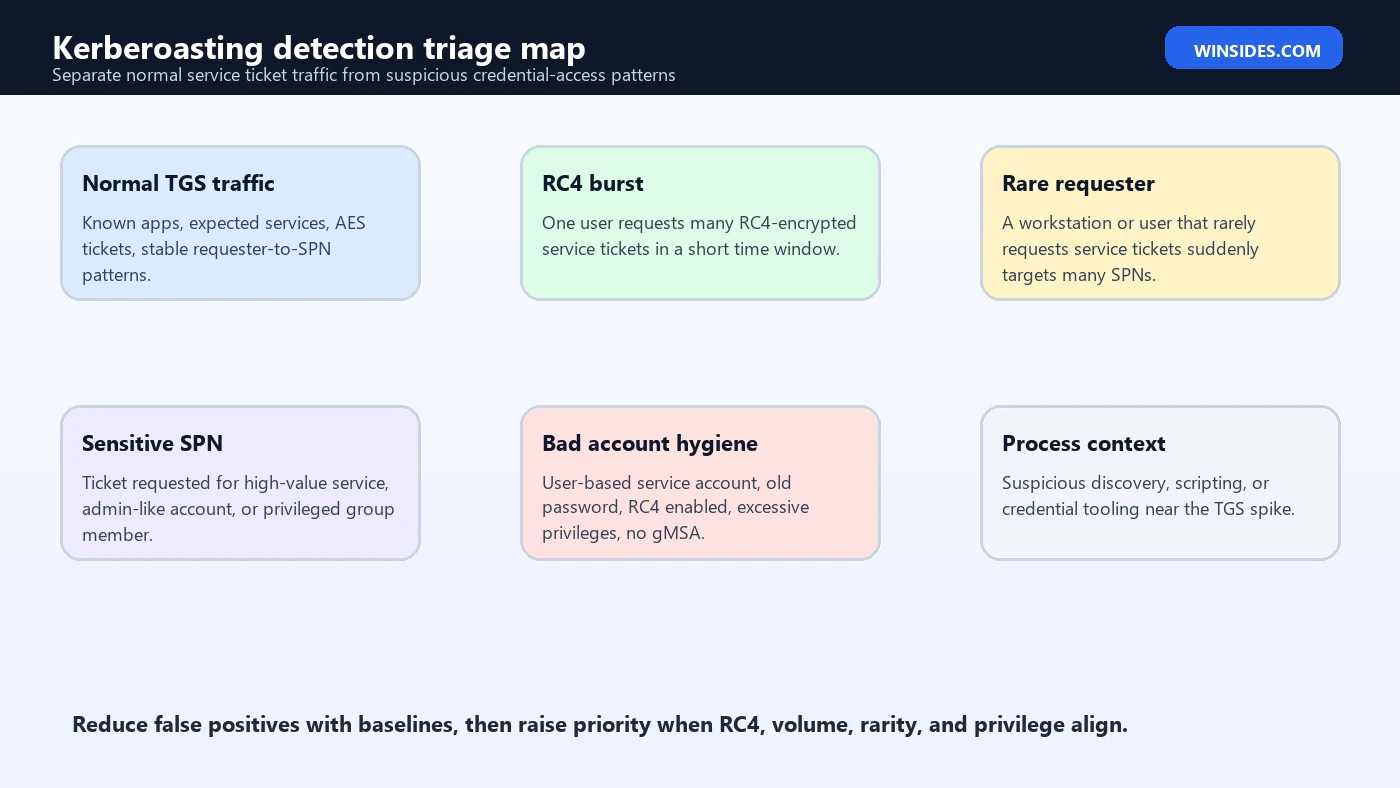
The best detections avoid single-field thinking. RC4 alone can be noisy in older environments. Volume alone can be noisy on application servers. Rare requester alone can be noisy after application changes. But RC4 plus high SPN count plus rare requester plus high-value service accounts is much stronger.
RC4 and Encryption Type Triage
Ticket encryption type is one of the most useful Event 4769 fields. In many environments, RC4 appears as 0x17. Modern service accounts should usually support AES, and environments often work to reduce or eliminate RC4. A service ticket using RC4 may be normal for older systems, but it deserves review when the target account is important, the requester is unusual, or many RC4 tickets appear at once.
Do not assume that every RC4 ticket is Kerberoasting. Legacy applications, old service account configuration, domain functional history, and compatibility settings can create RC4 traffic. The goal is to prioritize. RC4 tickets for a known legacy service during normal application use may be operational debt. RC4 tickets for many SPNs requested by a user workstation at odd hours may be a security alert. RC4 tickets for privileged service accounts are both detection and hardening priorities.
Track which SPN accounts still permit RC4. Then combine that list with Event 4769 monitoring. If an account should no longer accept RC4 but 4769 shows RC4 ticket requests, investigate configuration drift. If an account must temporarily support RC4, document the owner, exception reason, compensating controls, and planned retirement.
Volume and Distinct SPN Patterns
Kerberoasting activity often creates a pattern of one requester asking for tickets to many service names. The exact threshold depends on environment size and business activity. A domain admin workstation, vulnerability scanner, application server, or monitoring platform may request many tickets legitimately. A normal user workstation that suddenly requests dozens of SPNs may be suspicious. Use baselines rather than fixed universal thresholds.
Helpful metrics include count of Event 4769 records by requester, count of distinct ServiceName values, count of RC4 tickets, count of distinct client addresses, number of high-risk SPNs targeted, and whether the requester normally talks to those services. A short window such as 5, 10, 15, or 60 minutes can catch bursts. A longer daily view can catch slower activity.
Also check service-name distribution. A user requesting one known SQL service repeatedly may be a normal application. A user requesting many unrelated MSSQL, HTTP, CIFS, custom app, and service SPNs in quick succession is a very different pattern. Pair volume analytics with SPN category and account risk.
KQL-Style Detection Logic
The following pseudo-KQL is intended as defensive detection logic for SIEM tuning. Field names vary by connector, table, and product, so adapt it to your environment. The logic looks for high distinct SPN volume with RC4 emphasis. It does not contain attack execution steps; it is a monitoring pattern for Event 4769 data.
// Defensive Kerberoasting detection pattern for normalized Windows Security events
SecurityEvent
| where EventID == 4769
| extend Requester = tostring(Account), Service = tostring(ServiceName), EncType = tostring(TicketEncryptionType), Client = tostring(IpAddress)
| where Service !endswith '$'
| summarize
    TgsRequests = count(),
    DistinctServices = dcount(Service),
    Services = make_set(Service, 50),
    Clients = make_set(Client, 20),
    Rc4Requests = countif(EncType in ('0x17', 'RC4-HMAC'))
  by Requester, bin(TimeGenerated, 15m)
| where DistinctServices >= 10 or Rc4Requests >= 5
| order by Rc4Requests desc, DistinctServices desc
Tune this pattern with allowlists and baselines. Exclude known application servers only when you understand why they request many tickets. Keep separate logic for high-value SPNs because a single RC4 ticket for a privileged service account may matter more than a large volume of low-risk service traffic.
PowerShell Query for Event 4769
For local validation on a domain controller or lab system, PowerShell can query recent Event 4769 records from the Security log. In production, use a SIEM or central collector. The example below extracts fields from XML rather than scraping the rendered message text.
$events = Get-WinEvent -FilterHashtable @{LogName='Security'; Id=4769; StartTime=(Get-Date).AddHours(-2)}
$events | ForEach-Object {
  $xml = [xml]$_.ToXml()
  $data = @{}
  foreach ($d in $xml.Event.EventData.Data) { $data[$d.Name] = $d.'#text' }
  [pscustomobject]@{
    Time = $_.TimeCreated
    DomainController = $_.MachineName
    Requester = $data.TargetUserName
    ServiceName = $data.ServiceName
    ClientAddress = $data.IpAddress
    TicketEncryptionType = $data.TicketEncryptionType
    TicketOptions = $data.TicketOptions
    FailureCode = $data.Status
  }
}
Use this for defensive review only. The goal is to identify unusual TGS request patterns and service-account risk. If field names differ in your environment, print the EventData names from a sample 4769 event and adjust the parser.
Baselining Normal Kerberos Traffic
Kerberos traffic is highly environment-specific. A hospital, software company, school district, and manufacturing plant will all have different service-ticket patterns. Start by building baselines for normal requesters and normal service targets. Which users request which SPNs? Which servers request many tickets? Which applications use RC4? Which service accounts are frequently requested? Which SPNs are rarely used but high value?
Baseline by requester type. Workstations, domain controllers, application servers, admin workstations, vulnerability scanners, management tools, and service hosts behave differently. A scanner requesting many tickets may be normal if it is expected and scheduled. A normal user laptop doing the same thing may not be. Baseline by time too; service-ticket spikes during backup windows or patch windows may be expected, while the same spike at 2:00 AM from a user workstation may not be.
Baselines should not become permanent blind spots. If a system is allowed to request many tickets, document the owner, purpose, expected SPN categories, source address, and schedule. Review exceptions periodically. Attackers can abuse trusted systems and admin hosts, so high-volume allowlists should still have secondary controls.
Triage Workflow for Alerts
A Kerberoasting Detection alert should trigger both identity triage and service-account review. Start with the requester and source. Identify whether the account is a normal user, admin, service account, computer account, scanner, or application identity. Then identify the client address and host. Determine whether this requester normally asks for the targeted SPNs. Finally, review the targeted service accounts and encryption types.
- Validate the requester. Is the user, computer, or service account expected to request these SPNs?
- Validate the source. Map client address to device, VPN, server, scanner, or proxy path.
- Review ticket encryption. Prioritize RC4, unexpected downgrade, and accounts that should support AES.
- Review SPN targets. Identify service owners, privilege level, password age, delegation, and group memberships.
- Check for volume and rarity. Compare distinct service count and request rate with baseline.
- Correlate activity. Look for logons, process creation, directory enumeration, EDR alerts, and lateral movement.
- Decide response. Contain suspicious requester, rotate exposed service accounts, or document benign service behavior.
Do not treat the ticket request as proof that a service-account password was cracked. The offline portion, if attempted, may not appear in Windows logs. Treat the alert as evidence of suspicious access to ticket material and as a reason to harden targeted accounts immediately when risk is high.
Correlating with Other Events
Event 4769 is the anchor, but surrounding telemetry determines severity. Correlate with Event 4624 to understand successful logons by the requester and the source device. Event 4688 process creation can show discovery tools, scripting, unusual PowerShell, directory enumeration, or other suspicious activity near the TGS spike. Directory service logs, LDAP query telemetry, EDR detections, and identity protection alerts can add more evidence.
- 4624 successful logon: How did the requester access the machine before requesting tickets?
- 4688 process creation: Did suspicious discovery, scripting, or admin tooling run near the TGS burst?
- 4768 Kerberos AS requests: Was there unusual Kerberos authentication for the requester?
- Directory query telemetry: Did the requester enumerate SPNs or service accounts?
- Endpoint telemetry: Did the client write files, run unusual processes, or contact suspicious destinations?
- Account change events: Were service accounts modified, enabled, or delegated around the same time?
A high-fidelity case might look like this: a user logs on from an unusual workstation, runs suspicious process activity, queries directory objects with SPNs, then generates a burst of RC4 Event 4769 records across many service accounts. Each individual event may be explainable, but together they form a clear defensive story.
Service Account Hardening
Service account hardening is the prevention side of Kerberoasting Detection. A detection alert is much less dangerous when the targeted accounts use long random passwords, support AES, have limited privilege, and are rotated or managed automatically. The same alert is urgent when targeted accounts have old human-chosen passwords, RC4 enabled, broad admin rights, unconstrained delegation, and unclear ownership.
- Convert eligible services to group managed service accounts so passwords are long, random, and automatically managed.
- Use long random passwords for user-based service accounts that cannot become gMSAs.
- Reduce or eliminate RC4 support where application compatibility allows it.
- Remove unnecessary privileged group memberships from service accounts.
- Avoid assigning interactive logon rights to service accounts unless absolutely required.
- Document SPN ownership, service purpose, host, application owner, and rotation procedure.
- Review delegation settings, especially unconstrained or unnecessary delegation.
- Rotate old service-account passwords and prioritize accounts targeted in suspicious 4769 activity.
Hardening should be staged. Some legacy services may break if encryption settings or passwords change without testing. Work with application owners. Validate service dependencies. Rotate secrets in maintenance windows. But do not let compatibility debt hide forever. Kerberoasting risk is often a symptom of old service-account practices that need deliberate cleanup.
Response Workflow
When a Kerberoasting Detection alert fires, avoid two extremes: ignoring it as noisy Kerberos traffic, or immediately rotating every service account without understanding dependencies. The right response is evidence-driven. Validate the requester, validate the target accounts, check follow-on activity, and harden the highest-risk service accounts quickly.
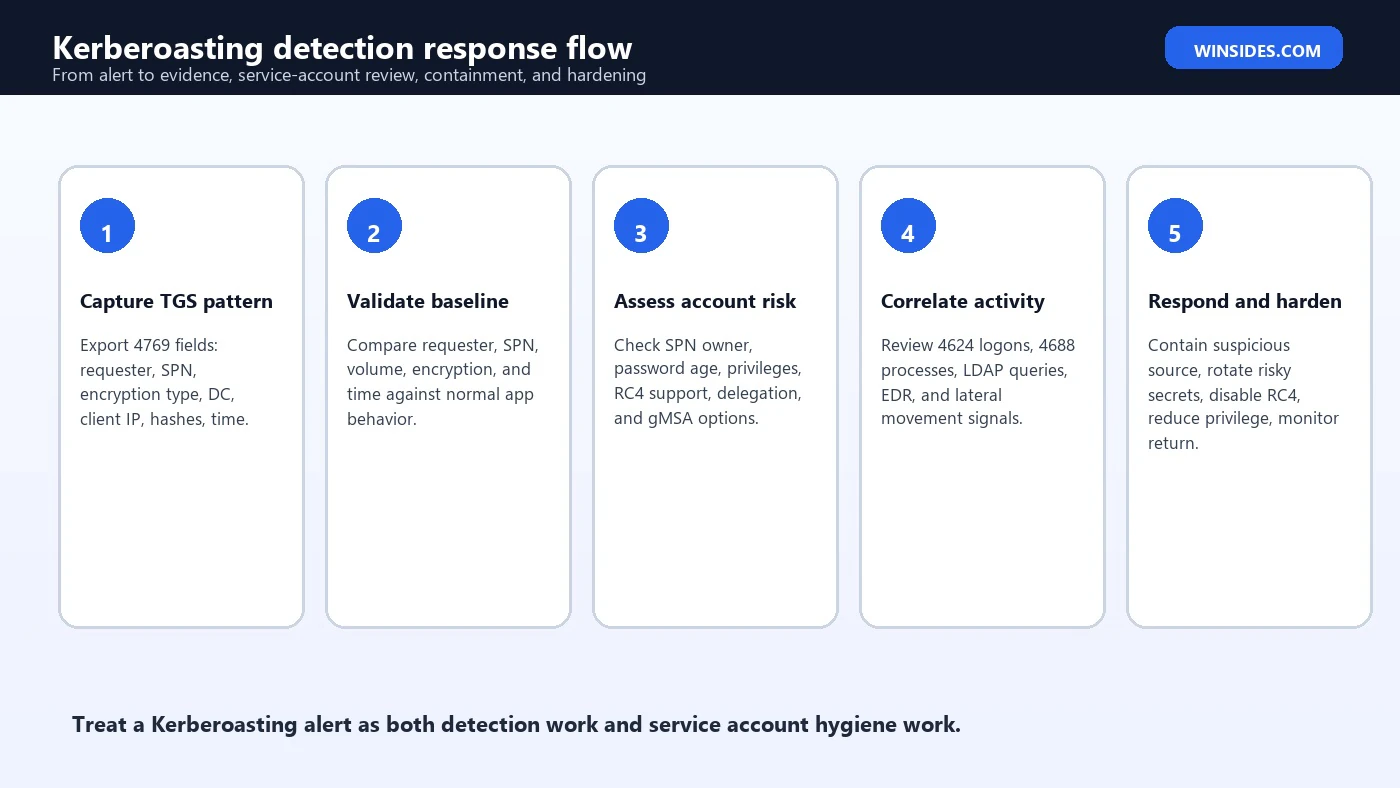
- Preserve evidence. Save Event 4769 records, SIEM alert context, source host, requester, SPNs, encryption type, and time window.
- Classify requester. Determine whether the account and device are expected to request those tickets.
- Contain suspicious source. If endpoint behavior is suspicious, isolate or investigate according to incident response procedure.
- Review targeted service accounts. Check password age, encryption support, privilege, delegation, and ownership.
- Rotate high-risk secrets. Prioritize weak, old, privileged, or RC4-only service accounts targeted by suspicious requests.
- Search for follow-on use. Look for successful logons, new processes, service installs, scheduled tasks, lateral movement, or privilege changes.
- Harden and monitor. Reduce RC4, move to gMSA, improve baselines, and monitor for repeat requests.
SIEM Detection Ideas
A mature detection program uses multiple rules rather than one generic Kerberoasting alert. Different rules catch different behaviors: RC4 bursts, high distinct SPN count, rare service targeting, high-value service accounts, suspicious requester context, and targeted accounts with poor hygiene. Each rule should include enough context for triage: requester, client, service names, encryption type, domain controller, baseline deviation, and account risk.
- One requester asks for tickets to many distinct service names in a short time.
- One requester receives many RC4 service tickets, especially from a workstation or rare source.
- RC4 ticket requested for a service account that should support AES.
- Ticket requested for a high-value service account, admin-like SPN, or privileged group member.
- Requester recently performed suspicious directory enumeration or process activity.
- User account requests service tickets from a source it has never used before.
- Service ticket requests happen outside the normal application schedule or maintenance window.
- Spike in Event 4769 activity against stale, user-backed, or unmanaged service accounts.
Enrich alerts with SPN owner, account type, password age, group membership, delegation flags, supported encryption types, host inventory, and recent EDR activity. Without enrichment, analysts must perform the same manual lookup for every alert. With enrichment, high-risk service accounts rise to the top quickly.
Common Mistakes to Avoid
- Alerting only on RC4. RC4 is useful, but legacy noise can bury real cases. Combine it with volume, rarity, and target risk.
- Ignoring service account privilege. A ticket for a privileged service account is higher risk than a ticket for a low-impact app account.
- Not knowing SPN ownership. Without an SPN inventory, every alert turns into a slow manual investigation.
- Suppressing application servers too broadly. Attackers can abuse trusted systems, so exceptions should be narrow and reviewed.
- Assuming no crack means no issue. Offline activity may not be visible. Suspicious ticket acquisition is still a security signal.
- Rotating blindly. Service account rotation without dependency mapping can break production. Prioritize and coordinate.
- Leaving RC4 enabled forever. Compatibility exceptions should have owners, timelines, and compensating controls.
Prioritizing High-Value Service Accounts
Not every SPN-backed account deserves the same urgency. A low-privilege application account with a long random password and AES support is different from an old service account that belongs to privileged groups, accepts RC4, and has not rotated in years. Kerberoasting Detection becomes more useful when alerts are scored by service-account risk, not only by ticket-request volume.
Build a priority model for service accounts. High-risk indicators include membership in administrative groups, access to sensitive databases, ability to deploy software, rights to modify directory objects, unconstrained or unnecessary delegation, old password age, interactive logon rights, use across many servers, unclear ownership, and RC4 support. If a suspicious Event 4769 pattern targets any account with those traits, raise severity even if the request count is modest.
The same model helps with proactive cleanup. Before an alert occurs, identify SPN accounts with old passwords, privileged membership, and weak encryption support. Move eligible services to gMSAs, rotate secrets, remove unnecessary rights, and document owners. Then retest detection logic after each improvement. A cleaner service-account inventory makes Kerberoasting alerts rarer, clearer, and easier to act on.
Frequently Asked Questions
What is Kerberoasting Detection?
Kerberoasting Detection is the defensive monitoring of Kerberos service ticket request patterns, usually through Event ID 4769, to find suspicious requests for SPN-backed service accounts and reduce service-account password risk.
Which Windows event is most important for Kerberoasting Detection?
Event ID 4769 is the primary Windows Security event because it records Kerberos service ticket requests on domain controllers. Correlate it with SPN inventory, encryption type, requester behavior, and other events.
Is every RC4 Event 4769 a Kerberoasting attack?
No. RC4 can appear for legacy compatibility reasons. It becomes more suspicious when paired with unusual requester behavior, high SPN volume, rare source, high-value service accounts, or unexpected encryption downgrade.
What is the role of SPNs?
SPNs identify service instances for Kerberos. Accounts with SPNs can receive service tickets, which is why SPN-bearing service accounts are central to Kerberoasting risk and detection.
How do I reduce Kerberoasting risk?
Use gMSAs where possible, long random passwords for remaining service accounts, least privilege, AES support, RC4 reduction, SPN inventory, delegation review, and monitoring for suspicious Event 4769 patterns.
Can Kerberoasting be detected after the offline step?
The offline password attack itself may not appear in Windows logs. Detection focuses on ticket request behavior, endpoint context, and follow-on use such as successful logons or lateral movement.
Should service account passwords be rotated after an alert?
Rotate high-risk targeted accounts when evidence suggests suspicious ticket acquisition, especially if the account is privileged, old, RC4-capable, or weakly managed. Coordinate rotation with service owners to avoid outages.
What causes false positives?
Application servers, scanners, monitoring tools, identity systems, and legitimate high-volume services can generate many TGS requests. Baselines and SPN ownership data are essential for tuning.
Conclusion: Detect the Pattern and Harden the Target
Kerberoasting Detection is effective when it combines domain-controller telemetry with service account context. Event ID 4769 shows service ticket requests. SPN inventory shows which accounts are exposed. Encryption type, requester behavior, volume, rarity, and privilege level help decide which events matter. No single field tells the whole story, but the pattern can be very strong when several signals align.
The best response is two-sided. Investigate the requester and source device to determine whether the ticket activity was expected. At the same time, review the targeted service accounts for password age, RC4 support, privilege, delegation, and ownership. If the account is weak or privileged, harden it even if the alert turns out to be benign. Kerberoasting alerts are often an early warning that service account hygiene needs work.
Long random passwords, group managed service accounts, least privilege, AES support, narrow exceptions, SPN inventory, and good Event 4769 monitoring make Kerberoasting much less attractive. The defensive goal is not merely to catch a tool. It is to make the environment resilient enough that suspicious TGS requests are detected quickly and weak service-account secrets are removed before they become domain compromise.
For references, use MITRE ATT&CK T1558.003 for technique context, Microsofts Event 4769 documentation for Kerberos service ticket fields, Microsofts SPN documentation for service identity context, and Microsofts Event 4624 documentation for logon-session correlation.
For more interesting articles, stay tuned to Winsides.com!



Community
Comments (0)